EasyManua.ls Logo

Kyocera ECOSYS FS-3540MFP - Encrypted PDF Password

Kyocera ECOSYS FS-3540MFP
352 pages
To Next Page IconTo Next Page
To Previous Page IconTo Previous Page
Loading...
7-11
Document Box > Functions for Document Box
Encrypted PDF Password
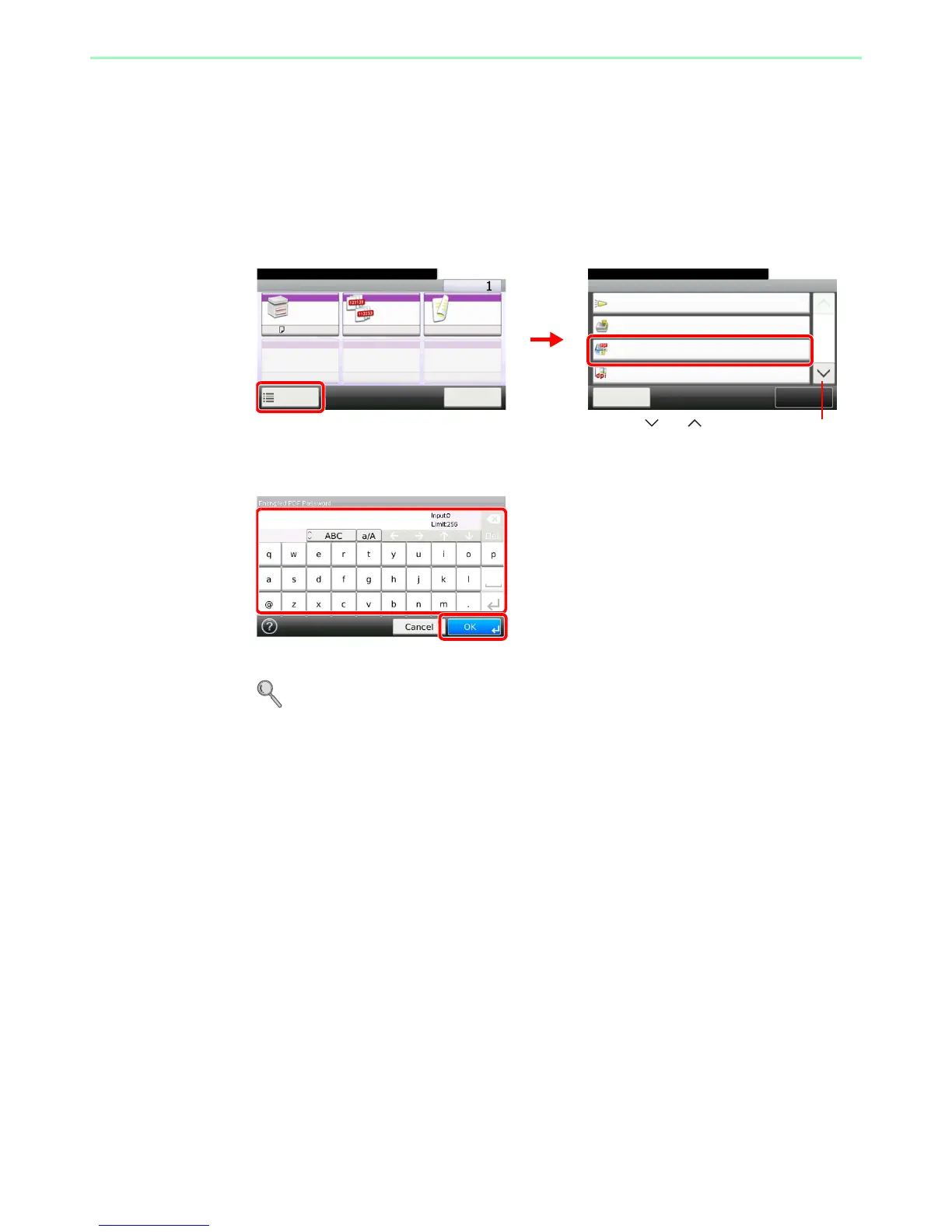
Enter the preassigned password to print the PDF data.
1
Display the screen.
1 Referring to Printing Documents Stored in Removable USB Memory on page 7-2, display
the screen.
2
2
Enter the password.
Up to 256 characters can be entered.
Refer to Character Entry Method on page 11-7 for details on entering characters.

Ready to print from Box.
Functions
Job Finish Notice
Off
Close
10:10
1/2
Add/Edit
Shortcut
Priority Override
Off
JPEG/TIFF Print
Paper Size
Encrypted PDF Password
Off
Ready to print from Box.
Print Copies
Paper
Selection
Collate Duplex
A4
Functions
10:10
Cancel
On 1-sided
GB0097_00
GB0099_00
1
Use [ ] or [ ] to scroll up and down.
2
GB0057_21
2
1

Table of Contents

Related product manuals