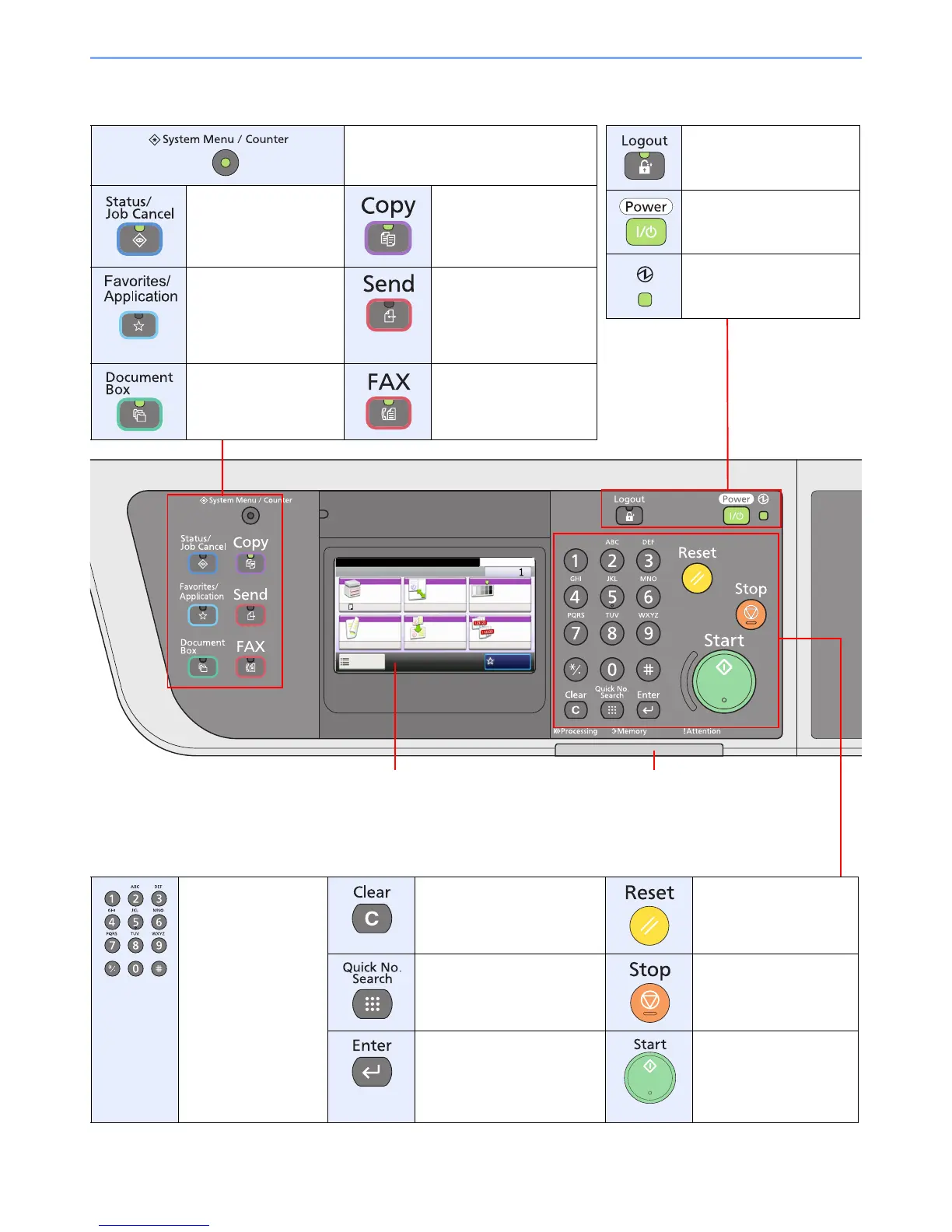
Touch panel. Displays buttons
for configuring machine
settings.
Processing: Blinks while printing or sending.
Memory: Blinks while the machine is accessing the
fax memory or USB memory (generalpurpose item).
Attention: Lights or blinks when an error occurs and
a job is stopped.
Displays the System Menu/Counter
screen.
Displays the Status/Job
Cancel screen.
Displays the Copy
screen.
Displays the Favorites
screen.
When using an
application, displays the
application screen.
Displays the screen for
sending.
Displays the Document
Box screen.
Displays the FAX screen.
Ends operation (logs out)
on the Administration
screen.
Puts the machine into Sleep
Mode. Recovers from Sleep
if in Sleep Mode.
Lit when the machine's
main power is on.
Numeric keys.
Enter numbers and
symbols.
Clears entered numbers and
characters.
Returns settings to their
default states.
Specifies registered
information such as address
numbers and user IDs by
number.
Cancels or pauses the
printing job in progress.
Finalizes numeric key entry,
and finalizes screen during
setting of functions. Operates
linked with the on-screen
[OK].
Starts copying and
scanning operations and
processing for setting
operations.



 To Next Page
 Loading...










