EasyManua.ls Logo

Kyocera ECOSYS FS-3540MFP - JPEG;TIFF Print

Kyocera ECOSYS FS-3540MFP
352 pages
Print Icon
To Next Page IconTo Next Page
To Previous Page IconTo Previous Page
Loading...
7-12
Document Box > Functions for Document Box
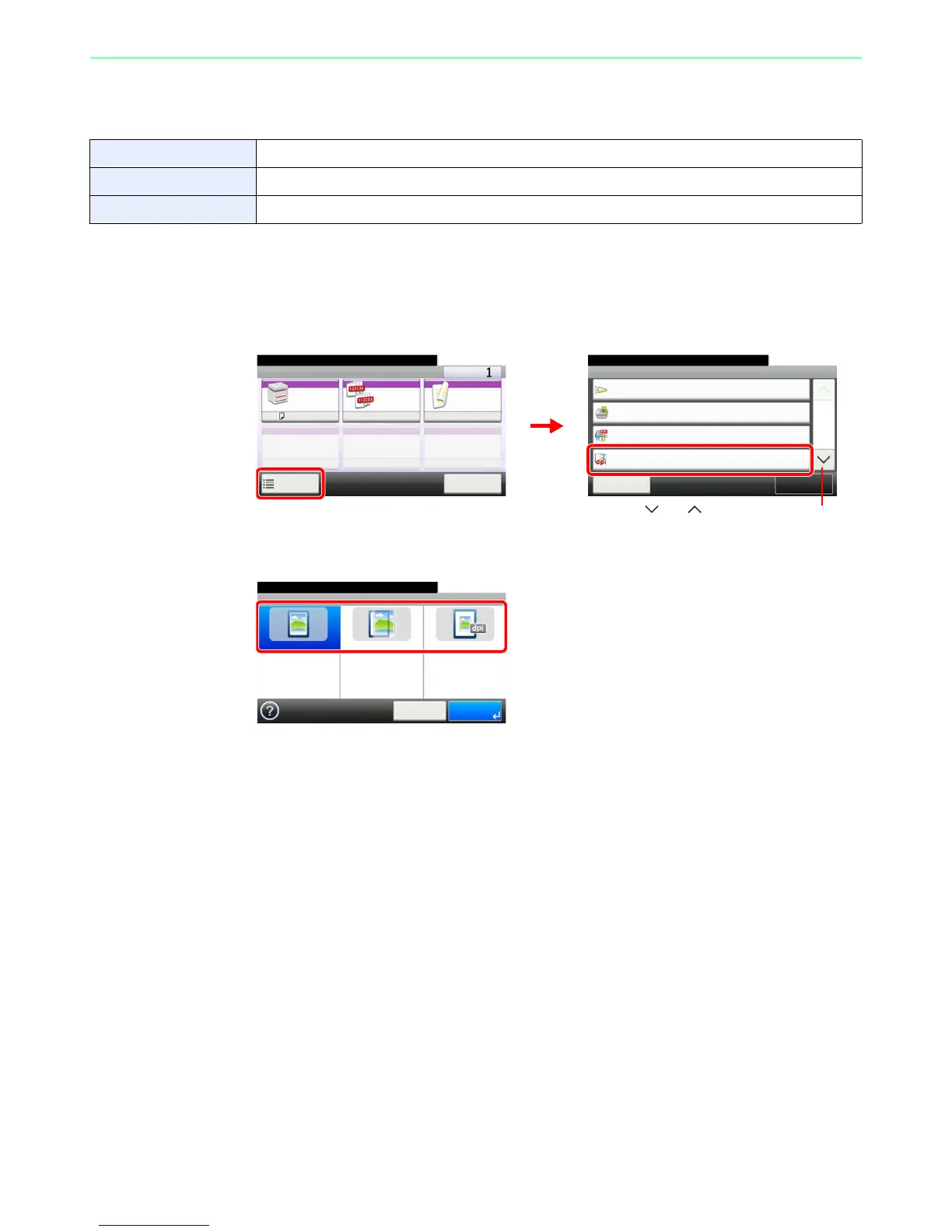
JPEG/TIFF Print
Select the image size when printing JPEG or TIFF files.
1
Display the screen.
1 Referring to Printing Documents Stored in Removable USB Memory on page 7-2, display
the screen.
2
2
Select the function.
Paper Size Fit the image size to the selected paper size.
Image Resolution Print at resolution of the actual image.
Print Resolution Fit the image size to the print resolution.

Ready to print from Box.
Functions
Job Finish Notice
Off
Close
10:10
1/2
Add/Edit
Shortcut
Priority Override
Off
JPEG/TIFF Print
Paper Size
Encrypted PDF Password
Off
Ready to print from Box.
Print Copies
Paper
Selection
Collate Duplex
A4
Functions
10:10
Cancel
On 1-sided
1
2
Use [ ] or [ ] to scroll up and down.
GB0097_00
GB0099_00
GB0101_00
Ready to print from Box.
JPEG/TIFF Print
Paper Size Image Resolution Print Resolution
10:10
Cancel OK

Table of Contents

Related product manuals