Power Calibration
Proper acoustic droplet ejection relies on a calibrated RF energy source. Environmental temperature changes can affect the
characteristics of the Echo RF energy pulses. Power calibration is performed automatically by the Echo Liquid Handler as part of
each liquid transfer protocol.
Note: Normally a manual power calibration will not need to be performed by a user. However, it can be useful during
certain repair, diagnostic, or recovery procedures. Perform power calibration only as directed by Labcyte personnel.
If manual power calibration is required, use the following procedure:
1. On the Calibration tab, click the Calibrate button in the Power section.
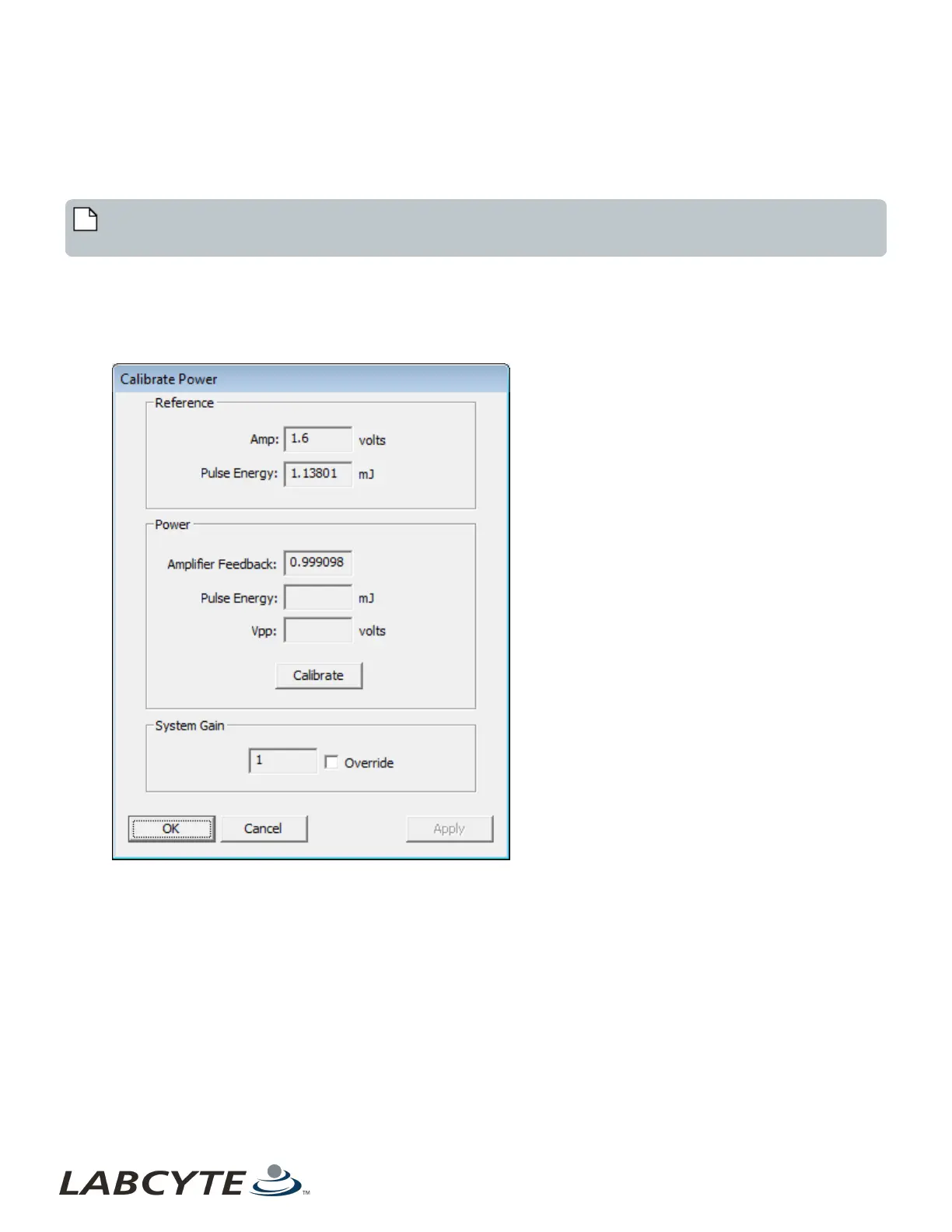
The Calibrate Power dialog box will open.
Figure 92: Calibrate Power dialog box reporting current values
Reference
l Amp: The Amp field displays the reference tone burst amplitude.
l Pulse Energy: The Pulse Energy field displays the reference pulse energy value.
Power
l Amplifier Feedback: The Amplifier Feedback field displays the current power correction factor, and normally should
be very close to 1.0.
l Pulse Energy: The Pulse Energy field will be empty until power calibration is performed.
l Vpp: The voltage peak-to-peak (Vpp) field will be empty until power calibration is performed.
2. Click the Calibrate button in the Power section of the Calibrate Power dialog box. The Echo Liquid Handler performs the
following procedure:
Echo Liquid Handler Software CHAPTER 5 | Software
136



 To Next Page