2big NAS User Manual 4
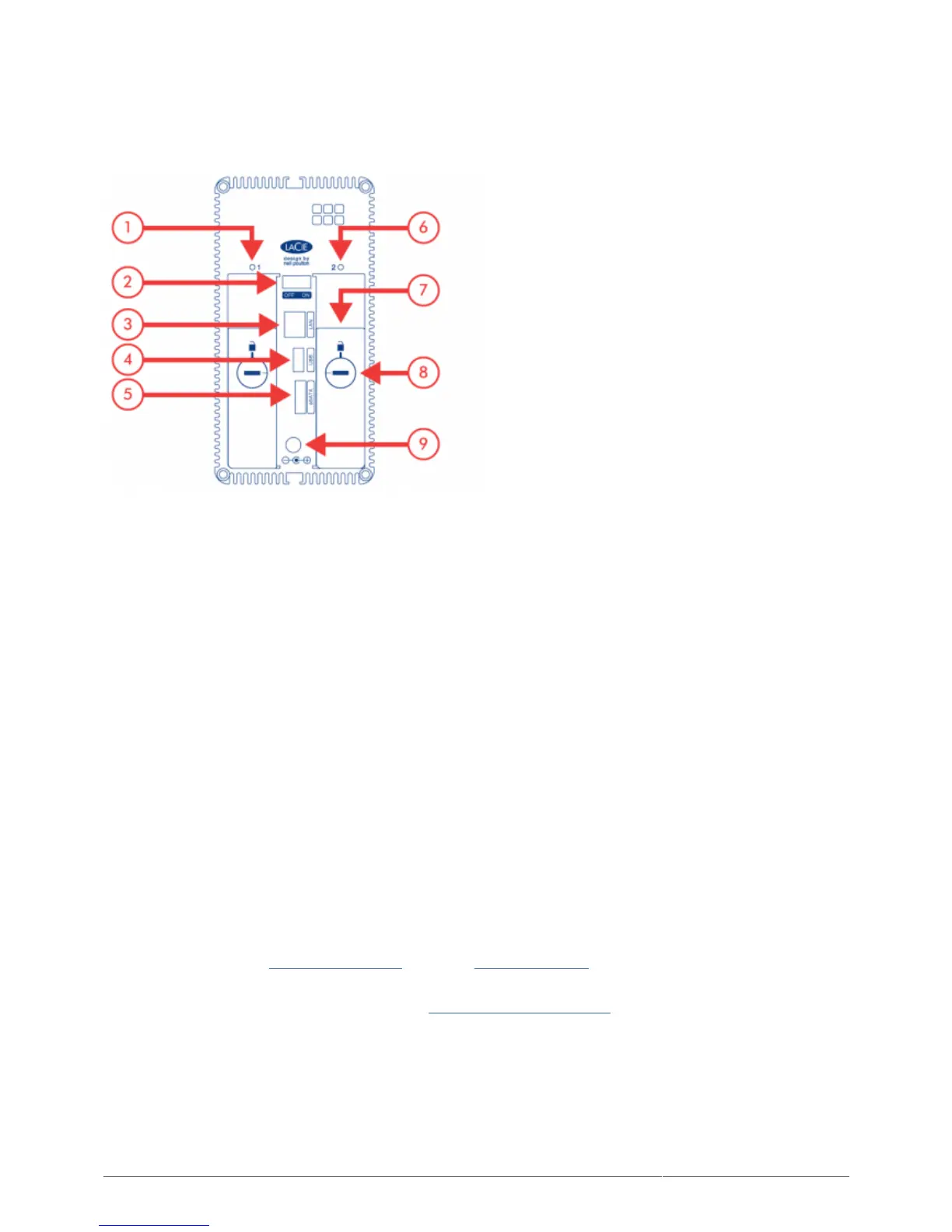
REAR VIEW
Left drive status LED1.
ON/OFF2.
Gigabit Ethernet3.
USB 2.0 expansion4.
eSATA expansion5.
Right drive status LED6.
Drive tray handle7.
Drive lock8.
Power connector9.
FRONT BUTTON FUNCTIONS
The multi-function front LED/button allows you to activate/deactivate sleep mode and reset to default.
Activate deep sleep mode: If Deep Sleep Mode is enabled in Dashboard - Eco Management, click the
■
blue button.
Wake from sleep mode: Press the blue button.
■
To wake the drive from Deep Sleep Mode, press the blue button or use the Wake on LAN function in the LaCie
Network Assistant (see Wake on LAN (WOL)) (see also Eco Management).
Reset to default: This process is explained in Reset to Factory Conditions.
■











 To Next Page