18
Manikin Setup
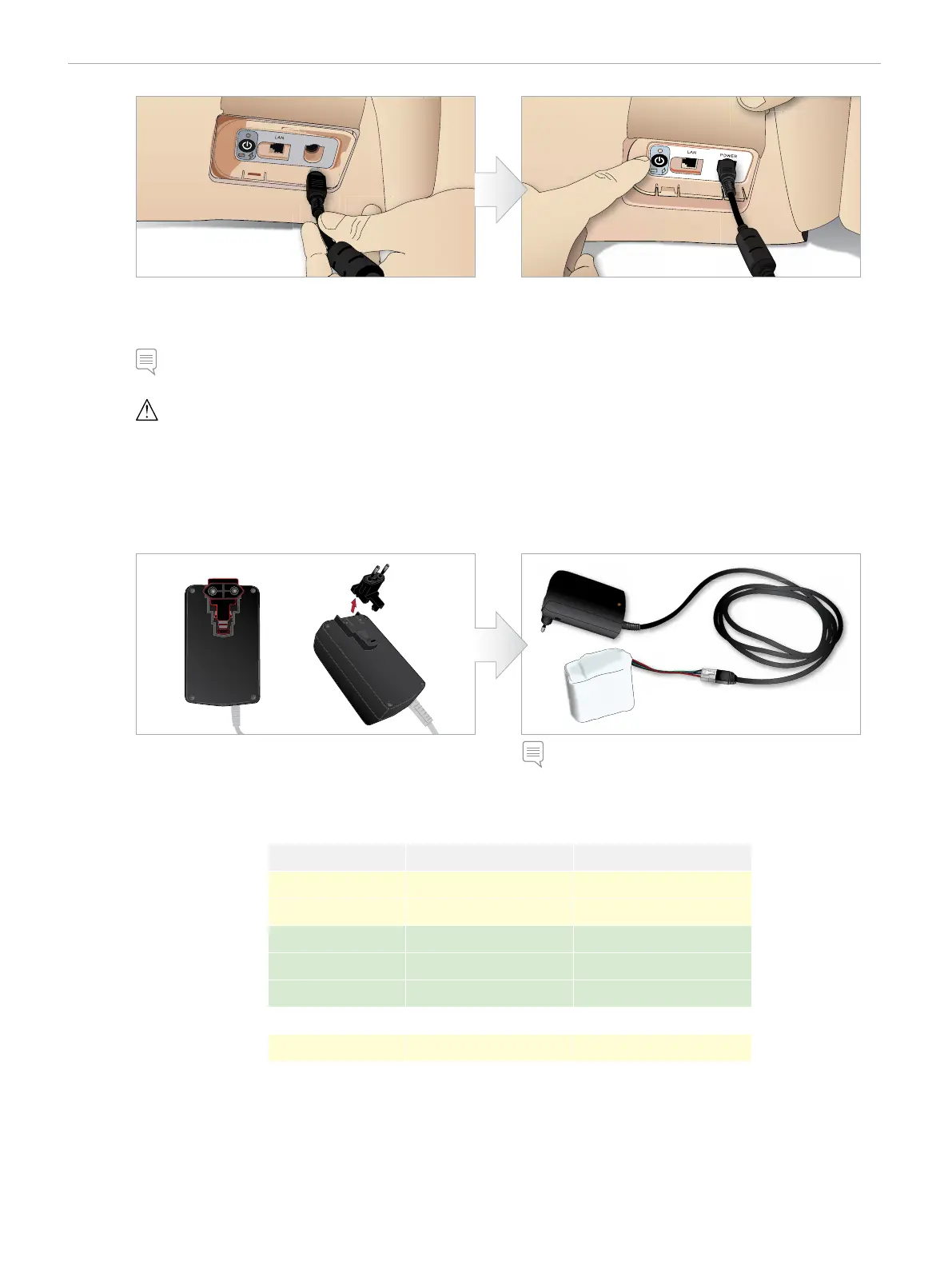
1 Connect the power cable to the power inlet on the
manikin’s power panel.
2 The batteries will begin charging when the external
power supply has been connected up.
POWER
Note: The manikin does not need to be switched ON for the batteries to charge. During start-up the power status indicator will show a
yellow (start-up) light. This process may take some minutes.
Caution: When manikin is turned off, wait 20 seconds before restarting. If not it may cause manikin to not function normally.
EXTERNAL BATTERY CHARGING
The external battery charger comes with 5 international plugs. Connect the appropriate plug to the charger:
3 Charging time is approximately 3 hours.
The external battery charger should only be used with
SimMan Essential batteries.
1 Connect the charger to a power outlet and connect the
manikin battery to the charger.
2 The indicator light on the battery charger shows charge
status.
CHARGER LIGHT SHOWING BATTERY STATUS
Status Light Color Characteristics
Standby Yellow Steady
Pre-charge Yellow Normal Blink
Rapid charge Green Rapid
Maintain Green Normal Blink
Ready Green Steady
Wait Alternating Alternating
Error Yellow Rapid















 To Next Page