64
Maintenance
9 Click <OK> to begin updating the software.
10 Complete the update wizard.
Note that some components might fail updating on first
attempt. Please ignore this and allow the update process
to continue.
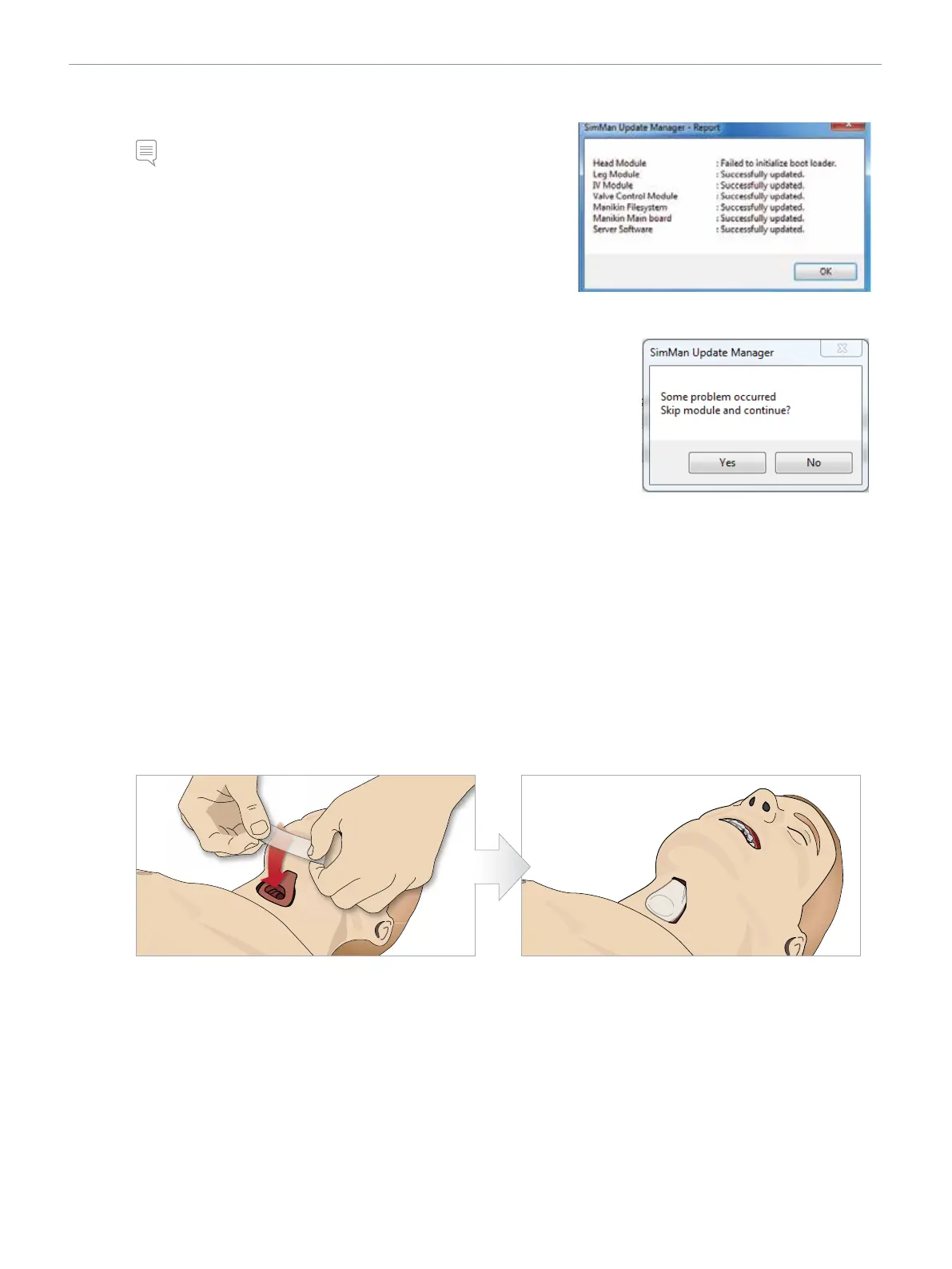
The <SimMan3G> <Update Manager – Report> will show all updates
and show which ones were performed successfully or failed.
• Repeat from step 5 until all components are successfully updated.
• Allow manikin time to save changes and reboot. Do not power
off manikin until it starts breathing again.
Troubleshooting
1 Should the following message appear on the screen during the update, click <Yes>
to continue the installing updates.
2 If a module fails to update, run the <Manikin Update> again.
Should the same module fail repeatedly, check to see whether
all internal wiring is connected and functioning properly.
Replacing Crico Tape / Neck Skin
After creating an emergency airway through the crycothyroid membrane, replace the perforated membrane before starting a new
simulation session.
1 Remove the neck skin (velcro fasteners behind the neck).
2 Remove the old strip of Crico tape.
3 Replace with a new Crico tape.
4 Refit the neck skin. Secure with velcro fasteners at the back of the neck.
5 Seal the opening with tape. 6 Ensure Crico-tape completely covers and seals the
opening to prevent leakage while ventilating the manikin.















 To Next Page