PLMNL0243 REV. A, Effective Date: 03/24/16 14 FiberMINI ™ 2.0 Operation Manual
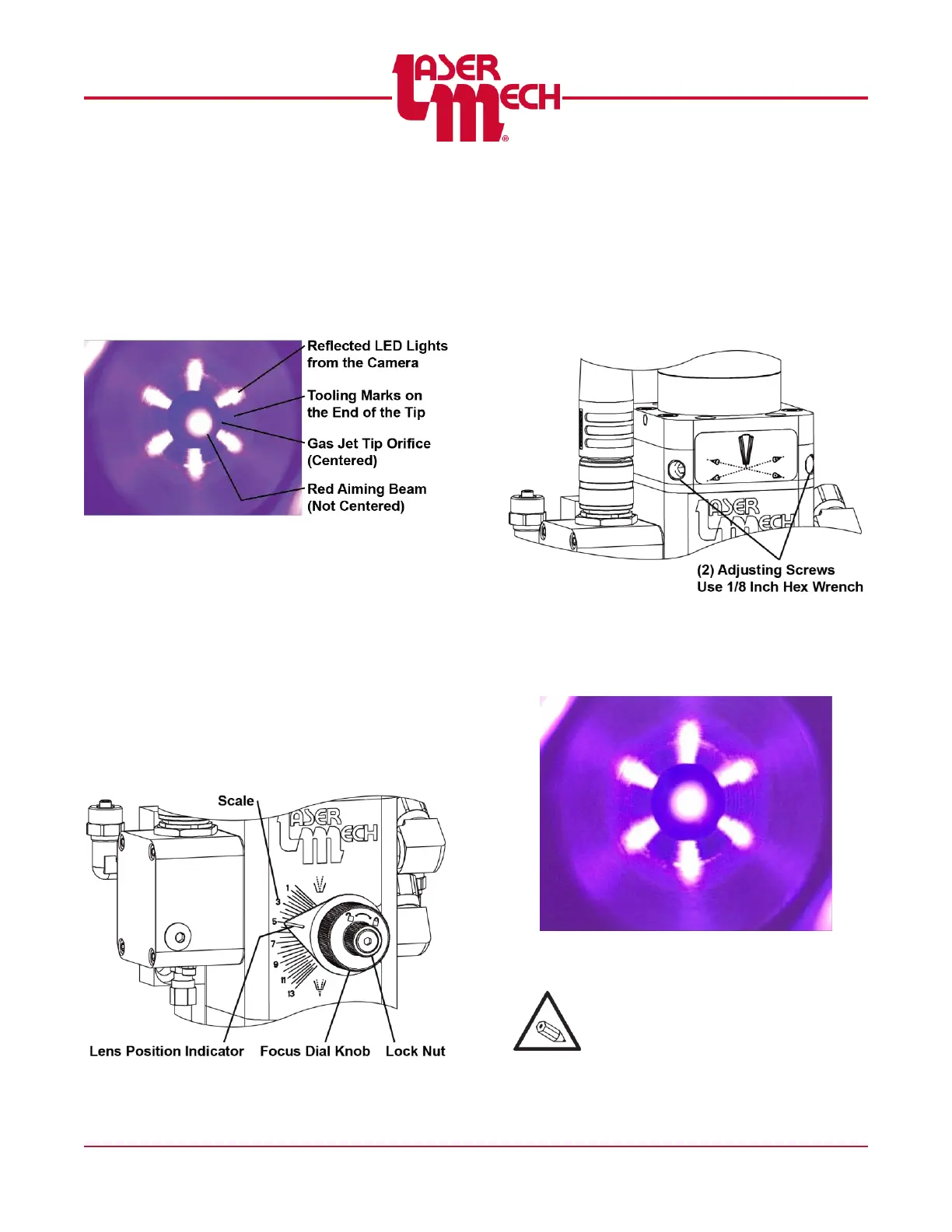
7. Adjust the camera focus knob (see
Figure 16) until the end of the gas jet
tip nozzle becomes in focus with a
clear image. See Figure 17.
You should be able to see tooling
marks on the end of the tip.
Figure 17
Use the image on the screen to
verify that the camera is centered
on the tip.
For steps 8 to 10, see Figure 18.
8. Loosen the lock nut by rotating it
counterclockwise.
9. Use the focus dial knob to move the
focus lens (approximately) to the
setting of 5 on the adjustment knob.
10. Tighten the lock nut by rotating it
clockwise.
Figure 18
11. Use a 1/8 inch hex wrench to loosen
or tighten the (2) adjuster screws so
the beam is centered in the nozzle
orifice. See Figure 19.
DO NOT OVERTIGHTEN.
You should be able to see tooling
marks on the end of the tip.
Figure 19
The image on the screen should
be similar to Figure 20.
Figure 20
Beam is centered
It is sometimes helpful to rotate the
camera while it is seated against the tip
assembly nut to confirm the beam
centering.
Use the image on the screen to verify
that the camera is centered on the tip.



 To Next Page