22
3.4 Control screen
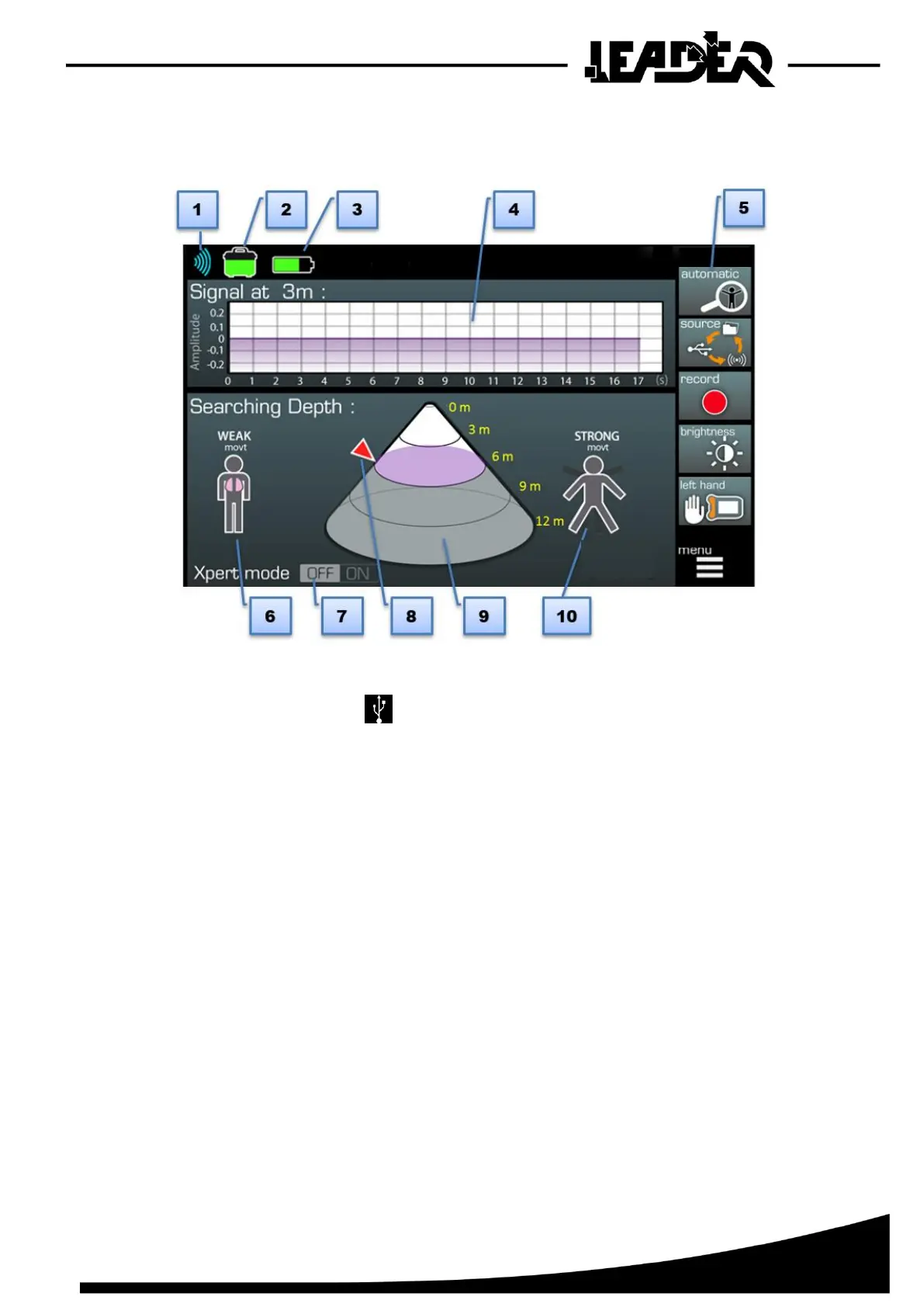
➢ Once the sensor is connected to the control box, the following screen appears:
1. Level of WiFi signal (sensor connection). If the sensor is connected with the USB cable,
the corresponding icon appears.
2. Sensor battery level.
3. Control box battery level.
4. Oscillogram representing the signal of movements detected by the device at a given distance
(in collaboration with the “pointer”).
5. Menu (for detailed functions see chapter 4).
6. Weak movt: When a weak movement is detected, this icon flashes and is also duplicated in
the cone at the detected distance.
7. Xpert Mode: When activated, the expert mode display gives additional information to the classic
display (cone diameter, detection surface, detection volume).
8. Pointer: Moves on the side of the cone to indicate the desired distance and help display
the signal at this depth in the oscillogram.
9. Detection cone: Detection area where the “Weak movt” or “Strong movt” icons appear to
locate the depth at which the movement has been detected.
10. Strong movt: When a medium/strong movement is detected, this icon flashes and is duplicated
in the cone at the detected depth.


 To Next Page