35
4.11 Record function
- Allows the control box screen activity to be recorded. Used to review a
search moment or for testing during training.
Go to the menu and select.
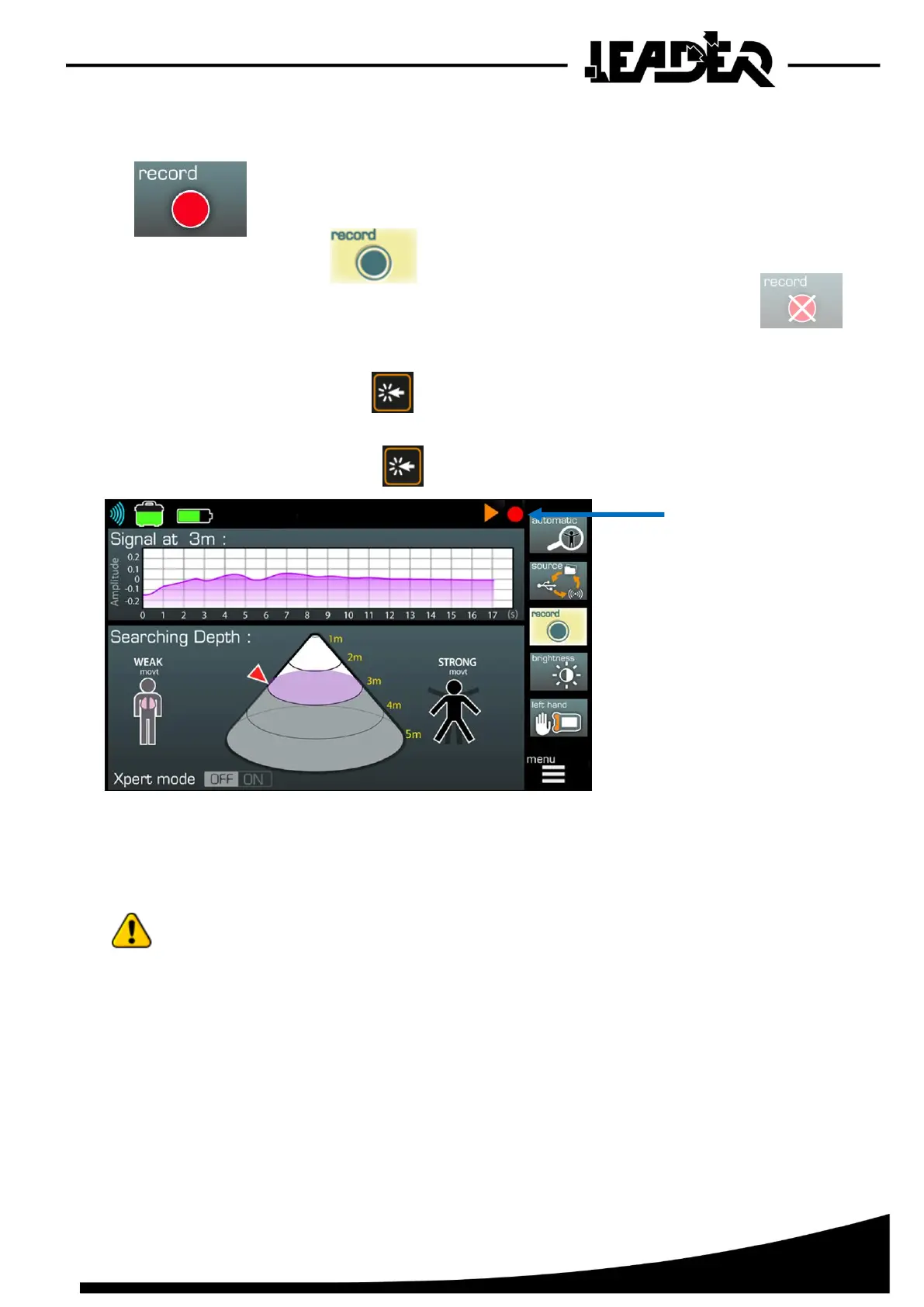
If the SD card is full or if there is no SD card inserted, the following icon is displayed:
In this instance a recording cannot be made.
Start the recording by clicking on .
A red circle icon (2) flashes at the top of the screen for the recording.
To stop the recording, just click on again.
The recordings can only be read on the control box.
To avoid any handling mistakes, the recorded files cannot be deleted from the LEADER Scan box.
To delete the files or clear the SD card, you must use a computer.
You can record approximately 110 hours on a 4 GB card.
When “Record” mode is launched, it is possible to browse through the menu.
- The following functions can be adjusted and their setting can be viewed when viewing a
recording: “Pointer, Mini, Maxi, Real time, Automatic”.
The following functions can be used/adjusted and their setting cannot be viewed when
viewing a recording: “Sensitivity, Brightness, Right/Left hand, Xpert Mode”.
The “Xpert mode” function can be viewed when viewing a file if and only if activated before
opening the recording.


 To Next Page