31
➢ Uses of the “Automatic” mode:
- Adjust the “Mini” and “Maxi” depths to define the search zone.
- Go to the menu and select.
- Launch the Automatic mode by pressing
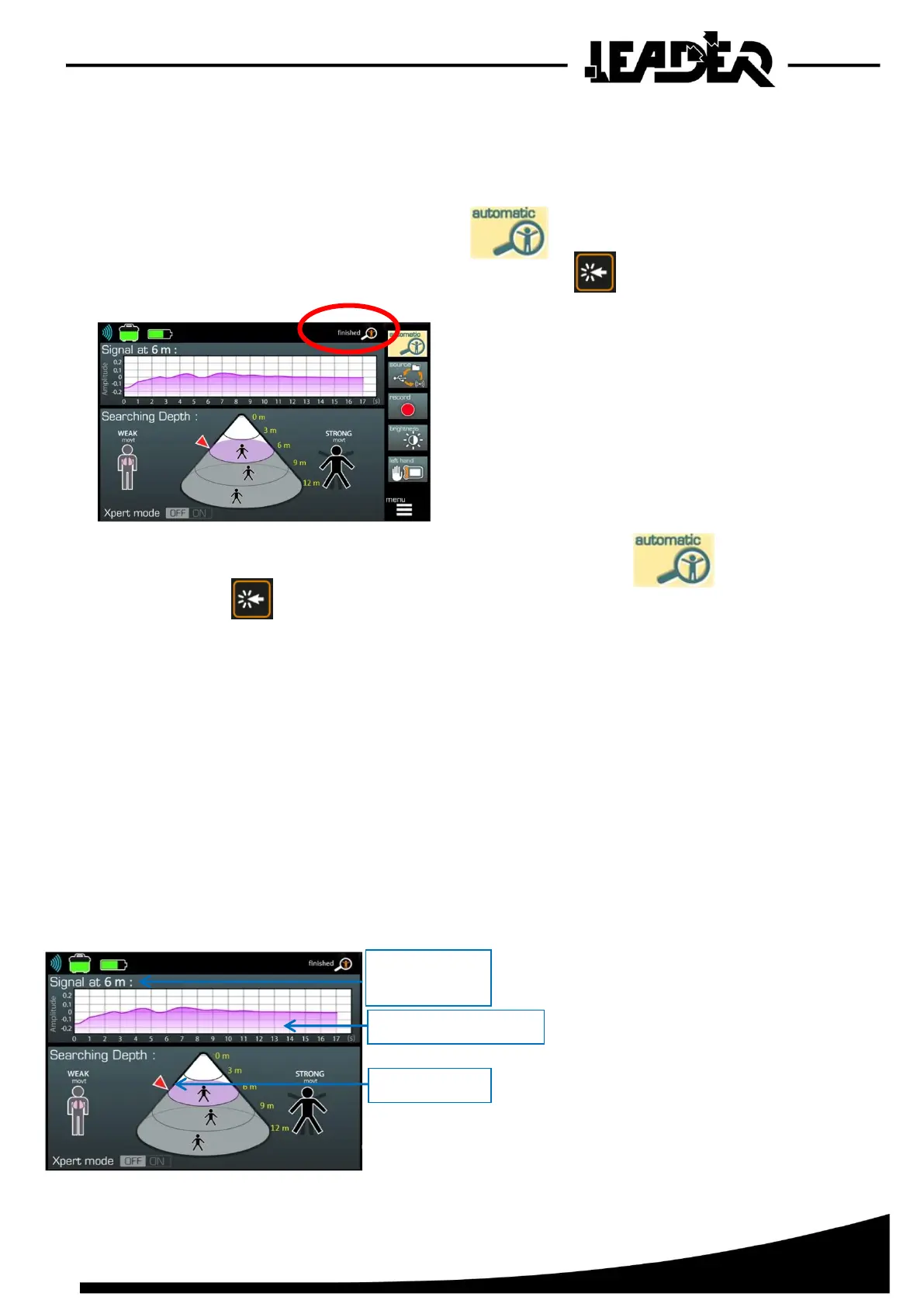
A magnifying glass starts to flash at the top of
the screen.
The device takes 15 to 20 seconds to start before
starting the scan.
Once all sections have been scanned,
a “finished” icon appears.
At any time you can stop the search by selecting the Automatic icon
and press.
During a search in “Automatic” mode, if several people/movements are found in the detection
section, only the largest person/movement will be used and displayed in the corresponding section.
Example: For a 0-12m search.
- 0-4m section: 0 victims detected.
- 4-8m section: 1 victim moves and is detected.
- 8-12m section: 5 victims move (only the person moving the most will be displayed, based on
the principle that if a victim is found there could be others nearby).
- 12-16m section: 1 victim moves and is detected.
=> Total displayed in the cone: 3 victims/movements:
After analysing each section, the pointer (1)
is positioned on the maxi of the section.
Once the full scan is complete, the pointer is
positioned at the level of the closest detected
movement to the sensor, indicating this depth
(2).
The oscillogram (3) shows the detected
signal at the depth indicated by the pointer.


 To Next Page