Key Function
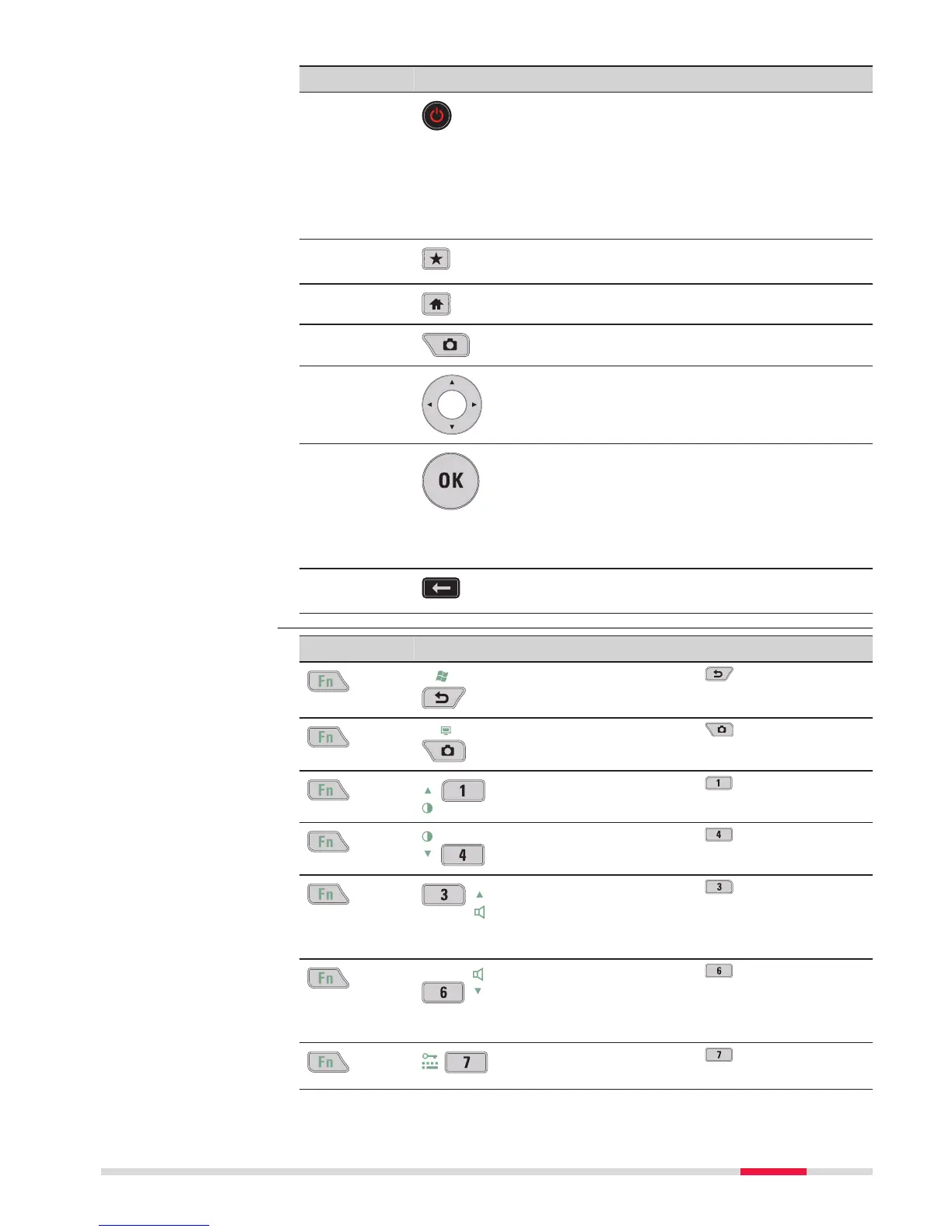
ON/OFF If the field controller is already off: Turns the
field c
ontroller on when held for 2 s.
If the field controller is already on:
•
Tur
ns to Power Options menu when held
for 2 s.
•
Turns the field controller off when held
for 5 s.
Favourites
Opens the “Favourites” pop-up bubble within
Leica Captiva
te.
Home
Switches to the Windows EC7 Start Menu.
Cameras Access the cameras.
Arrow keys Move the focus on the screen.
OK Selects the highlighted line and leads to the
next log
ical menu/ dialog.
Starts the edit mode for editable fields.
Opens a selectable list.
Backspace
Deletes the job in the centre of the job car-
ousel.
Key Function
+ Hold Fn while pressing .
Switch to Windows.
+ Hold Fn while pr
essing
.
Tak
e a screenshot of the current screen.
+ Hold Fn while pressing .
Increase the screen brightness.
+ Hold Fn while pr
essing
.
Decre
ase the screen brightness.
+ Hold Fn while pr
essing
.
Incre
ase the volume for acoustic warning sig-
nals, beeps and keypresses on the field con-
troller.
+ Hold Fn while pr
essing
.
Decre
ase the volume for acoustic warning
signals, beeps and keypresses on the field
controller.
+ Hold Fn while pr
essing
.
Lock/unlo
ck the keyboard.
Key combinations
User Interface 27



 To Next Page