•
The ba
tteries can be operated from -30°C to +60°C/-22°F to +140°F.
•
Low operating temperatures reduce the capacity that can be drawn; high
operating temperatures reduce the service life of the battery.
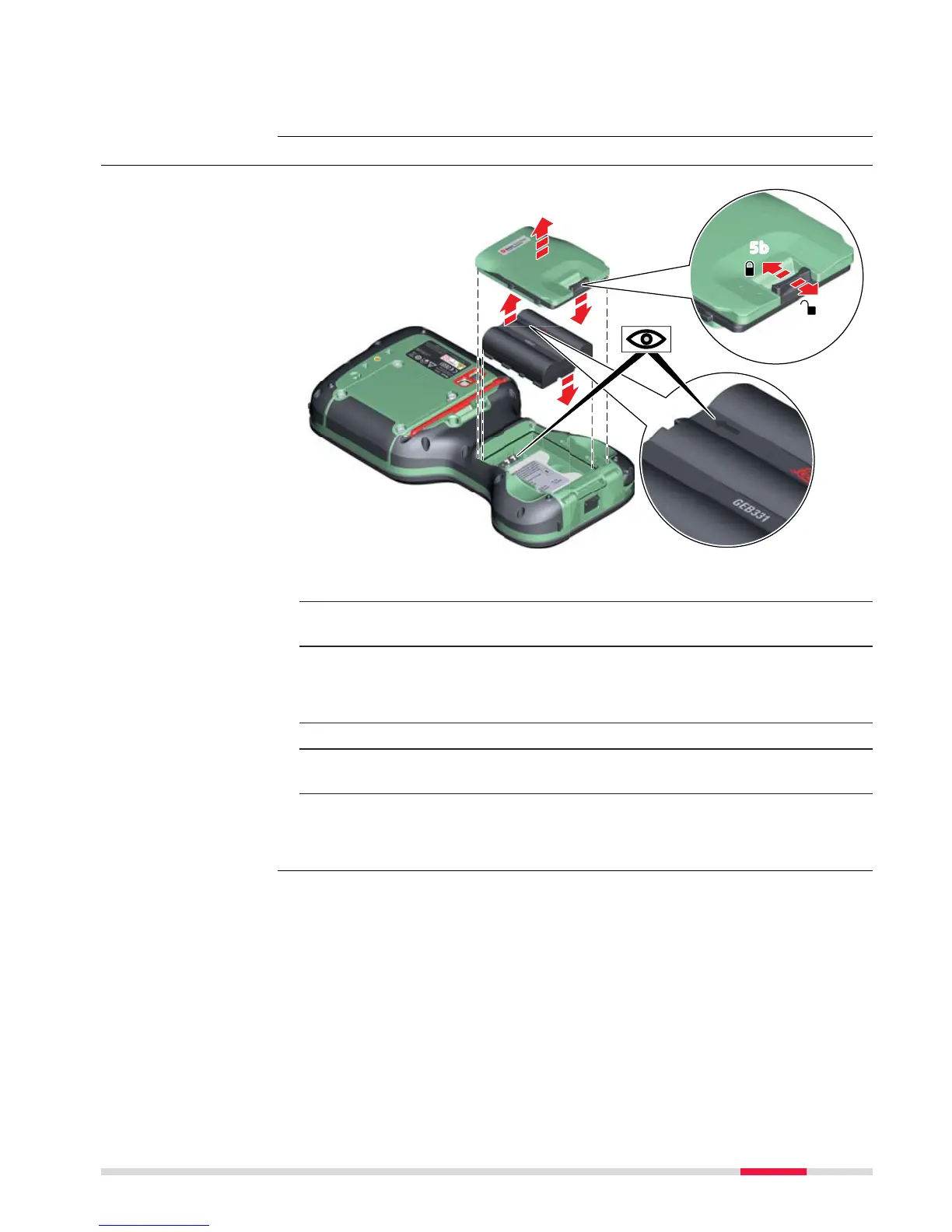
4.2.2 Changing the Battery
☞
Turn over the field controller.
1. Push the slide fastener in the direction of the arrow with the open-
lock sy
mbol.
2. Remove the cover from the battery compartment.
☞
Ensure that no water enters the battery compartment.
IP68 applies only with the battery compartment closed.
3. Pull the battery from the battery compartment.
4. Place the battery into the battery compartment with the arrow facing
to the top.
5. Attach the cover of the battery compartment. Push the slide fastener
of the battery compartment in the direction of the arrow with the
closed-lock symbol.
Operation/discharging
Insert and remove the
batter
y step-by-step
Operation 41



 To Next Page