1. Touch the yellow-coloured sticker with two fingers and pull it slowly
upwards. T
he carrier foil is peeling away.
☞
Do not peel the carrier foil more than 2 cm - 3 cm away.
2. Fix the adhesive underside of the display foil on the display edge.
Peel away the carrier foil slowly and smooth it out gently onto the
display.
3. Remove the additional layer foil which has a red-coloured sticker.
4. Potential air bubbles between display and display foil have to be
smoothed out using the included microfibre cloth.
☞
Do not use sharp objects!
5. In case of remaining dust or grease under the display foil or the need
to replace the display foil, lift it again with some adhesive tape.
4.1.6 Inserting and Removing a SIM Card
☞
Inserting/removing the SIM card while the CS20 is turned on can
re
sult in permanent damage to the card. Only insert/remove the SIM
card when the CS20 is switched off.
☞
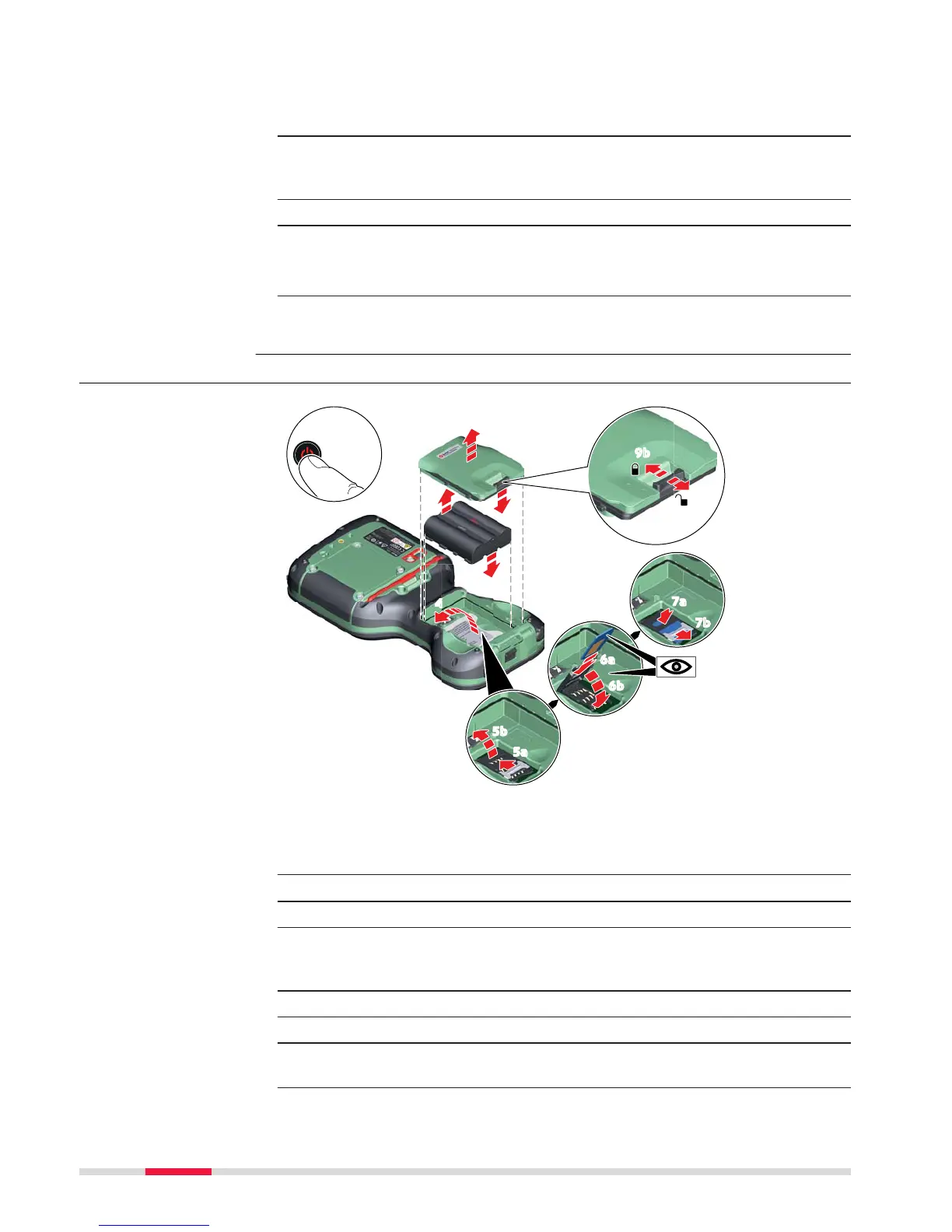
The SIM card is inserted into a slot inside the battery compartment.
1. Switch off the field controller.
2. Push the slide fastener of the battery compartment in the direction
of the arrow with the open-lock symbol.
Remove the cover from the battery compartment.
3. Remove the battery from the battery compartment.
4. Bend up the flap that covers the SIM card holder.
5. Push the SIM card holder in the direction of the OPEN arrow and flip
it up.
Insert and remove a
SIM c
ard step-by-step
36 Operation



 To Next Page