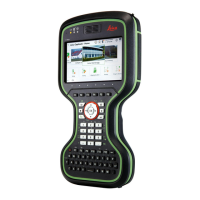
1. Connect the GEV276 power adapter or GEV219 with the field con-
troller
.
2. The power LED on the CS field controller switches on. While charg-
ing, the power LED flashes. When the field controller’s battery is fully
charged the Power LED is green.
☞
Refer to LED indicators for detailed information about the
power LED.
To charge the batteries for GS07, use the Leica Geosystems chargers GKL311
or G
KL341. Refer to the GKL311 or GKL341 User Manual for further informa-
tion.
4.3 Power Functions
Press and hold power key ( ) for 2 s.
☞
The field controller must have a power supply.
Press and hold power key ( ) for 5 s.
☞
The field controller must be on.
Press and hold power key ( ) for 2 s to open Pow
er Down Options menu.
☞
The field controller must be on.
Option Description
Power down and turn off To turn the field controller off.
Put into stand-by To put the field controller into stand-by
mode.
R
eset hardware Perform one of the following options:
•
Restart hardwareThe device powers
down and restarts.
•
Reset Windows EC7The device powers
down and restarts. Any Bluetooth pair-
ings are deleted.
•
Reset Leica CaptivateThe device pow-
ers down and restarts. All working styles,
dial-up lists and server lists are deleted.
Jobs, code lists, coordinate systems etc.
are not deleted.
•
Reset Windows EC7 and Leica Capti-
vateThe device powers down and
restarts. Bluetooth pairings, working
styles, dial-up lists and server lists are
deleted.
To turn on the instrument press and hold the ON/OFF button for 2 s.
To turn off the instrument press and hold the ON/OFF button for 2 s.
Charge battery for
GS07
T
urning field
controller on
Turning field
controller off
Menu “Power Down
Options”
Turn on GS07
Turn off GS07
Operation 43



 To Next Page