6. Place the SIM card into the SIM card holder, the chip facing the con-
nect
ors inside the slot - as shown beside the SIM card holder.
7. Press the SIM card holder down and push the SIM card holder in the
direction of the LOCK arrow to close.
8. Bend down the flap again and reinsert the battery.
9. Attach the cover of the battery compartment. Push the slide fastener
of the battery compartment in the direction of the arrow with the
closed-lock symbol.
4.1.7 Setting Up for Remote Control or RTK using an Expansion Pack
This section does only apply to the models CS20 3.75G, CS20 3.75G DISTO and
CS20 CD
MA DISTO.
☞
The CTR20 is not available in EU countries.
☞
When the expansion cover or expansion pack are detached from the
field c
ontroller, the IP68 protection does not apply! Look for a dry and
dust free atmosphere when detaching the expansion cover or the
expansion pack.
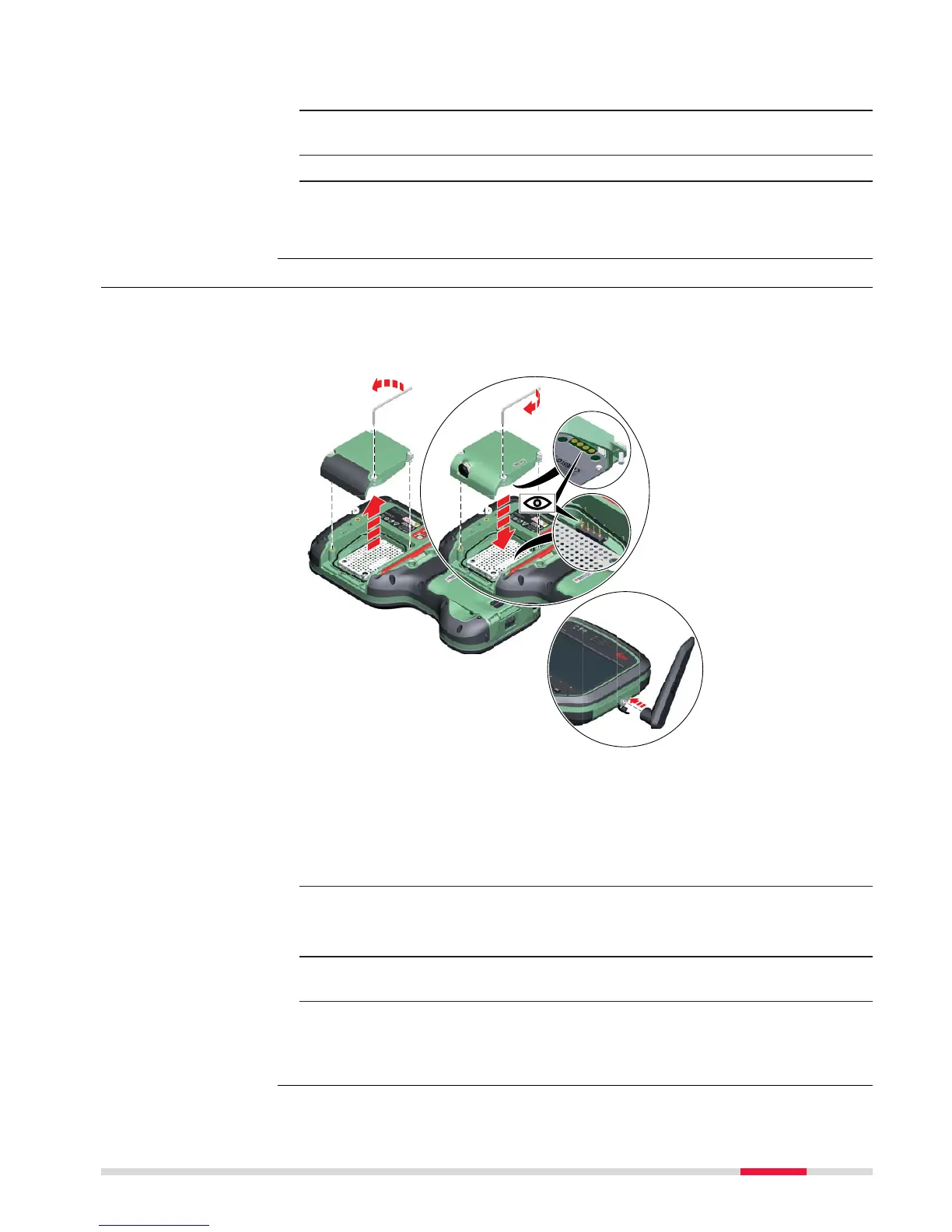
1. Loosen the screws of the expansion cover and detach the cover from
the field controller.
2.
☞
Check the position of the contacts in the inner surface of
the field controller.
Attach the expansion pack to the field controller.
3. Tighten the screws of the expansion pack with the supplied allen
key.
4. Attach the antenna to the expansion pack.
☞
Using a rotating movement makes it easier to attach the
antenna, especially at low temperatures.
Attaching the exten-
sion pac
k step-by-
step
Operation 37



 To Next Page