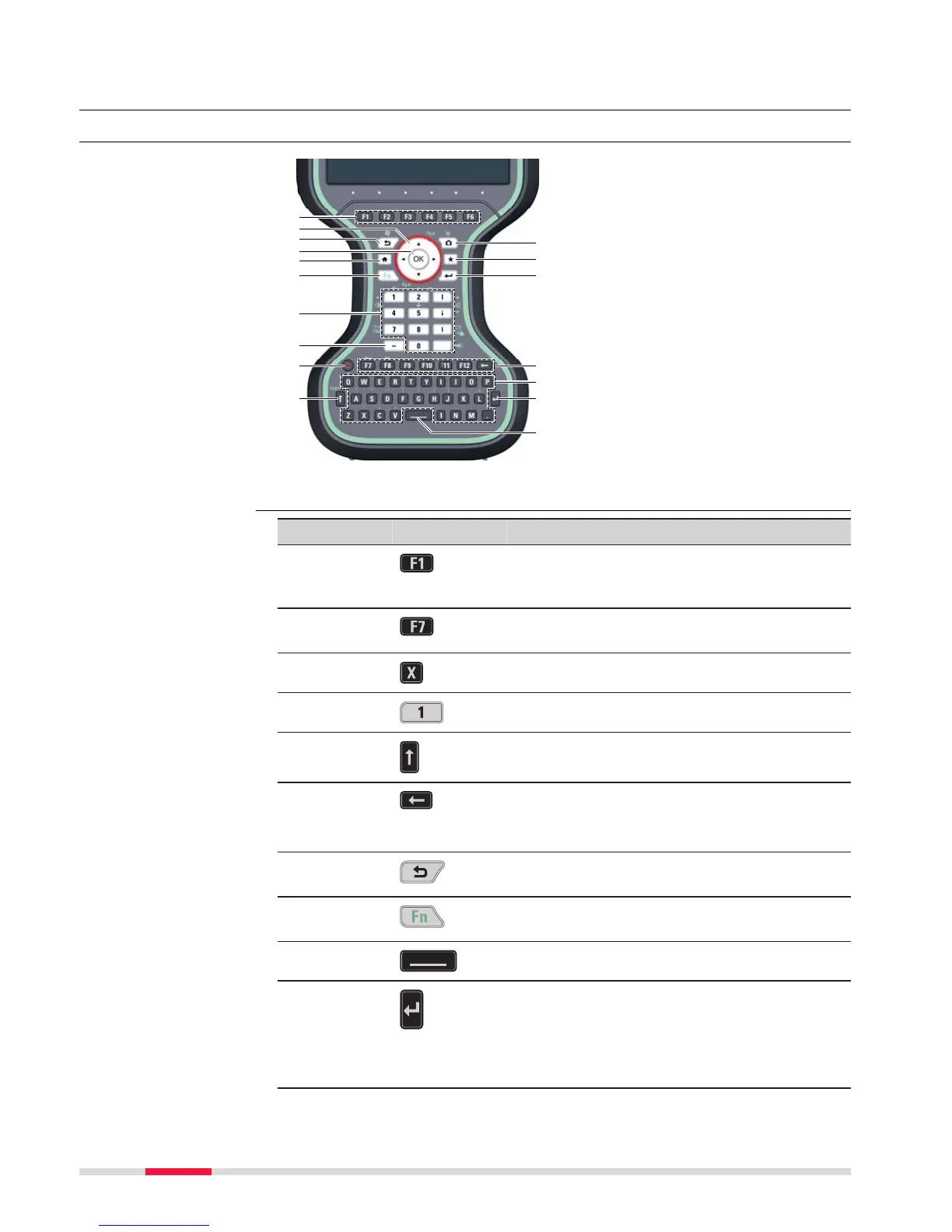
a Function keys F1 - F6
b Ar
row keys
c ESC
d OK
e Home
f Fn
g Numeric keys
h ± key
i ON/OFF
j CAPS Lock
k Cameras
l Favourites
m ENTER
n Function keys F7 - F12;
Backspace
o Alpha keys
p ENTER
q SPACE
Key Function
Function keys
F1-F6
Correspond to six softkeys that appear on
the bo
ttom of the screen when the screen is
activated.
Function keys
F7-F12
User definable keys to execute chosen com-
mands or ac
cess chosen screens.
Alpha keys
To type letters.
Numeric keys To type numbers.
Caps Lock Switches between upper case and lower case
let
ters.
Backspace
Clears all entry at the beginning of user
input.
C
lears the last character during user input.
Esc
Leaves the current screen without storing
any change
s.
Fn
Switches between the first and second level
of f
unction keys.
Space
Enters a blank.
Enter Selects the highlighted line and leads to the
next log
ical menu/ dialog.
Starts the edit mode for editable fields.
Opens a selectable list.
Keyboard display
Keys
26 User Interface



 To Next Page