4.1.8 Connecting to a Personal Computer
Windows Mobile Devic
e Center for PCs with Windows 7/Windows 8/
Windows 10 operating system is the synchronization software for Windows
mobile-based pocket PCs. WMDC enables a PC and a Windows mobile-based
pocket PC to communicate.
Leica USB drivers support Windows 7, Windows 8 (8.1) and Windows 10 oper-
ating sys
tems.
Cables
Leica USB drivers support:
Name Description
GEV223 USB data cable, 1.8 m, connects instrument to Mini-USB to
USB
GEV234 USB data cable, 1.65 m, connects CS to GS or CS to PC (USB)
GEV261 Y-cable, 1.8 m, connects instrument to PC – battery
☞
Skip the following steps if you have never installed Leica USB drivers
be
fore.
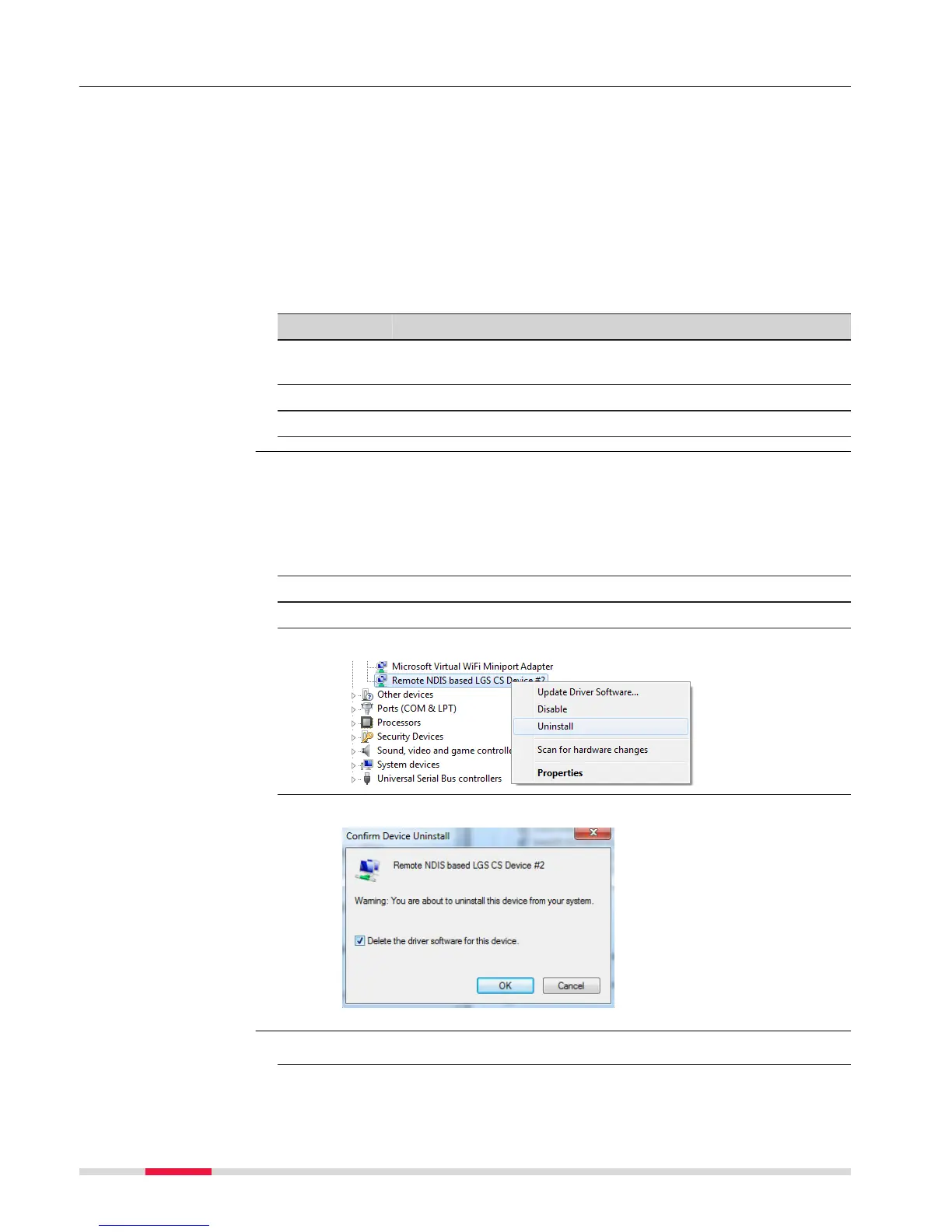
If older drivers were previously installed on the PC, follow the instructions to
uninstall the drivers prior the installation of the new drivers.
1. Connect your instrument to the PC via cable.
2. On your PC, select to Contr
ol Panel > Device Manager.
3. In Network Adapters, right-click on Remote NDIS based LGS….
4. Click on Uninstall.
5. Set Delete the driver… as checked. Press OK.
1. Start the PC.
Description
Uninstalling the
previous drivers
Ins
tall Leica USB
drivers
38 Operation



 To Next Page