☞
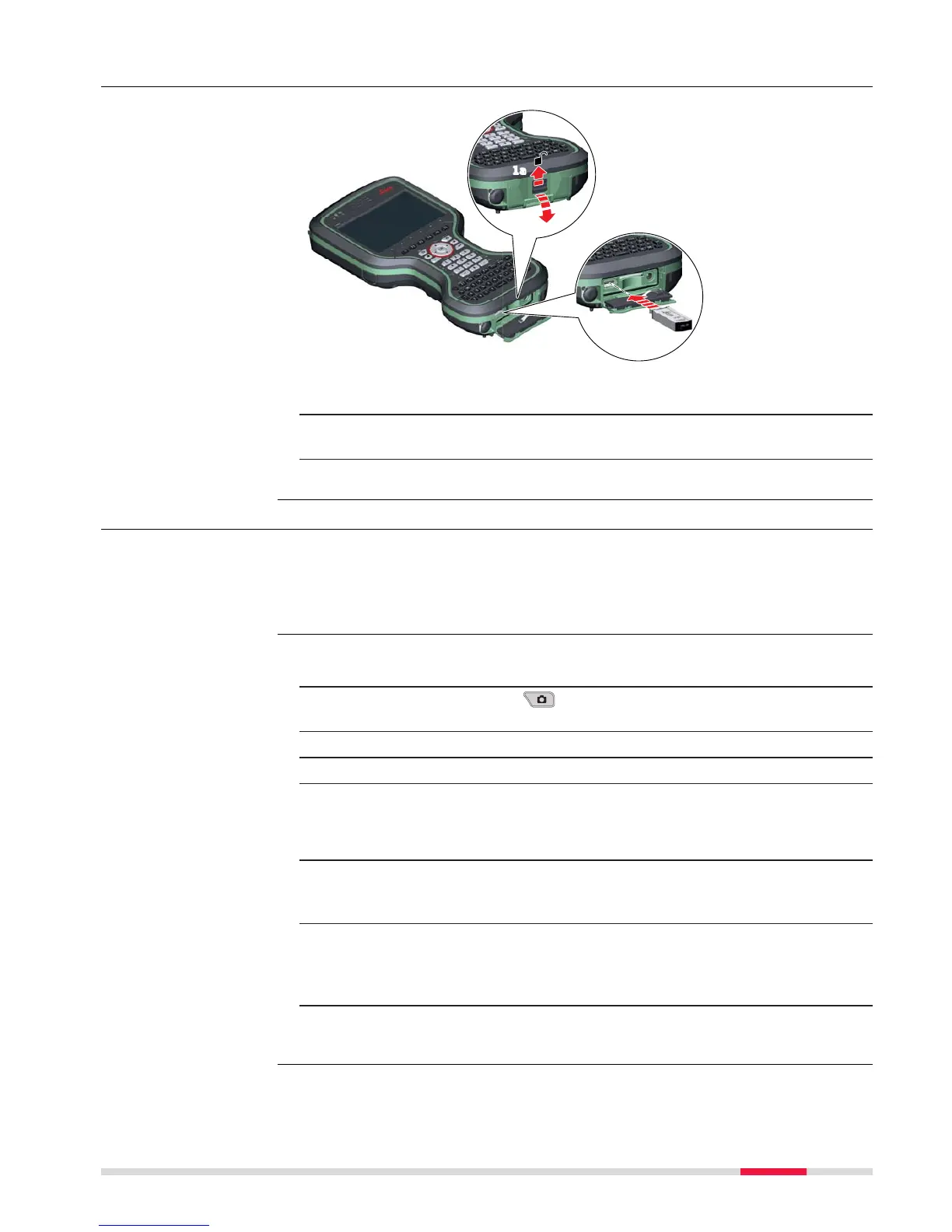
The USB stick can be inserted into a slot behind the connector cover.
1. Push the slide fastener of the connector cover in the direction of the
arrow with the open-lock symbol. Open the connector cover.
2. Insert the USB stick into the USB A host port.
4.5 Using the Digital Camera
The field controller is equipped with a digital camera and a flash light, both
located at the underside. Mounting a hand strap or pole holder plate does not
limit the camera view.
You can start the camera application from within Leica Captivate.
☞
To be able to start the camera application, Leica Captivate has to be
op
en.
1. Press the Camera key
.
The s
creen Capture Image is displayed.
2. Aim the camera to the desired target.
3. Check the view at the display.
4. Press the OK key or click Capture to take a picture.
The picture is displayed in the Image Viewer.
☞
Capture changes to Store.
5. Press OK again or click Store to store the picture.
An info screen is displayed where you can choose to save the picture
with a link to a point, line or area.
6. Press F2 or F3 to store the picture with a link. Follow the instructions
on the screen.
Press F4 to store the picture without a link.
Press F6 to return to the Image Viewer without storing the picture.
After storing the picture, the Capture Image screen is displayed
again.
Insert a USB stick
step-by-s
tep
Overview
Taking a picture step-
by-step
Op
eration 45



 To Next Page