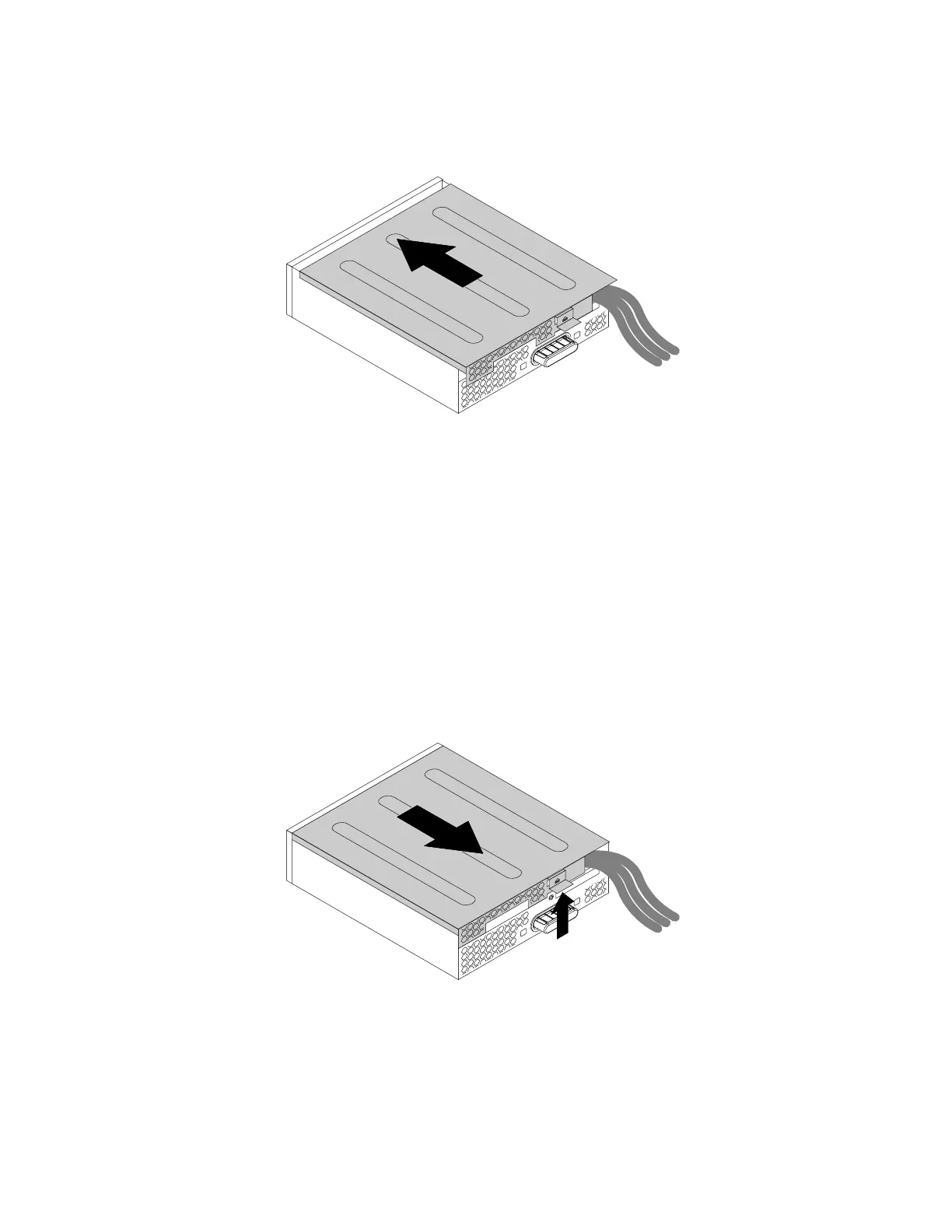
6.Positiontheflexmodulecoverontheflexmodule.Ensurethatgtherailguidesonthebottomofthe
coverengagetherailsontheflexmodule.Then,pushthecovertothefrontuntilitsnapsintoposition.
Figure39.Reinstallingtheflexmodulecover
7.ConnectthecardreadercabletotheUSB2.0connectoronthesystemboard.See“Partsonthe
systemboard”onpage7.
Whattodonext:
•Toworkwithanotherpieceofhardware,gototheappropriatesection.
•Tocompletetheinstallationorreplacement,goto“Completingthepartsreplacement”onpage105.
InstallingorreplacinganeSATAconnectororIEEE1394connectorintheflexmodule
ToinstallorreplaceaneSATAconnectororIEEE1394connectorintheflexmodule,dothefollowing:
1.Removetheflexmoduleoutofthechassis.See“Installingorreplacinganopticaldrive”onpage66.
2.Lifttheclipontherearoftheflexmoduleandslidetheflexmodulecovertothereartoremovethecover.
Figure40.Removingtheflexmodulecover
3.IfyouarereplacinganeSATAconnectororIEEE1394connector,dothefollowing:
a.DisconnecttheeSATAconnectororIEEE1394connectorcablefromthesystemboard.See“Parts
onthesystemboard”onpage7.
74ThinkStationP310UserGuide













 To Next Page