•Tocompletetheinstallationorreplacement,goto“Completingthepartsreplacement”onpage105.
Installingorreplacingaharddiskdriveintheoptical/storagecombinationenclosure
Toinstallorreplaceaharddiskdriveintheoptical/storagecombinationenclosure,dothefollowing:
1.Slidetheenclosureoutofthechassis.See“Installingorreplacinganopticaldrive”onpage66.
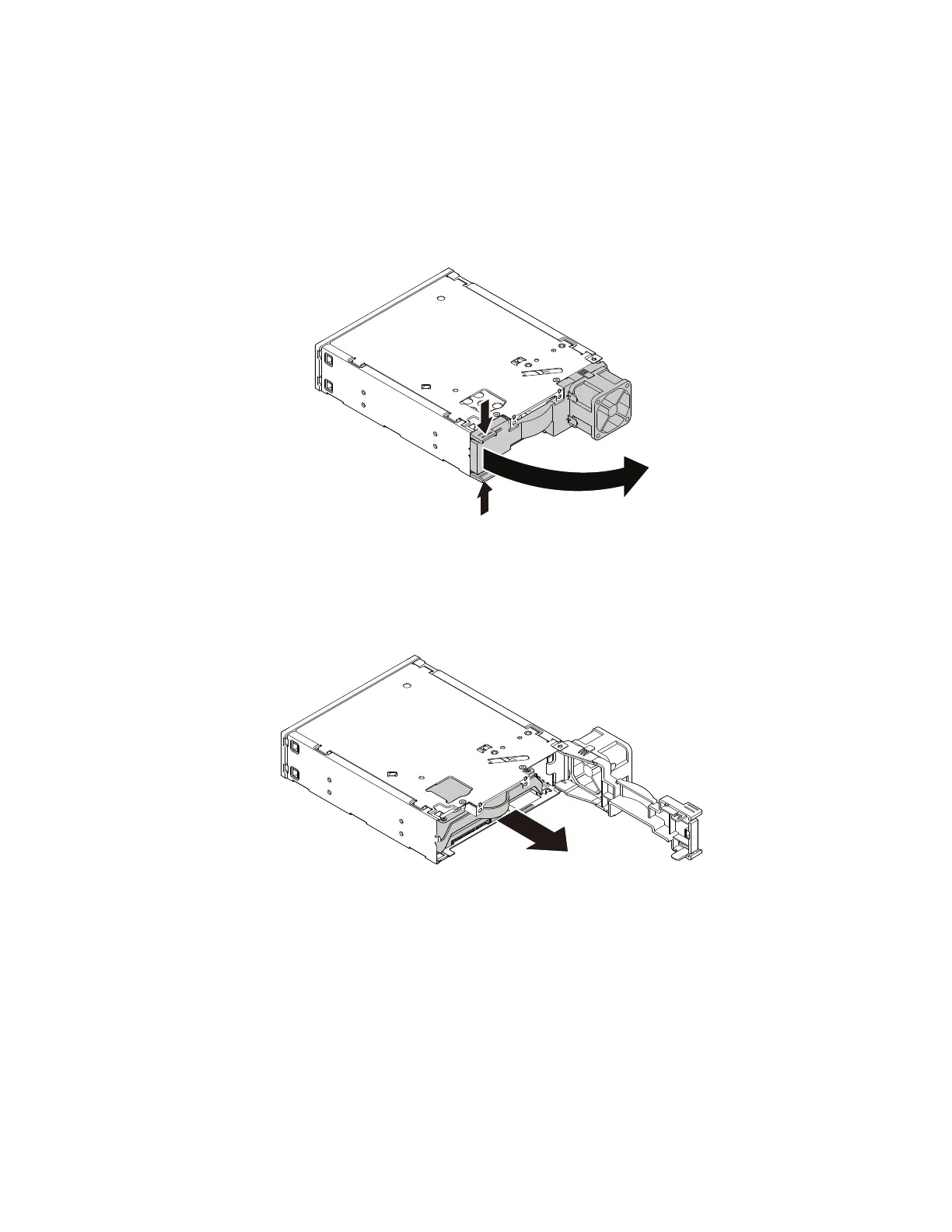
2.Pinchthetwoclipstowardeachotherasshowntoopentherearcoveroftheenclosure.
Figure51.Openingtheenclosurefromtherear
3.Ifyouarereplacinganoldharddiskdrive,dothefollowing:
a.Slidetheharddiskdriveoutoftherearoftheenclosure.
Figure52.Removingtheharddiskdrivefromtherear
b.Flextwosidesofthebluebrackettoremovetheharddiskdrivefromthebracket.
80ThinkStationP310UserGuide













 To Next Page