Wireless Access (optional equip-
ment)
When wireless access is activated, a connec-
tion is established between the truck and an
external management system.
NOTE
Contact the operating company/fleet manager
to activate wireless access.
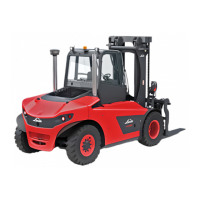
Turn the rotary-push button to the rel-
evant position and push it to confirm the
"Wireless access" (1) selection.
The second menu level "Wireless access" (1)
is opened.
Turn the rotary-push button
to the rel-
evant position and press it to confirm the
"Back" selection (cancel the process) or to
choose between different options.
NOTE
To deactivate wireless access, confirm the
corresponding selection.
EFF
h
104575
%
1
Display_2206
EFF
h
104575
%
1
Display_2207
Operation
4
Premium Display Unit (optional equipment)
141Operating Instructions-1202 series LP 12028011590US-11/2022 - 04


 To Next Page