Display Unit
System Startup
Switching on the display unit
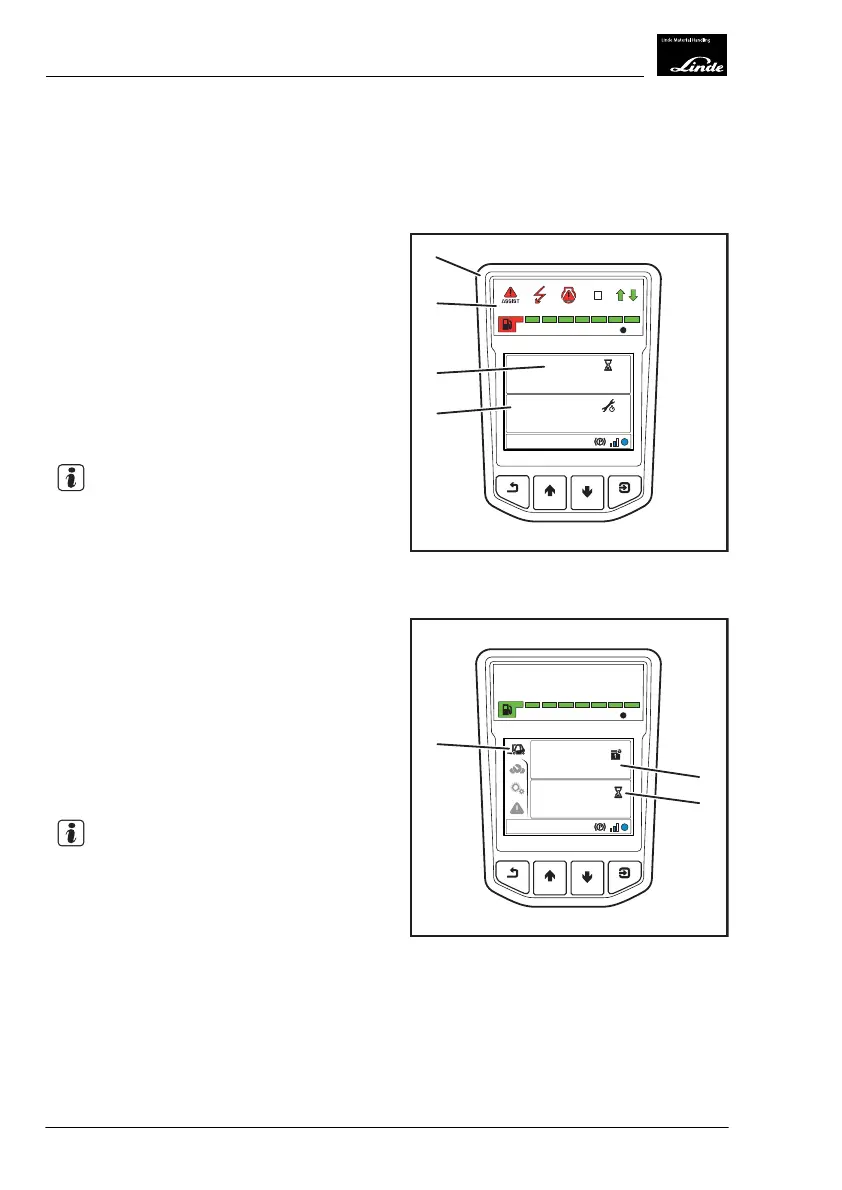
After the electrical system is switched on, the
display unit (1) performs the following actions:
●
Self-testing of the lights: All displays (2)
light up for approx. 2seconds.
●
Display (3) displays the number of operat-
ing hours for approx. 5seconds (example:
1045,0 h
)
●
Display (4) displays the remaining operating
hours (example:
1000 h
) and operating
days (example:
365 d
) until the next serv-
ice for approx. 5seconds
NOTE
The displays (3) and (4) can be changed using
the diagnostic program:
●
Time span of displays: 2 to 10seconds
●
Displayed only when a service is required
●
Display not active
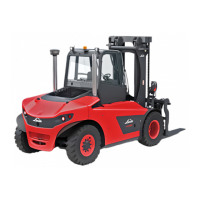
The display then switches to the status dis-
play(5) (factory setting).
Status display (5):
●
Time/date (6) (factory setting)
●
Operating hours (7) (factory setting)
See the section entitled "Starting and stopping
the internal combustion engine" for details on
the following procedure.
NOTE
The display saves the last displayed view and
displays this again after the electrical system
has been switched back on.
EFF
1045,0
h
1000
h
365
d
1
3
4
2
Display_1003a
h
10:30
03.03.2015
1045,0
h
EFF
5
6
7
Display_1004b
4
Operation
Display Unit
70 Operating Instructions-1202 series LP 12028011590US-11/2022 - 04


 To Next Page