Rev: 06.14.2016
Page 6
IN-WALL® Slide-out Service Manual
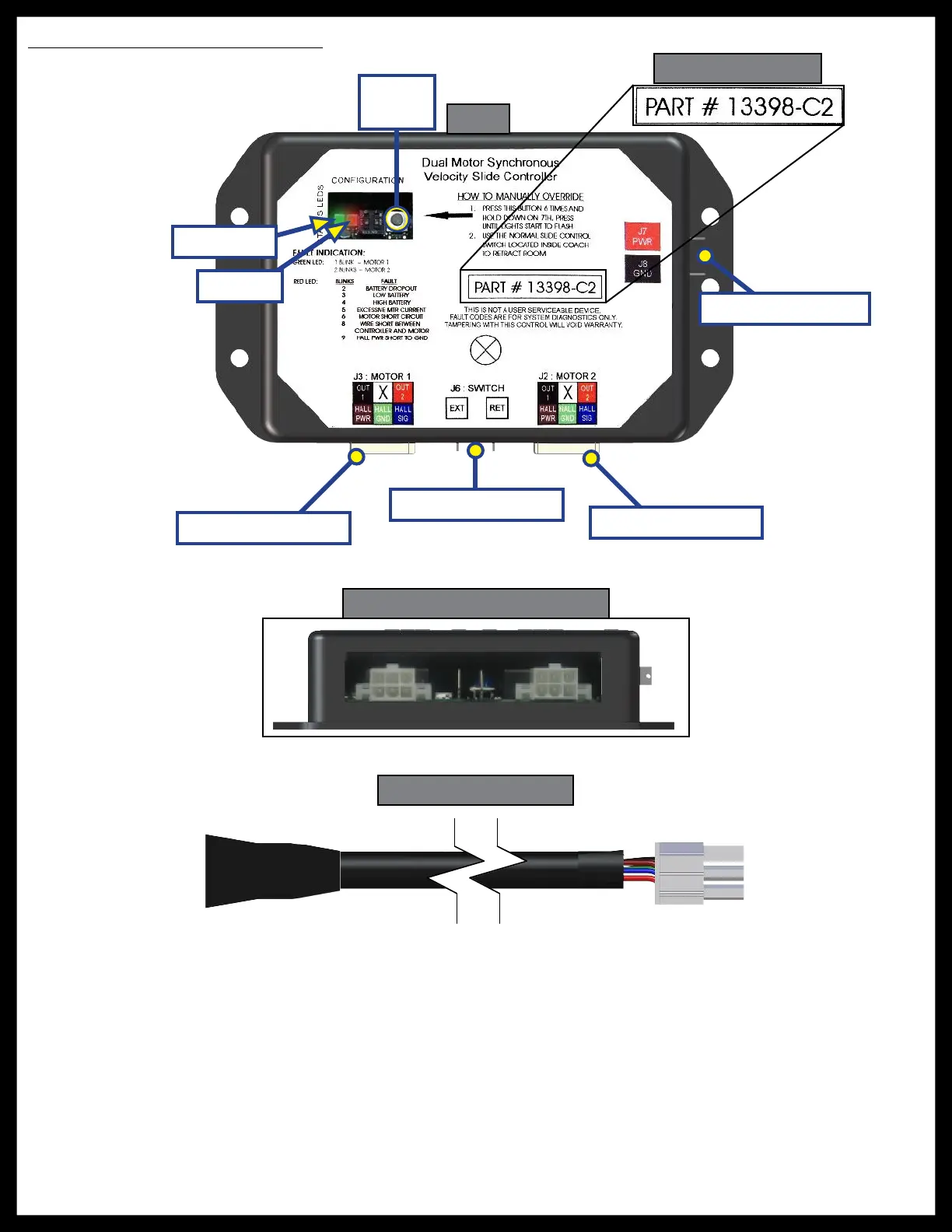
Controller Overview (C2 Version)
Controller Version
Fig. 5
Fig. 6 - Controller Connections
Fig. 7 - Motor Harness
Status LEDs: 2 LEDs, 1 green and 1 red, are provided to indicate current controller status and faults.
Mode Button: Used to engage the electronic manual override.
Power Connection: 12V DC input. Unit will operate from 8V DC to 18V DC.
Switch Connection: Spade connection for the switch wiring.
Motor 1 Connector: Power and encoder input for motor 1.
Motor 2 Connector: Power and encoder input for motor 2.
NOTE: Motor harnesses have Molex® connectors at the controller and a molded connector at the motor
end (Figs. 6 and 7). Wire colors match with color codes on control board. It does not matter which
motor is 1 or 2.
Mode
Button
Green LED
Red LED
Motor 1 Connector
Switch Connection
Motor 2 Connector
Power Connection



 To Next Page
 Loading...