CHAPTER 3: PROCEDURES
QUICK LOAD SERVO 65/80
3-11
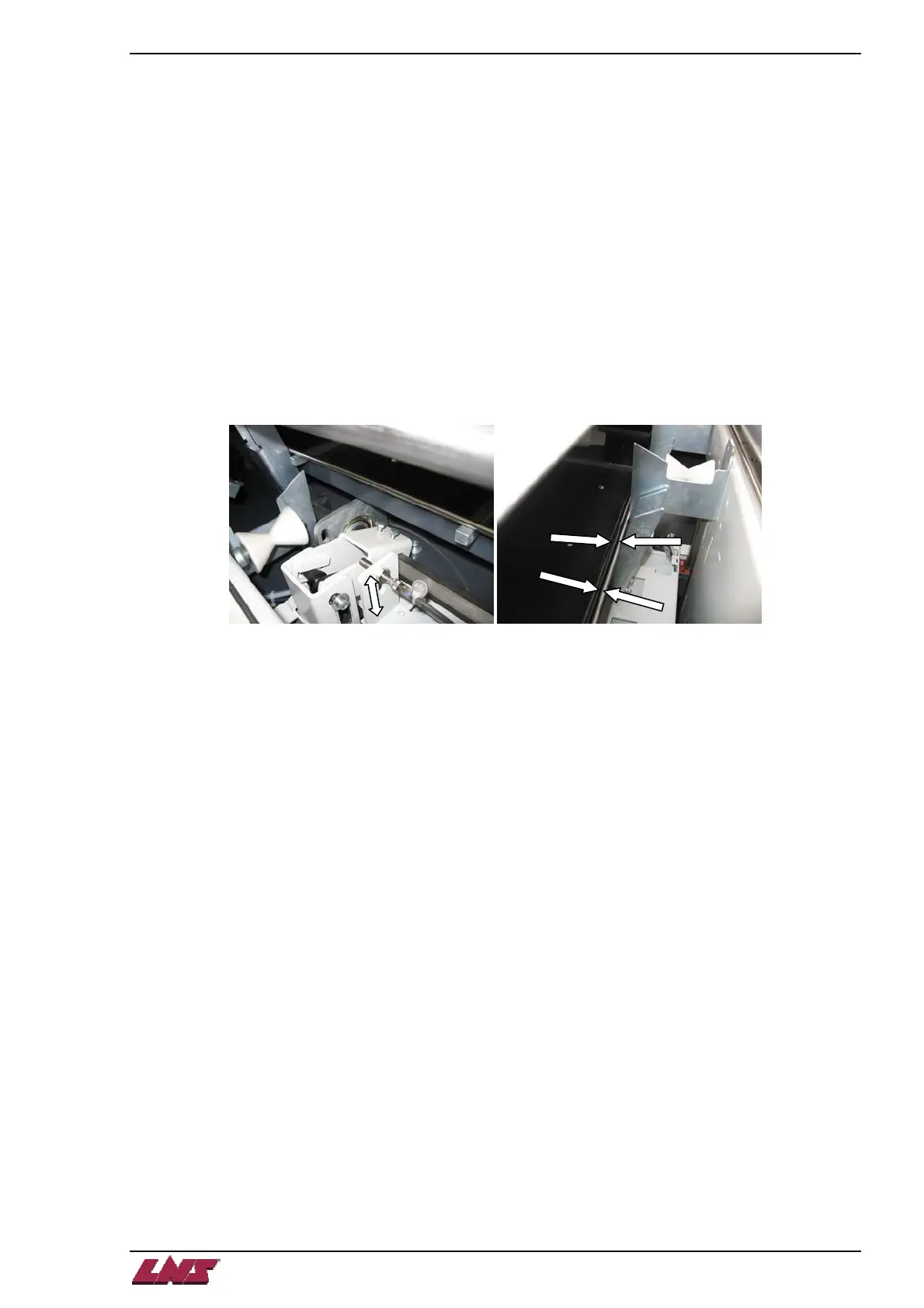
Diameter Adjustment Motor Proximity Switch – SQ4
Conditions:
- No bar stock in the magazine.
- Loading table in lower position.
- Bar feed in STOP mode.
Procedure:
Note: The bar feed must be calibrated for a diameter of 6 mm.
Step 1: In the "Part Setup", enter a bar stock diameter of 6 mm.
Step 2: Place 2 pieces of 6mm bar stock on the magazine rack.
Step 3: In manual mode, move up the loading table (if the adjustment fingers don't move, run the carrier flag
forward to the end and then back to the home position, drop the table down and then repeat this step).
Note: If the bar is not picked up by the table, the switch is set too high. Set it a little lower and repeat points 2 and 3.
In upper position, the bar stock should touch the table stops and the selection fingers.
Step 4: Once the bar stock loads correctly, check that the bar feed does not load 2 bar stocks at once.
Note: the stock must be straight to obtain the ideal adjustment.
Procedure complete.














 To Next Page