Please fold out this page.
- 2
english
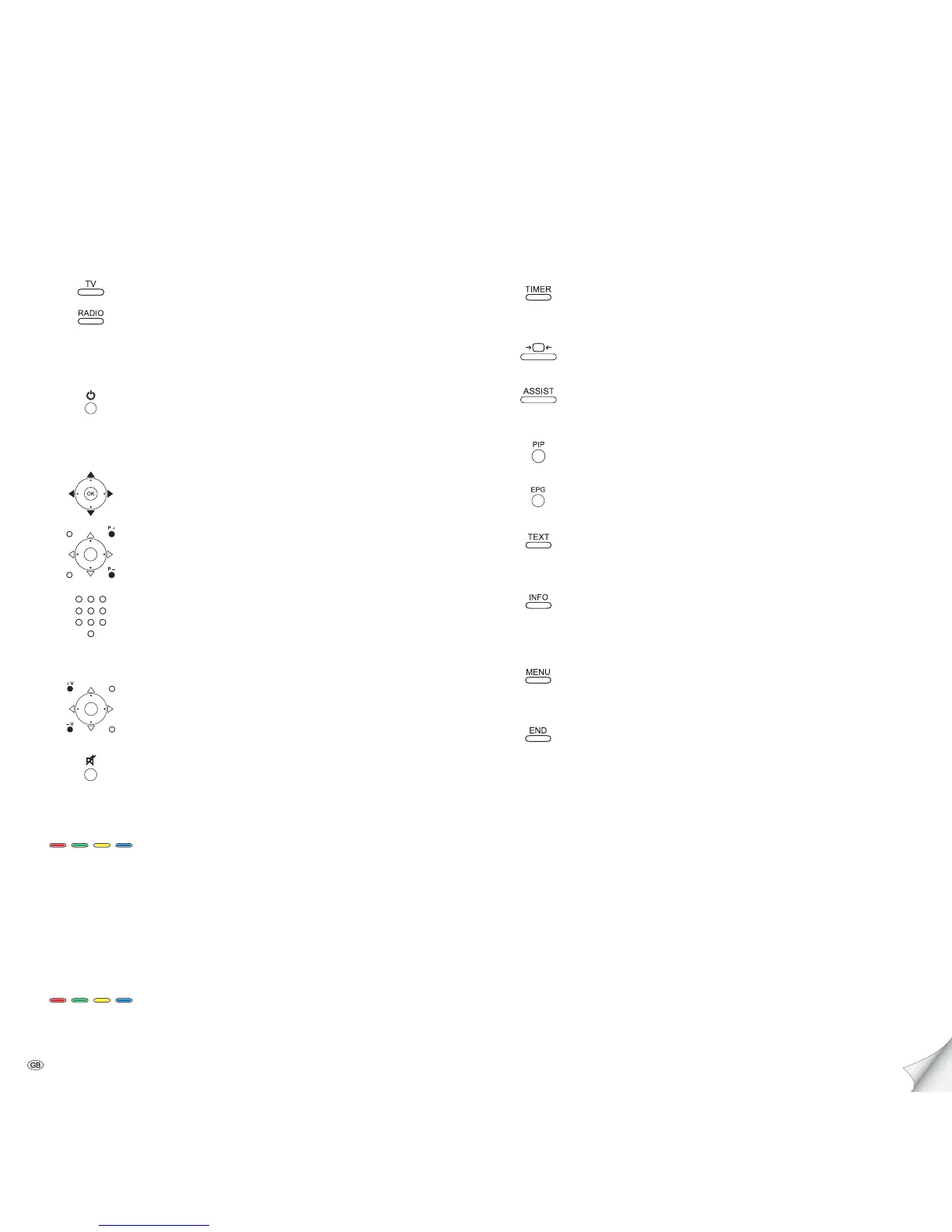
Button functions
On/Off permanent time display
(Press button twice in quick succession)
Adjust picture format
Call Assist
+
menu,
Select operating mode and/or function
On/Off PIP (picture in picture)
On/Off EPG (Electronic Programme Guide)
On/Off teletext,
select teletext page with keyboard
Call index,
Language, TV set equipment, etc. and/or explanation of
the individual settings
Call TV menu,
carry out settings
Call status display;
with opened menu: Exit menu;
Terminate inserts
Set operating mode
TV operation
Radio operation
On/Off of the television set
On/Off device in standby
(Main switch must be turned on)
Selecting stations
OK Calling station overview and with
selecting station
or
P+/P– Programme +/–
or
Selecting station with keyboard
Sound
V+/V– Volume up/down
Sound on/off
Colour key function during TV operation
Red button: DR archive
Green button: Teletext functions
Yellow button: Last selected station
Blue button: Programme information
Colour key function during radio operation
Red button: On/Off screen
Yellow button: Last selecting station
Quick guide













 To Next Page