maXim Operator Manual Utilities
LSC Lighting Systems (Aust) Pty. Ltd. Page 55 of 66
MAIN DISPLAY
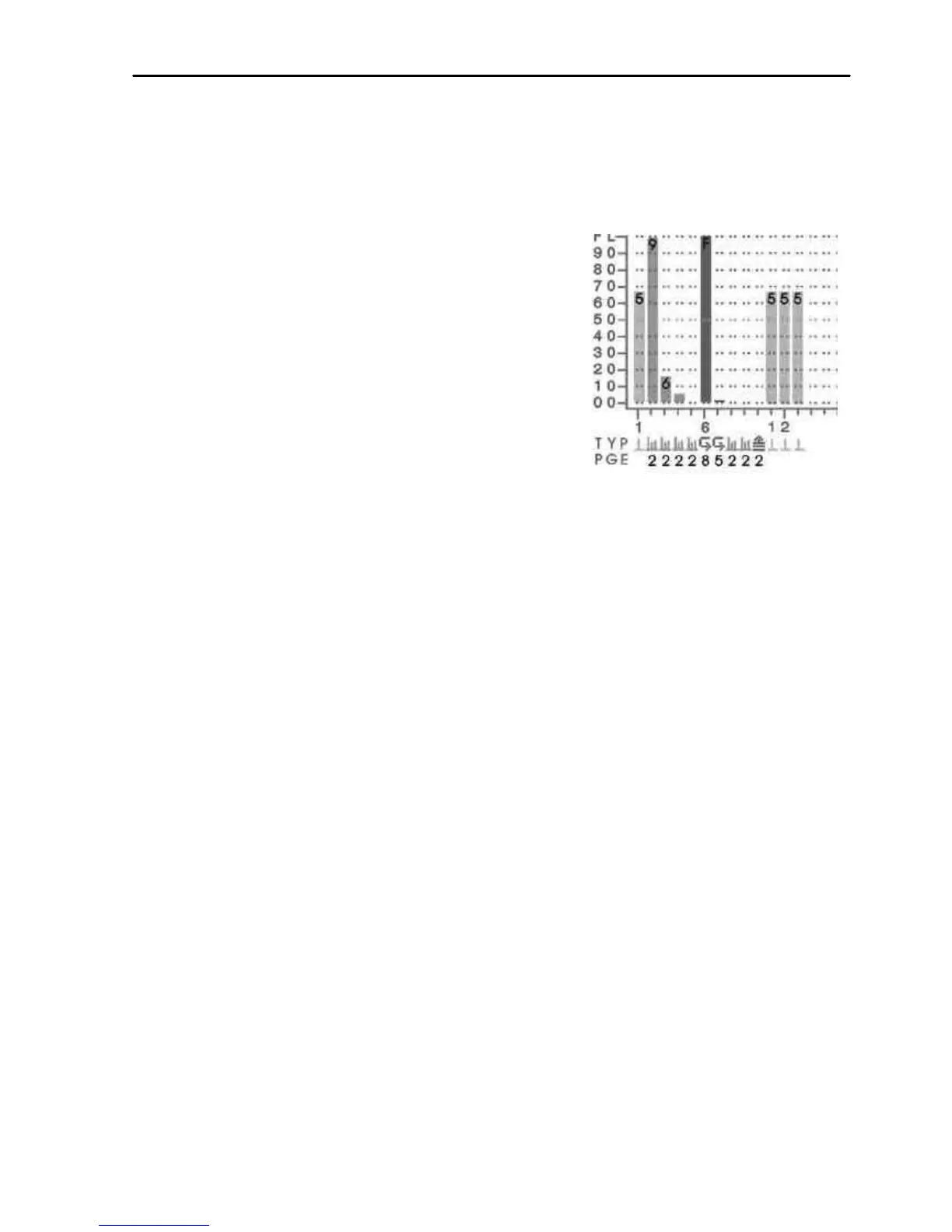
The main part of the screen always shows the fixture intensities (cyan bargraphs) at the top, a
message area in the middle and the status of the playbacks and masters at the bottom. The
bargraphs are laid out in a similar fashion to the maXim faders. Their intensity levels are shown in
tens on the side axis of the display and in units inside each individual bar. The “Fixture Intensity”
levels are shown prior to the patch.
The contents of each playback is shown in the “TYP” row by
a symbol and colour. The colour is repeated in the bargraph.
In this example;
Playback 1 is empty.
Playbacks 2 to 5 contain scenes (orange).
Playbacks 6 and 7 contain chases (green).
Playback 10 is a stack memory (magenta).
The page number that the memory is recorded in is shown in
the “PGE” row. This may be different to the current page due
to a “page freeze”.
SELECTABLE AREAS
The left side of the screen is selected by the operator and shows either:
o 1 of 4 selectable video pages (not shown above, see below) or
o If none of the 4 pages are selected it further divides the left side into 4 areas and
allows you to select any 4 Playbacks or the stack master and “pin” a status display
for that Playback or stack into any of the 4 positions (as shown above).
VIDEO 1 TO 4
To turn on one of the 4 video pages on the left of the screen,
Press and hold [function], tap [F/A] (video 1 to 4).
• Video 1 is “Channel View”
• Video 2 is “DMX Output”
• Video 3 is “Stack Cue List”
• Video 4 is “PATPAD”
To turn off the current video page on the left of the screen,
Press and hold [function], tap [F/A] (video 1 to 4).
PINNED VIDEO
When none of the 4 video pages are displayed, any Playback status or the stack status displays
that have been “pinned” are revealed.
To “pin” a Playback status display into any of the 4 areas firstly deselect any of the 4 selectable
video pages that might be active (see above) then press:
[select]
[F/A] (playback to pin) or
[stack flash]
[F/A] (video 1 to 4). (Video 1 is at the top left of the screen and video 4 is at the bottom).
Pressing [F/A] (video 1 to 4) a second time turns off (unpins) the display.
[select] (deselects select)
Up to 4 pinned displays may be viewed at the same time.
16.5 DIAGNOSTICS
The maXim provides diagnostics which allow you to;
• Test the operation of all buttons, LEDS, faders and the Edit wheel.
• Check internal battery voltage and charge condition.
• Check memory capacity and usage.



 To Next Page