User Interface
BPD17 pH / Redox Monitor
Operating Guide
- 27 -
User Interface
CAUTION! BEFORE PROCEEDING, ENSURE THAT THE INSTALLATION INSTRUCTIONS HAVE BEEN
FOLLOWED CORRECTLY. FAILURE TO DO SO MAY RESULT IN AN ELECTRICALLY HAZARDOUS
INSTALLATION OR IRREPARABLE DAMAGE TO THE INSTRUMENT.
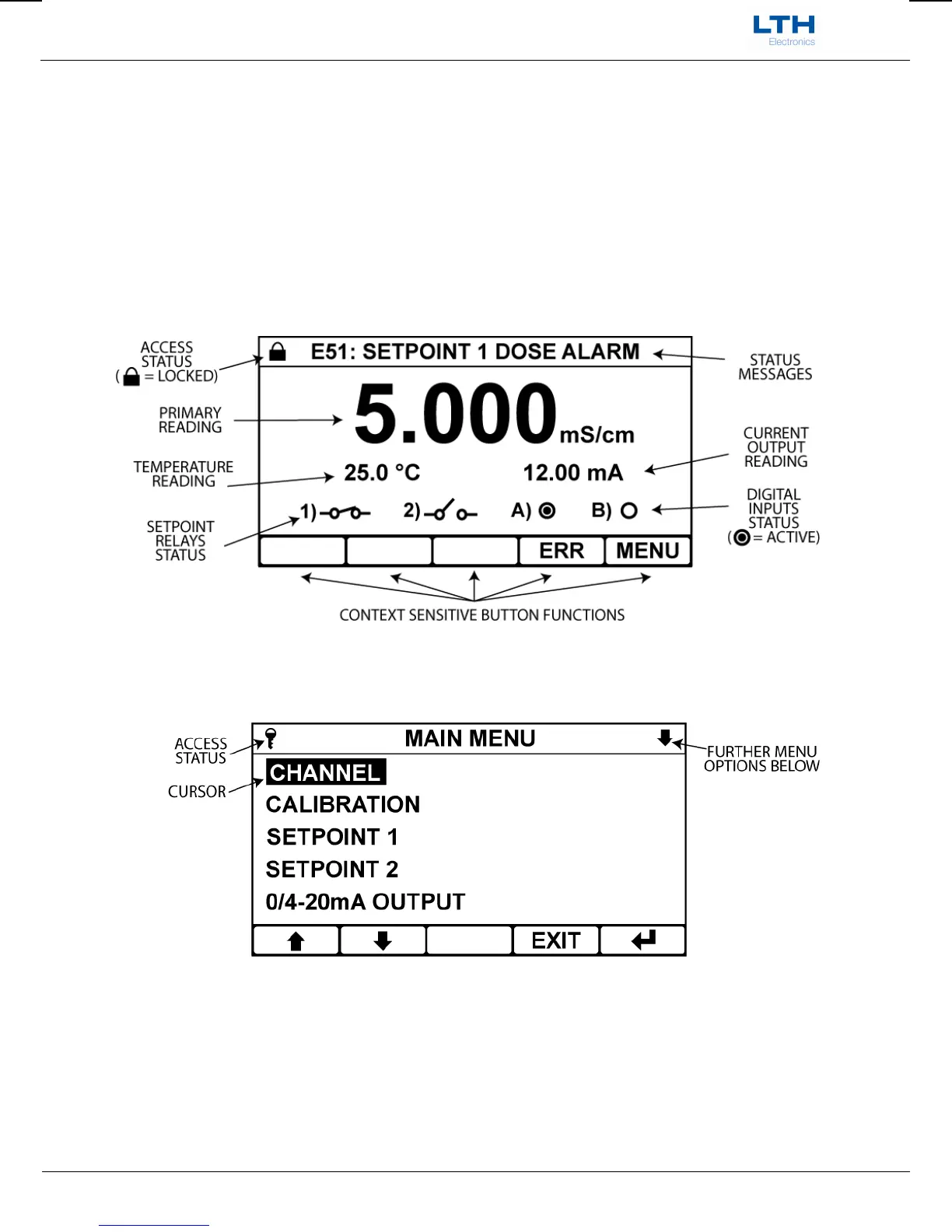
The BPD17 uses a 3¾” 240x128 dot LCD Module to display the primary reading and temperature, show
operational status and to provide an intuitive user interface. This is accompanied by 5 control buttons
whose function varies depending upon which screen the user is viewing. The button function is
indicated by the control section at the bottom of the display.
The Front Screen
The instrument configuration is accessible by pressing the menu button on the front screen.
The main menu is split into two main sections. The top shows the current menu you are currently in
the access status of the instrument and whether there are further menu options below. The bottom
section shows the current options for that menu which may be selected by moving the cursor with the
arrow buttons and pressing the enter button. The exit button is used to return to the previous menu. If
no buttons are pressed after 2 minutes the instrument will default back to the front screen.


 To Next Page