Configuration
- 58 -
BPD17 pH / Redox Monitor
Operating Guide
Configuration
The configuration menu enables the user to configure the basic operating parameters of the
instrument.
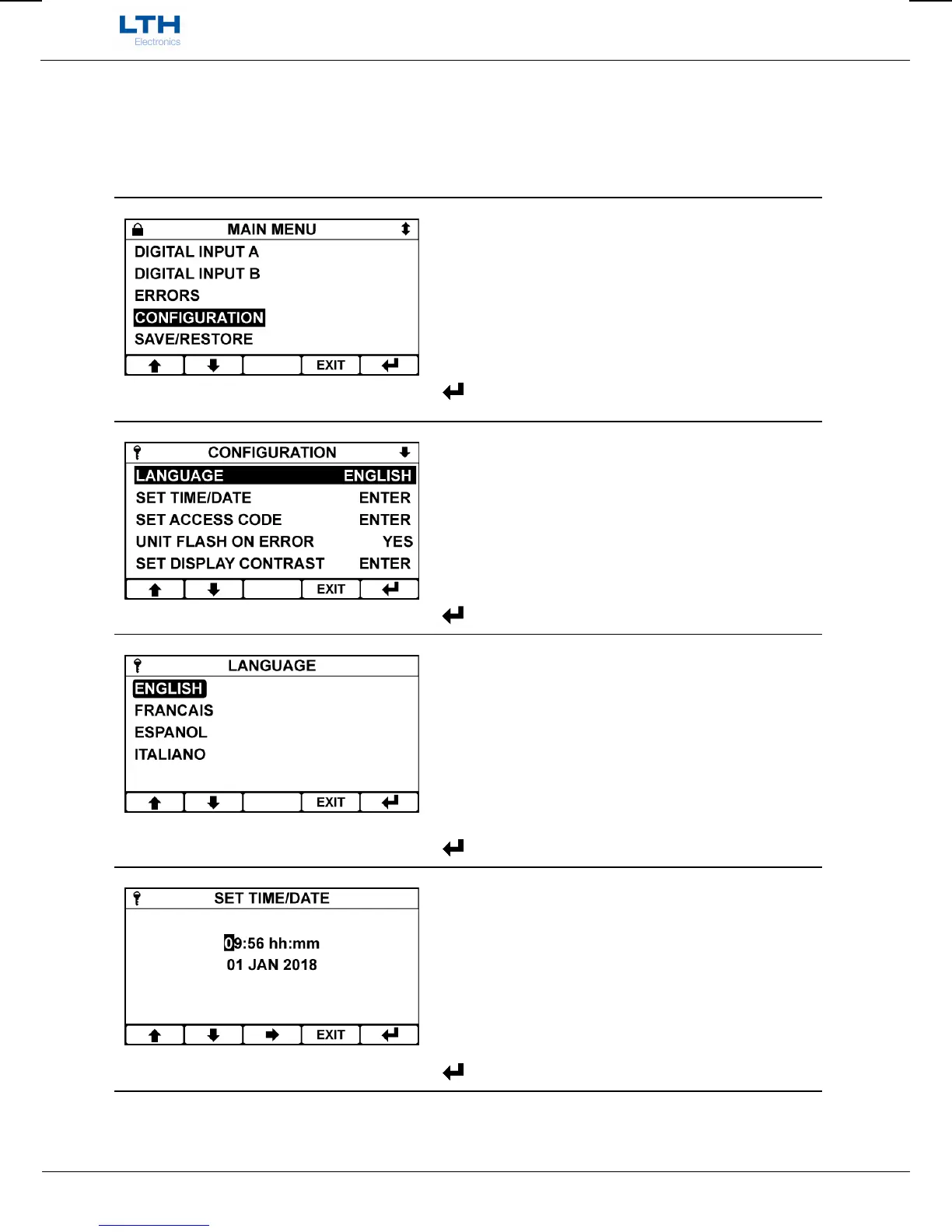
Main Menu
From the front screen press the menu button to show
the main menu options and select Configuration.
/ – Select Option
EXIT
– Return to Front Screen
– Enter Option
Configuration Menu
Select the function you wish to configure.
/ – Select Option
EXIT
– Return to Main Menu
– Enter Option
Language
The BXD17 Series has the ability to support
multilingual menus. The language of choice can be
selected from this menu.
/ – Select Option
EXIT
– Cancel
– Save Selection
Set Time/Date
Sets the instruments time and date.
/ – Increase / Decrease Digit / Item
– Select Next Digit / Item
EXIT
– Cancel
– Save Time


 To Next Page