Channel
- 30 -
BPD17 pH / Redox Monitor
Operating Guide
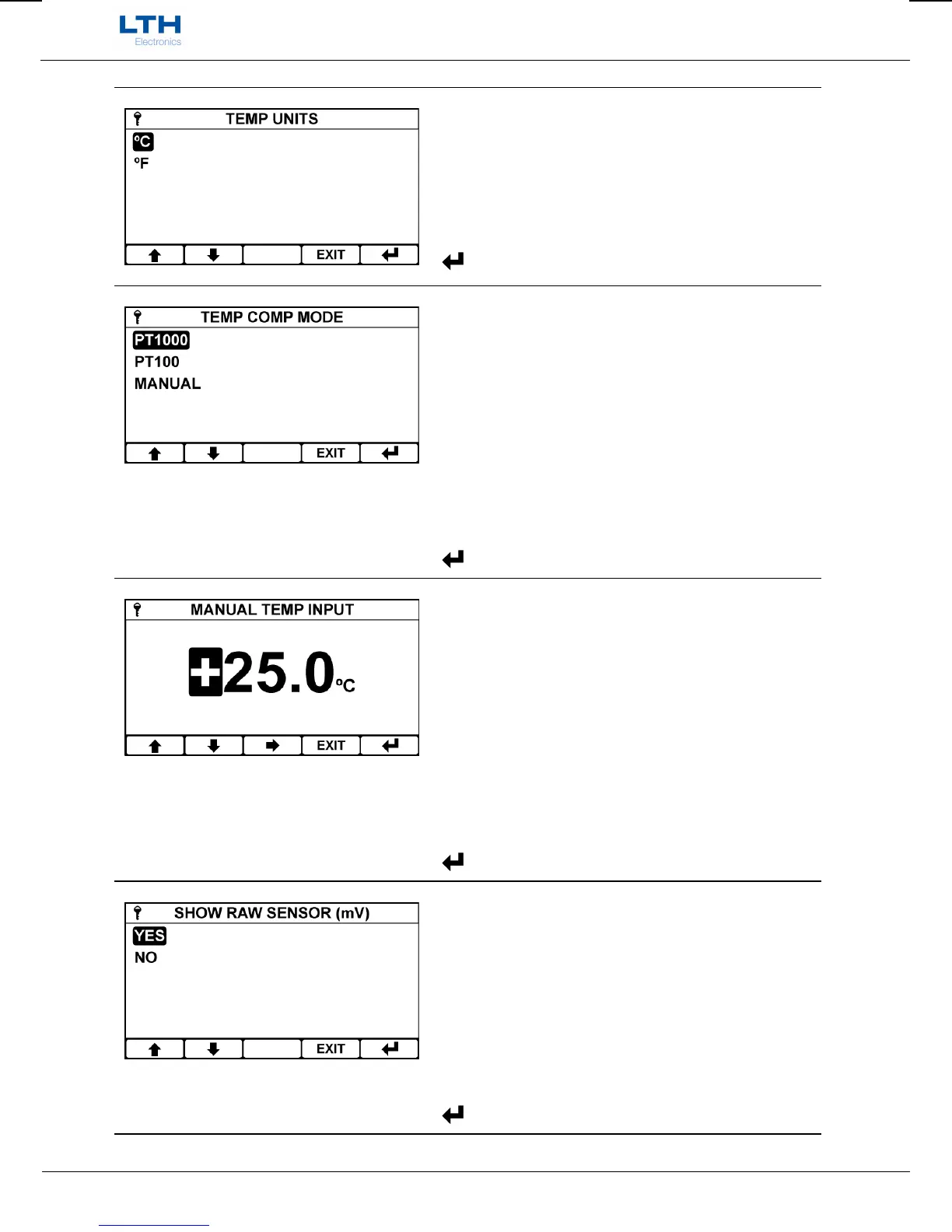
Temperature Units
Sets the temperature units used.
/ – Select Option
EXIT
– Cancel
– Save Selection
Temperature Compensation mode
To use temperature compensation from a measured
input select either PT1000 or PT100 (depending
upon temperature sensor used), else select “Manual”
to enable a fixed value entry.
Only Available when units set to pH.
/ – Select Option
EXIT
– Cancel
– Save Selection
Manual Temp Input
The fixed temperature value used for manual
temperature compensation.
Only available when temperature compensation
mode is set to “manual”.
/ – Increase / Decrease Digit
– Select Next Digit
EXIT
– Cancel
– Save Value
Show Raw Sensor (mV)
Enables showing the electrode’s raw mV input on the
front screen in addition to the primary pH reading.
Only Available when units set to pH.
/ – Select Option
EXIT
– Cancel
– Save Selection


 To Next Page