Calibration
- 34 -
BPD17 pH / Redox Monitor
Operating Guide
Calibration Menu
The calibration menu provides the facility to adjust the sensor inputs to the system in which it is
operating.
The default security access code is 1000
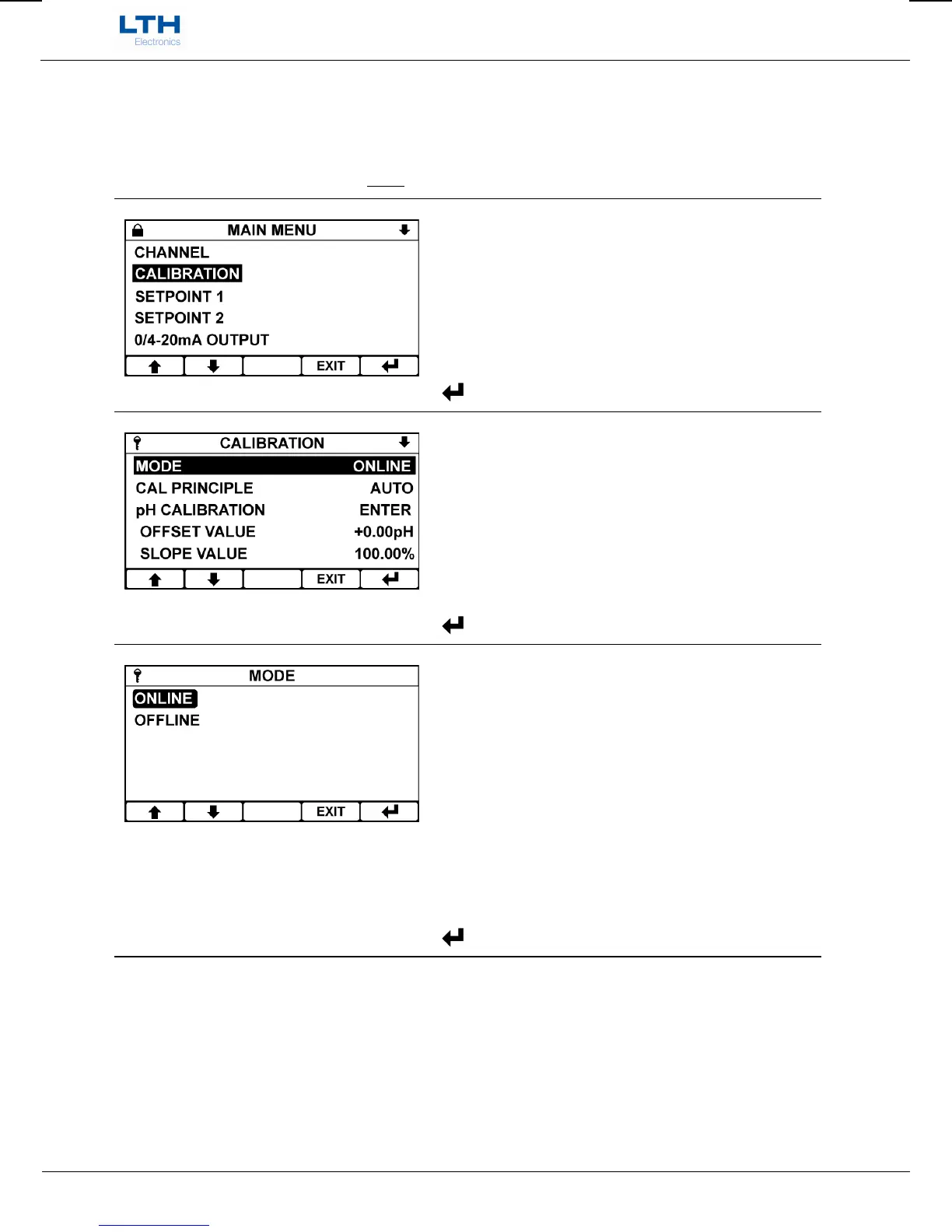
Main Menu
From the front screen press the menu button to
show the main menu options.
/ – Select Option
EXIT
– Return to Front Screen
– Enter Option
Calibration Menu
From the main menu highlight “calibration” and
press the enter option button to show the channel
menu options.
/ – Select Option
EXIT
– Return to Main Menu
– Enter Option
Mode
Selecting off-line causes any setpoints to de-energise
and current outputs to go to their off-line state.
Useful for when commissioning or calibrating the
instrument.
When the instrument is placed in an off-line state
“off-line” will appear on the front screen.
/ – Select Option
EXIT
– Cancel
– Save Selection


 To Next Page