Channel
BPD17 pH / Redox Monitor
Operating Guide
- 29 -
pH / Redox (ORP) Input Setup
The Channels Setup menu contains the basic configurations for the sensor’s input.
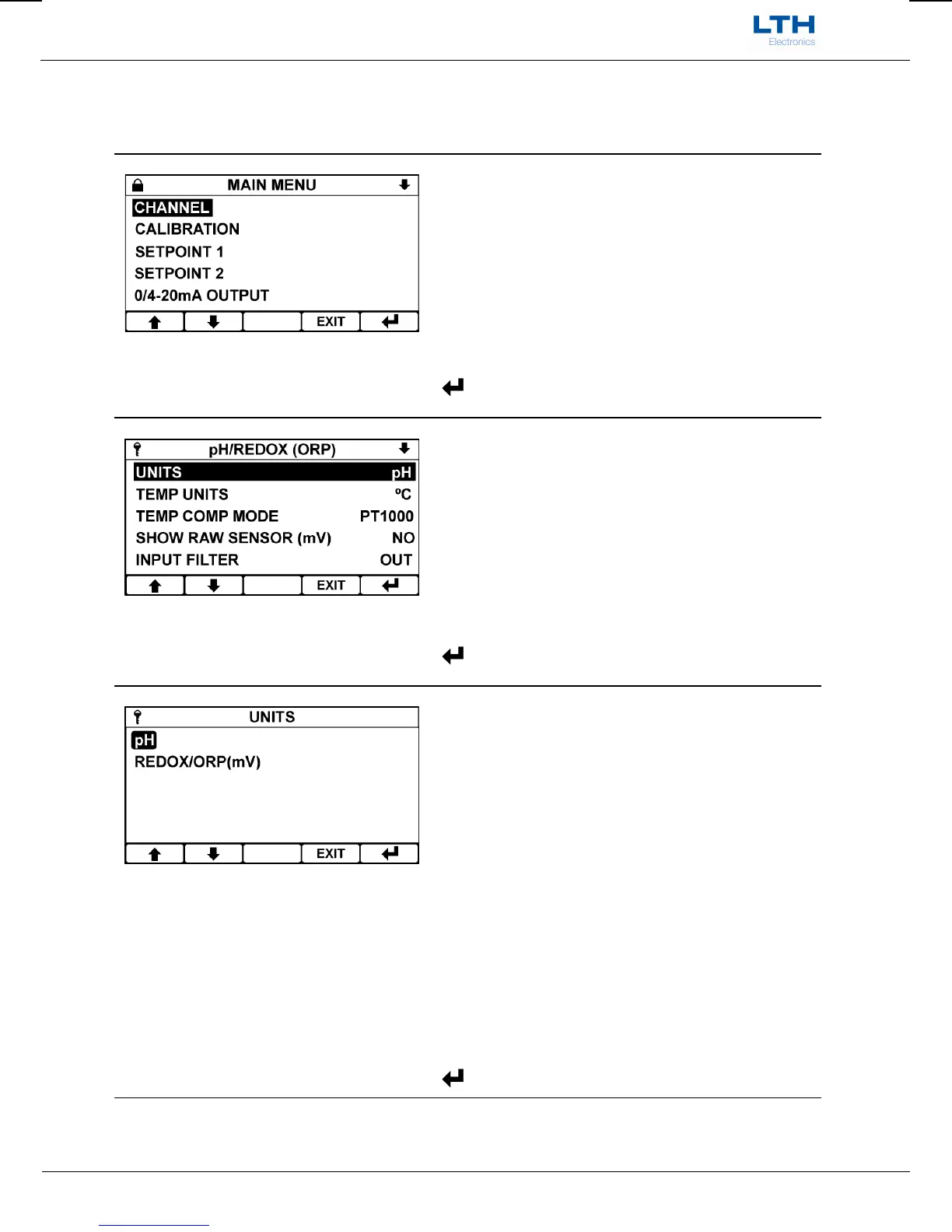
Main Menu
From the front screen press the menu button to
show the main menu options.
/ – Select Option
EXIT
– Return to Front Screen
– Enter Option
Channel Menu
From the main menu highlight “channel” and press
the enter option button to show the channel menu
options.
/ – Select Option
EXIT
– Return to Main Menu
– Enter Option
Units
The channel can be configured as a pH or Redox
input.
When “pH” is selected the channel will automatically
apply the correct temperature compensation and
probe type to the electrodes raw mV input to provide
a display of pH. Note, the instrument can also display
the raw mV as a secondary value on the front screen.
When “Redox (mV)” is selected the instrument
displays the unprocessed input voltage to the
electrode terminals.
/ – Select Option
EXIT
– Cancel
– Save Selection


 To Next Page