Configuration
BPD17 pH / Redox Monitor
Operating Guide
- 59 -
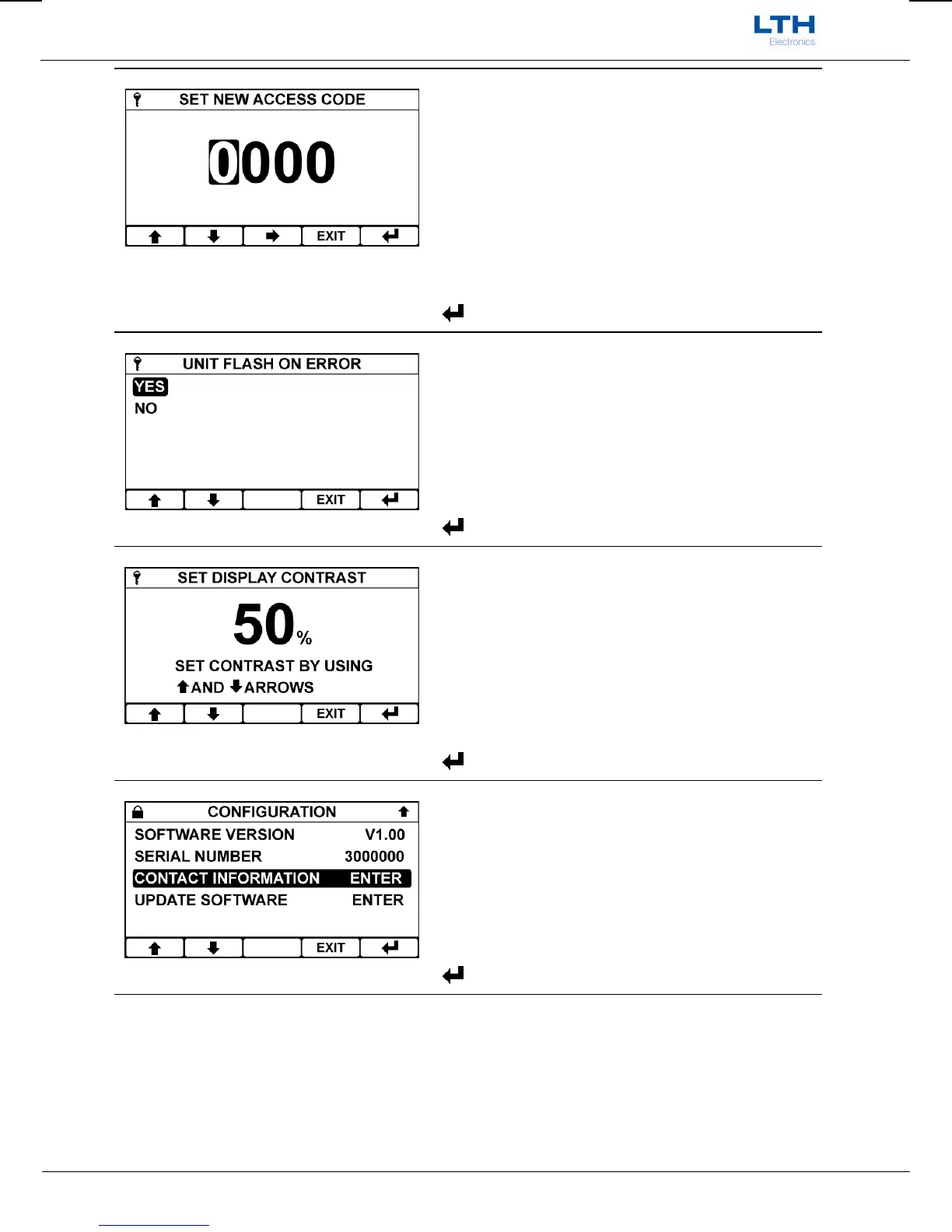
Set Access Code
Sets the access code used by the instrument to
prohibit changes to configuration by unauthorised
personnel.
/ – Increase / Decrease Digit / Item
– Select Next Digit / Item
EXIT
– Cancel
– Save Time
Unit Flash On Error
Enables the flashing of the display backlight in the
event of an instrument error.
/ – Select Option
EXIT
– Return to Main Menu
– Enter Option
Set Display Contrast
This allows the user to adjust the contrast of the
display to compensate for environmental conditions
that may affect the readability of the display.
/ – Adjust Contrast
EXIT
– Return to Configuration Menu
– Enter Option
Software Version
Displays the instrument’s current software version
number.
/ – Select Option
EXIT
– Return to Main Menu
– Enter Option


 To Next Page