Setpoints
BPD17 pH / Redox Monitor
Operating Guide
- 49 -
Setpoint Dose Alarm
The dose alarm timer can be used to prevent overdosing under many different fault conditions, such as
sensor failure or application problems.
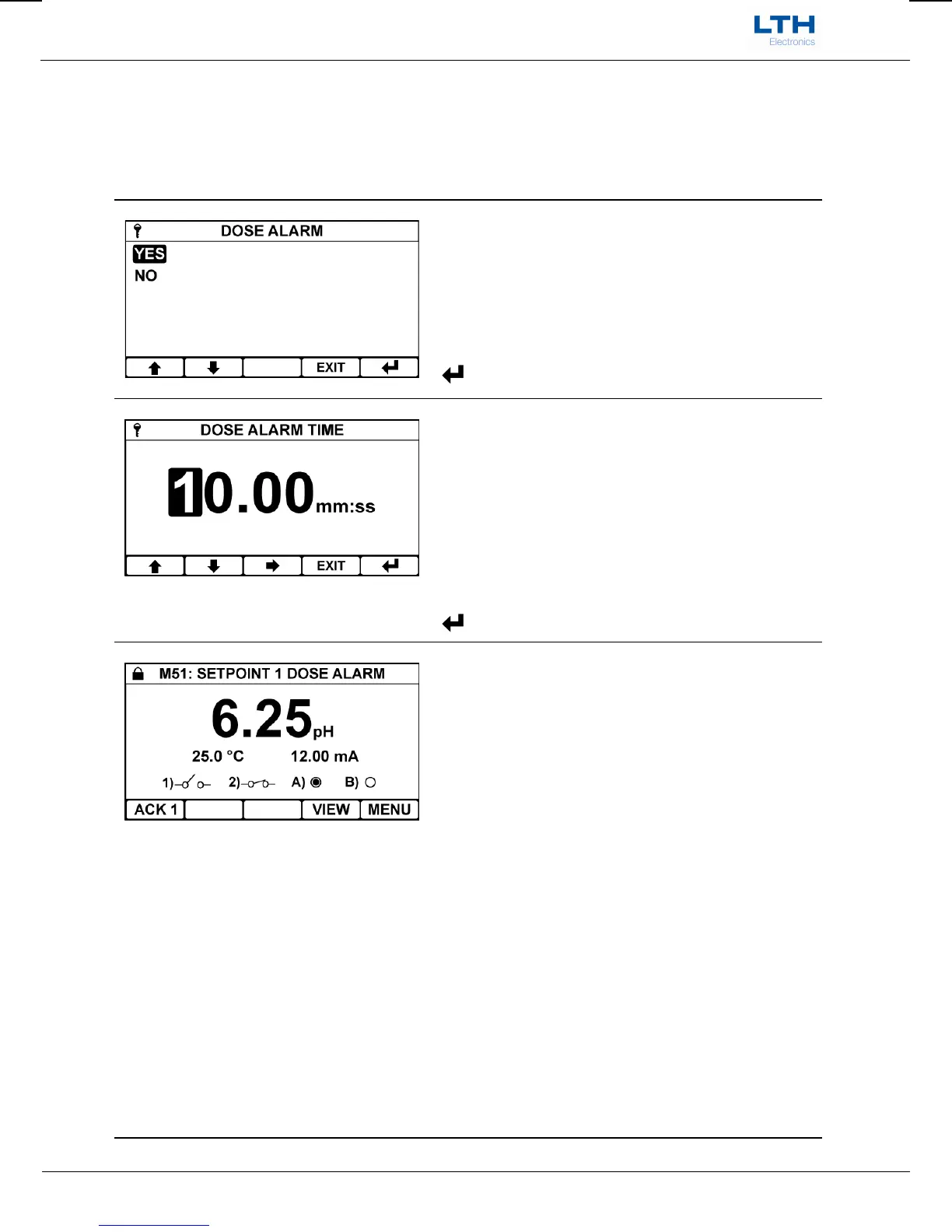
Dose Alarm
Enable the dose alarm for the selected setpoint.
/ – Select Option
EXIT
– Cancel
– Save Selection
Alarm Time
Sets the time which if the setpoint is active for longer
than causes the dose alarm to activate.
/ – Increase / Decrease Digit
– Select Next Digit
EXIT
– Cancel
– Save Value
Dose Alarm Active
When the dose alarm activates the following
happens:-
The setpoint will de-energise.
The associated front screen setpoint symbol will
flash.
The Dose Alarm error message will appear at the
top of the front screen.
ACK will appear as a function to acknowledge the
setpoint on the front screen – press to clear the
alarm.
Note – If, once cleared, the setpoint again remains
energised for the length of the dose alarm timer then
the dose alarm will once again activate. If this
problem persists then a dosing problem will need to
be investigated.
ACK 1
– Clear Setpoint 1 Dose Alarm
ACK 2
– Clear Setpoint 2 Dose Alarm
Menu
– Access Main Menu


 To Next Page