Calibration
- 38 -
BPD17 pH / Redox Monitor
Operating Guide
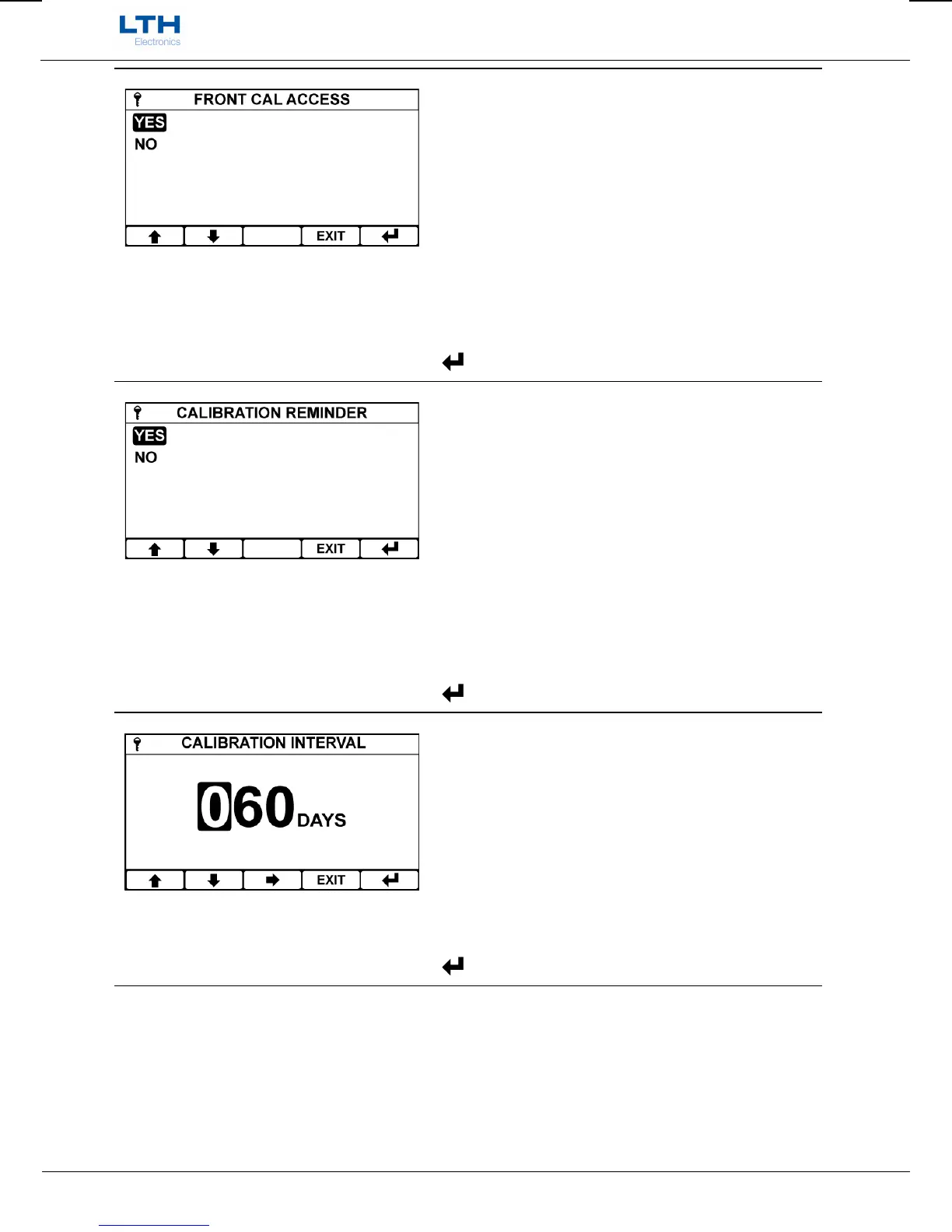
Front Screen Calibration Access Enable
When enabled front calibration access allows direct
entry into the calibration menu from the front screen
by pressing the “CAL” button.
It also disables the security access system within the
calibration menu enabling the calibration functions
without having to enter the security access code.
/ – Select Option
EXIT
– Cancel
– Save Selection
Calibration Reminder
By enabling the calibration reminder the user can
configure a calibration interval, which when expired
will activate an alarm and message on the front
screen.
On the completion of a successful sensor calibration
the next cal date will be automatically incremented
by calibration interval.
/ – Select Option
EXIT
– Cancel
– Save Selection
Calibration Interval
Sets the interval time for the calibration alarm.
The Next Cal Date will update to show the date of the
next calibration alarm.
/ – Increase / Decrease Digit
– Select Next Digit
EXIT
– Cancel
– Save Value


 To Next Page