Calibration
BPD17 pH / Redox Monitor
Operating Guide
- 43 -
Manual pH Sensor Calibration
When using Manual calibration mode, it is possible to do either a single or two-point calibration. This is
accomplished by using the Buffer and Slope menu items. However, it is important to do the calibration
in the correct order:
1. Adjustment of the Buffer (Offset) value at 7.00 pH.
2. Adjustment of the Slope (Gain) value at any other pH (usually 4 or 9 pH).
If a single point calibration is required then only the buffer should be adjusted and no adjustment
made to the slope.
As actual pH buffer values are used no compensation is made for the buffer solution with temperature
in the instrument. It is important therefore to know the actual buffer value at the temperature of the
solution. The standard LTH 4, 7 and 9 pH values at temperature can be seen on page 44.
It is also important that the buffer temperature is entered into the Calibration Manual Temperature
Input if manual temperature compensation is being employed. Alternatively, any automatic
temperature compensation element should be placed in the buffer solution with the pH sensor if Auto
TC is being used.
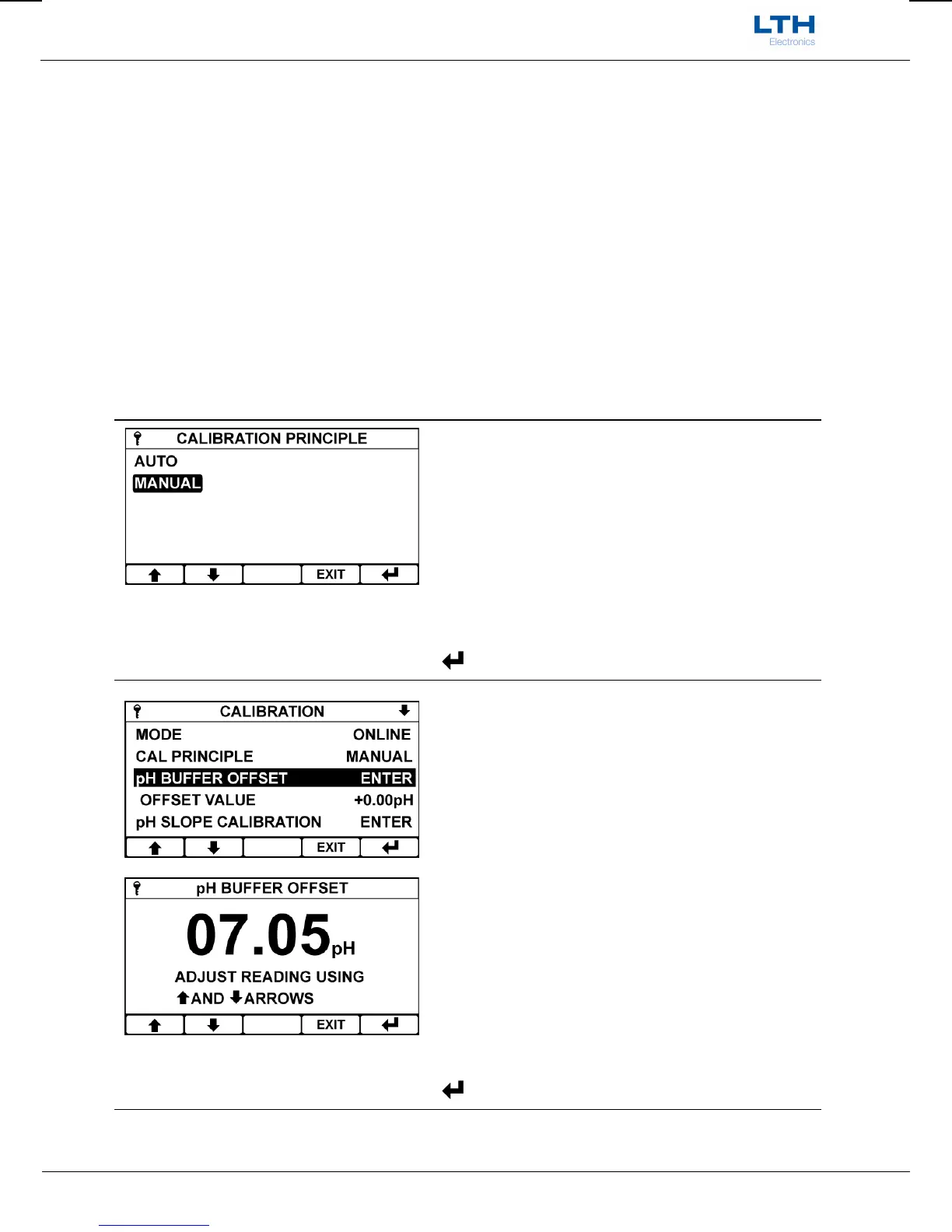
Calibration Principle
To use Manual calibration first set the calibration
principle to Manual.
Note. Calibration Principle is only available when
units are set to pH in the channel setup menu.
/ – Select Option
EXIT
– Cancel
– Save Selection
pH Buffer (Offset) Calibration
The pH buffer calibration enables the user to adjust
the sensor buffer until the displayed reading matches
the known input. To activate the function, select “pH
Buffer Offset” and press enter.
The current sensor reading can be seen in the pop-up
window and is adjusted by pressing the up and down
arrows.
When the reading is correct press the enter button to
store the calibration, update the sensor offset value
and the sensor condition status located further down
in the menu.
It is recommended that the buffer should be adjusted
at 7pH.
/ – Adjust the Reading Up or Down
EXIT
– Cancel
– Save Calibration


 To Next Page