Calibration
- 42 -
BPD17 pH / Redox Monitor
Operating Guide
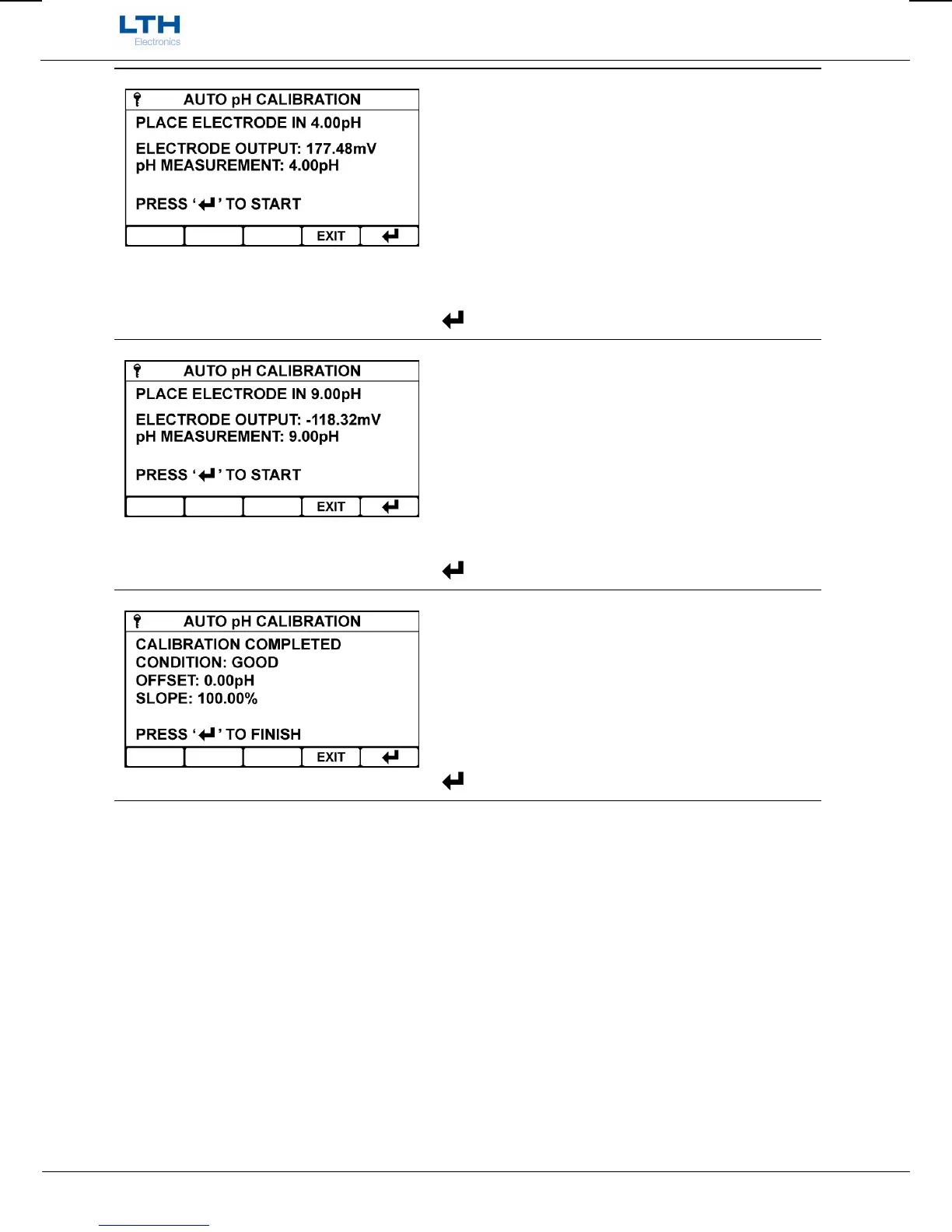
Place Electrode In Nominal pH Buffer 1
Place the electrode in the first nominated pH buffer
and press enter to begin sampling.
Once the electrode has been sampled press enter
when prompted to continue to the next calibration
point.
EXIT
– Exit Calibration Without Saving
– Initiate Nominated pH Sampling
Place Electrode In Nominal pH Buffer 2
Place the electrode in the second nominated pH
buffer and press enter to begin sampling.
Once the electrode has been sampled press enter
when prompted to continue to the summary screen.
EXIT
– Exit Calibration Without Saving
– Initiate Nominated pH Sampling
Auto Calibration Summary
Upon completion of the buffer sampling the
instrument will calculate the offset and slope for the
attached electrode and indicate its condition.
EXIT
– Exit Calibration Without Saving
– Save Calibration


 To Next Page