Setpoints
BPD17 pH / Redox Monitor
Operating Guide
- 45 -
Setpoints
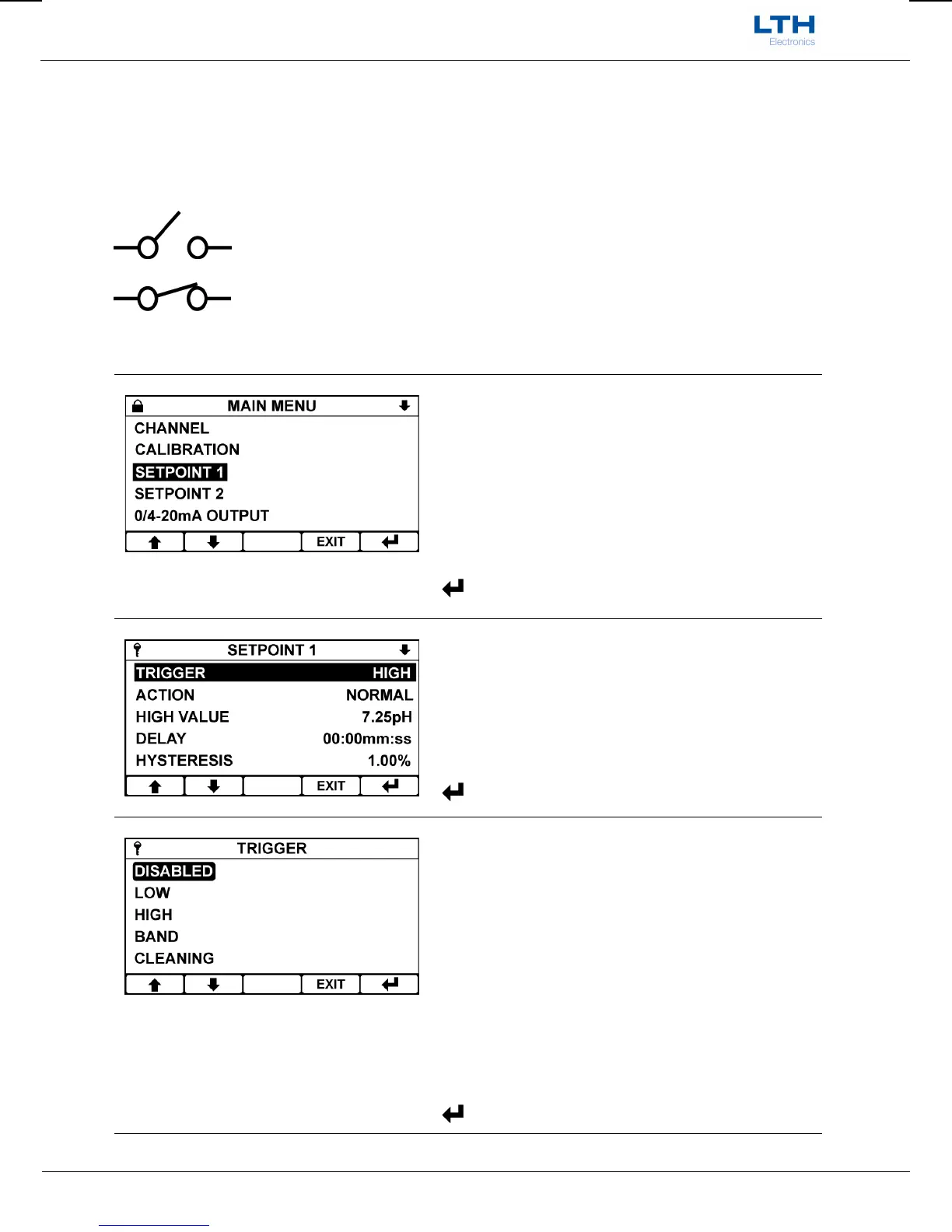
The BPD17 is be fitted with two “Normally Open” setpoint relays designated Setpoint 1 and Setpoint 2.
The Setpoint menu contains all of the necessary setup functions to configure the setpoint. The
instrument indicates the status of the relay by means of a symbol on the front screen.
Indicates that the relay contact is open
Indicates that the relay contact is closed (if flashing indicates that a dose alarm has
occurred).
Main Menu
From the front screen press the menu button to show
the main menu options and select the setpoint you
wish to configure.
/ – Select Option
EXIT
– Return to Front Screen
– Enter Option
Setpoint Menu
Select the Setpoint function you wish to configure.
/ – Select Option
EXIT
– Return to Main Menu
– Enter Option
Trigger
The setpoints can be configured to trigger in the
following ways:
Low
High
Band
Cleaning
/ – Select Option
EXIT
– Cancel
– Save Selection


 To Next Page