Configuration
BPD17 pH / Redox Monitor
Operating Guide
- 61 -
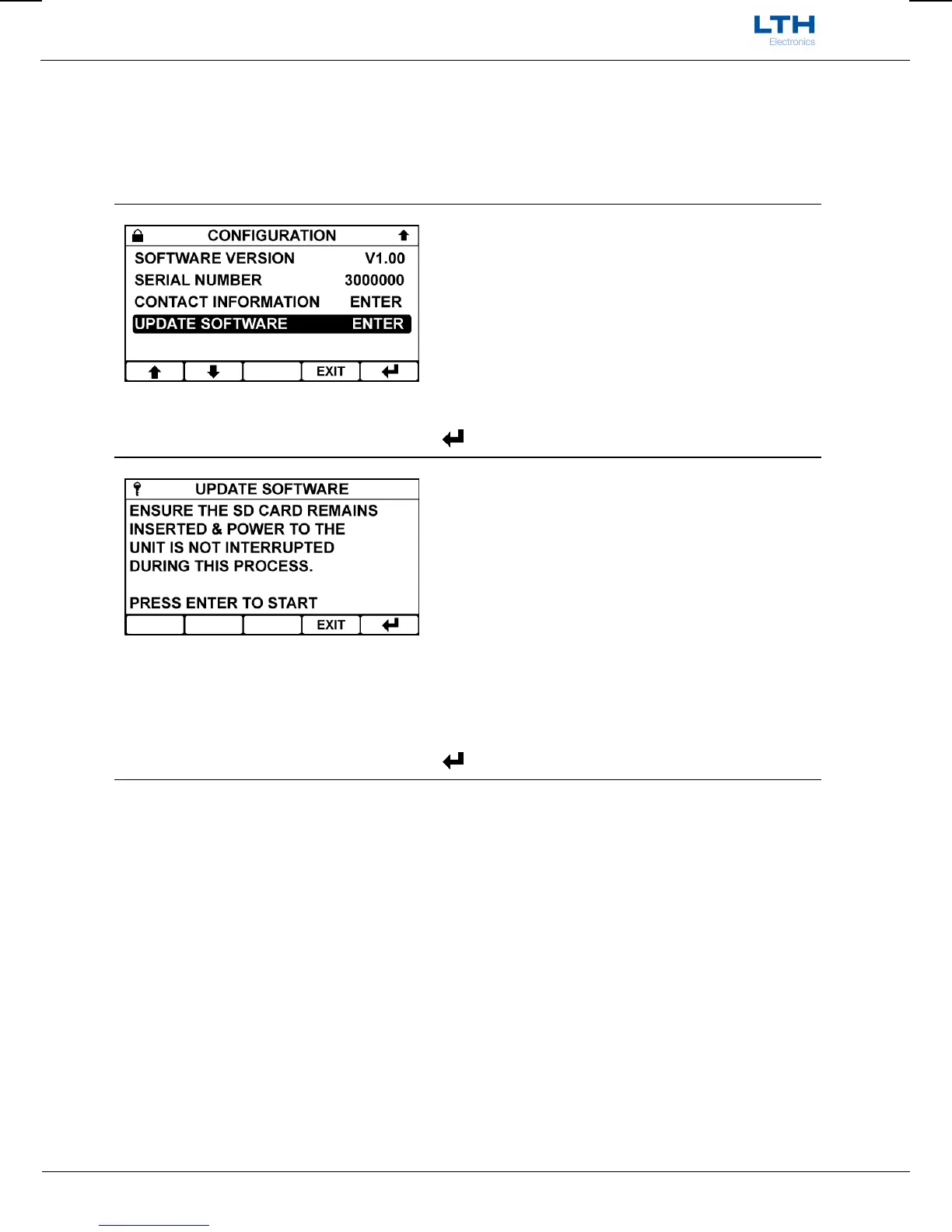
Update Software
The BPD17 operating software can be upgraded by saving the latest version from LTH onto a micro SD
card, inserting it into the instrument and following the instructions below. All three files must be
present on the SD card for the update to work. The instrument supports SDHC and SDXC cards;
however, they must be formatted to fat32 which can be accomplished using a personal computer.
Update Software
Select the update software option from within the
configuration menu.
/ – Select Option
EXIT
– Return to Main Menu
– Enter Option
Update Software
If the instrument has verified that all of the required
software is present on the micro SD card press enter
to begin the update.
During the update the display will indicate the
progress of the update.
Once finished the instrument will restart
automatically.
EXIT
– Return to Update Software Menu
– Begin Update


 To Next Page