Calibration
- 40 -
BPD17 pH / Redox Monitor
Operating Guide
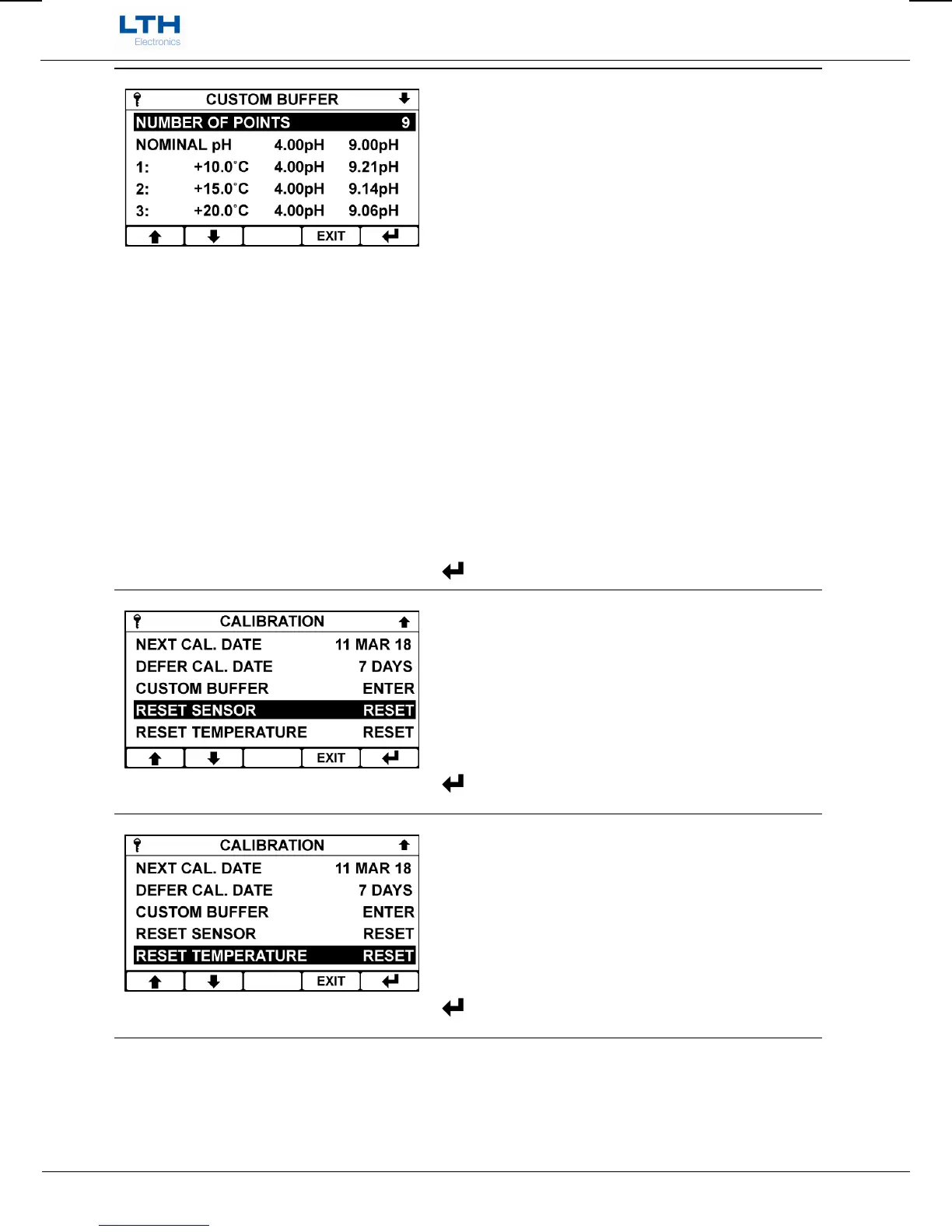
Custom Buffer Menu
The custom buffer menu allows the user to enter in
custom buffer solution values at fixed temperatures
for the nominated pH values chosen, for use with the
pH automatic calibration function.
Number of Points – Define the required number of
data points to be entered (Maximum 13)
Nominal pH – Set the nominal value of the two pH
buffers chosen for Auto calibration
Data Points – Enter the custom buffer solution values
at the entered temperature
Reset Custom Buffer – Reset the points back to the
LTH standard buffer defaults.
/ – Select option or Increase / Decrease Digit
– Select Next Digit
EXIT
– Cancel or Return to Calibration Menu
– Save Entry
Reset Sensor
Reset any sensor calibration that may have been
performed.
/ – Select Option
EXIT
– Return to Main Menu
– Enter Option
Reset Temperature
Reset any user temperature calibration that may have
been performed.
/ – Select Option
EXIT
– Return to Main Menu
– Enter Option


 To Next Page