214633 18 Revision C
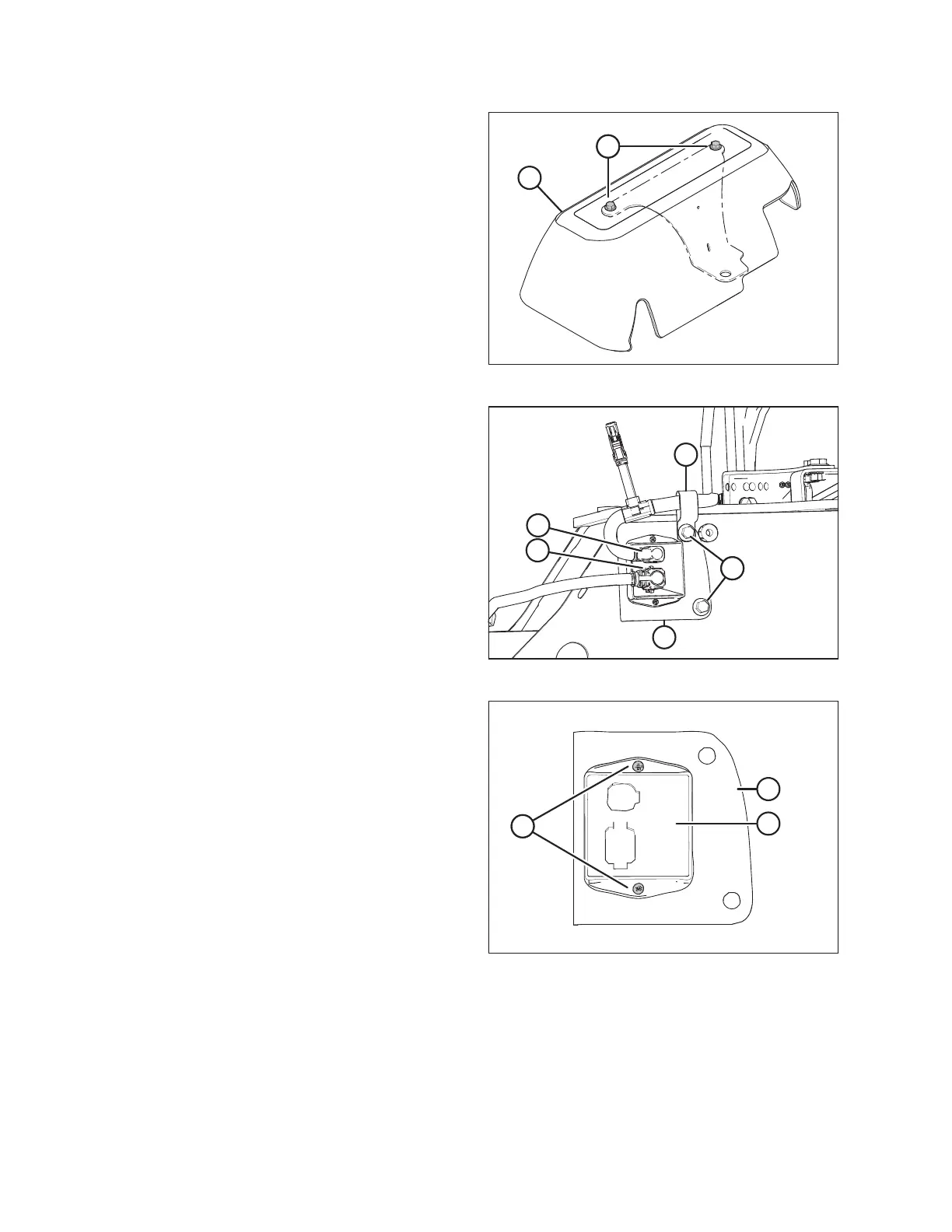
Figure 3.14: Cover Assembly
11. Retrieve cover assembly (B) from the shipping location.
12. Remove two bolts (A) from cover assembly (B). Retain the
bolts and cover for installation later.
Figure 3.15: Lighting Module Harness
13. Disconnect plugs P102 (A) and P301 (B) from the transport
lighting module.
14. Remove bolts (C) and remove the transport lighting
module, complete with support bracket (D).
15. Discard P-clip (E).
NOTE:
Rotary disc pull-types built prior to model year 2019 are
NOT equipped with P-clip (E).
Figure 3.16: Lighting Module Attached to Bracket
16. Remove two screws (A) and nuts attaching module (B) to
bracket (C). Retain module (B).
INSTALLATION INSTRUCTIONS





 To Next Page