EasyManua.ls Logo

Mark-10 ESM301 - User Manual

Mark-10 ESM301
30 pages
Print Icon
To Next Page IconTo Next Page
Loading...
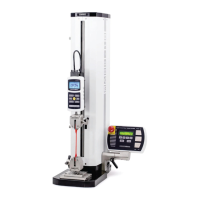
Force Test Stand Model ESM301 / ESM301L
User’s Guide

Questions and Answers

  • M
    Misty HudsonSep 9, 2025
    How to fix 'CHECK GAUGE' error on Mark-10 ESM301 Test Equipment?
    • N
      Nathan BrownSep 9, 2025
      If the Mark-10 Test Equipment's ESM301 displays a 'CHECK GAUGE' error, it means the force gauge is powered off, in a menu, or not connected to the stand controller. This message appears when overload protection is turned on. Ensure that the force gauge is set to 9,600 baud and RS-232 communication, and that the 09-1162 interface cable is used.
  • M
    Madison BakerSep 12, 2025
    What to do if travel display value doesn't change on Mark-10 ESM301?
    • K
      Kenneth HansenSep 12, 2025
      If the travel display value on your Mark-10 Test Equipment does not change when the crosshead moves, check to make sure the encoder cable is plugged in properly.
  • L
    Laura HuntSep 13, 2025
    What does 'M5 1.7+ REQD' mean on Mark-10 ESM301 Test Equipment?
    • D
      daniel30Sep 13, 2025
      A Series 5 or 7 force gauge with firmware version 1.7 or later is required for proper operation of the selected functions in the Mark-10 Test Equipment stand.
  • C
    Colleen CalderonSep 16, 2025
    Why are some menu items missing on my Mark-10 Test Equipment?
    • J
      Jessica ThomasSep 16, 2025
      All test stand functions are temporarily enabled for 160 hours of operation in Demo Mode. When demo mode has expired, any functions (and their associated menus) not originally purchased will no longer be available on Mark-10 Test Equipment.

Summary

Setup and Safety

Mounting the Test Stand

Instructions for securely mounting the test stand to a work surface.

Safety and Proper Usage

Discusses safe operating practices and material handling precautions.

Connecting Power

Steps and safety checks for connecting the test stand to a power source.

Operation Basics

Operational Safety

Safety procedures and precautions to follow before and during test stand operation.

Test Feature Setup

Configurable Test Features

Lists test features, their status (standard/optional), and available settings.

Speed Settings

Auto Return Function

Cycling Function

Travel Limits

Overload Protection

Compression;Tension Overload

Preload Function

Load Holding Function

Break Detection

Break Detection Threshold

Break Detection Percentage

Programmable Button Function

Return to Default Settings

Password Protection

Basic Mode Operation

Button Control Modes

Overload Protection

Auto Return Mode

Cycling Mode

Preload Mode

Loadholding Mode

Break Detection Mode

Communication

PC Control Mode Commands

Function Activation

Troubleshooting

Common Error Messages

Lists common error messages and their possible causes and solutions.

Crosshead Movement Issues

Addresses problems with crosshead movement in one direction or not at all.

Specifications

Dimensions

Mark-10 ESM301 Specifications

General IconGeneral
BrandMark-10
ModelESM301
CategoryTest Equipment
LanguageEnglish

Related product manuals