43
7. Setting the ON Time
Press the TIMER ON set ‘S’ button and step to the required ON time. Hold the button down for repeated stepping. Press the TIMER
ON ‘C’ button to cancel the ON time.
8. Setting the OFF Time
Press the TIMER OFF ‘S’ button and step to the required OFF time. Hold the button down for repeated stepping. Press the TIMER OFF
‘C’ button to cancel the OFF time.
9. Only ON Time Selected
Unit will turn ON at the selected time and stay ON.
10. Only OFF Time Selected
Unit will turn OFF at the selected time and stay OFF.
11. Use of the Pink
H ON/STANDBY button when time programmes are selected
At any time, pressing the Pink button will either start the unit or return it to standby mode. The unit will remain at this condition unless
an appropriate ON or OFF time has been programmed.
12. Cold Start
In Cool or Heat mode, not Auto, after more than 3 days without power, or after 2 hours of non-operation, the set temperature is
automatically raised (in heating mode) or lowered (in cooling mode) by 2°C until this temperature is reached or the unit has run for 20
minutes after which the unit operates with the displayed temperature. This decreases the time taken to reach set point.
13.Fan Speed ( heat pump systems only)
In heat pump systems, the indoor fan always starts at low speed in heating mode, and changes to the selected speed when the indoor
coil is warm, returning to low speed when not calling for heating.
14. Off cycle delay
To prevent operational problems, cooling restart is delayed for 3 minutes following power up, or from the time the unit was last cooling
or heating, (if heat pump). Cooling or heating, (if heat pump) will operate for a minimum of 2 - 3 minutes.
15. Displays
Cool Dry Fan Heat
DIAGNOSTICS
DI4F
Green Red Red Amber
OFF OFF OFF OFF
No power, manual OFF, timed OFF, condensate
high level, fault in condensate control
ON
OFF ON OFF Cooling mode selected
ON
OFF ON
BLINKS
AUTO - predominantly cooling
OFF OFF ON
ON
Heating mode selected
BLINKS
OFF ON
ON
AUTO - predominantly heating
OFF OFF
ON
OFF Fan mode selected
OFF
ON
ON OFF Dry mode selected
OFF OFF OFF
BLINKS
Outdoor unit defrosting
Diagnostics
OFF OFF
BLINKS x 4
OFF Room sensor missing
OFF OFF
BLINKS x 4
OFF Indoor coil sensor missing
OFF
BLINKS BLINKS x 4
OFF Heat pump only, outdoor coil sensor missing
BLINKS
OFF
BLINKS x 1
OFF Compressor overload
16. Heat Pump Only
If the outdoor coil temperature reaches 68°C, the compressor and outdoor fan will stop until the coil cools to 50°C.
17. Commands Refused
a. Attempts to set temperatures outside the display range are not transmitted.
b. If heating commands are refused, the installer's programming is incorrect - call the engineer.
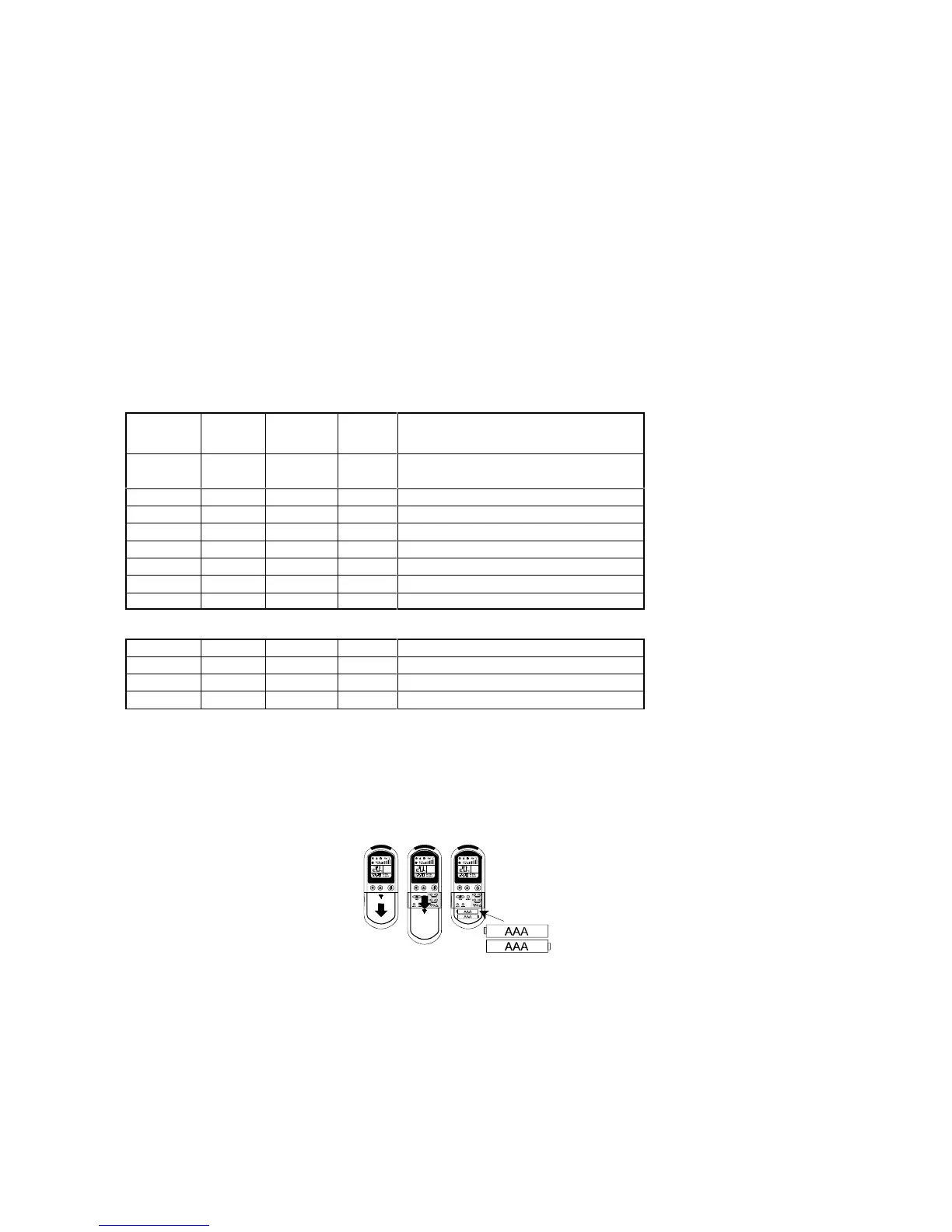
18. Battery Replacement
It is advisable to replace the batteries as soon as the display begins to fade. Correct transmission cannot be guaranteed if the battery
is failing.
2 x 1.5V AAA
batteries
19. Power Cuts
The unit permanently memorises its settings.
20. User Maintenance
Isolate the unit at the mains supply before commencing any maintenance work.
The unit should always be used with a filter. In order to maintain efficiency it is important that the filter behind the air intake grille is
cleaned regularly:
! Remove the filter(s) from behind the air intake grille.
! Wash the filter (in tepid water only) and shake dry before use.
! Alternatively tap the filter gently to remove dust or vacuum clean.
! To clean the unit use soap or a non-scratch liquid cleaner.
–N–N–F–F–F–N–N–


 To Next Page