44
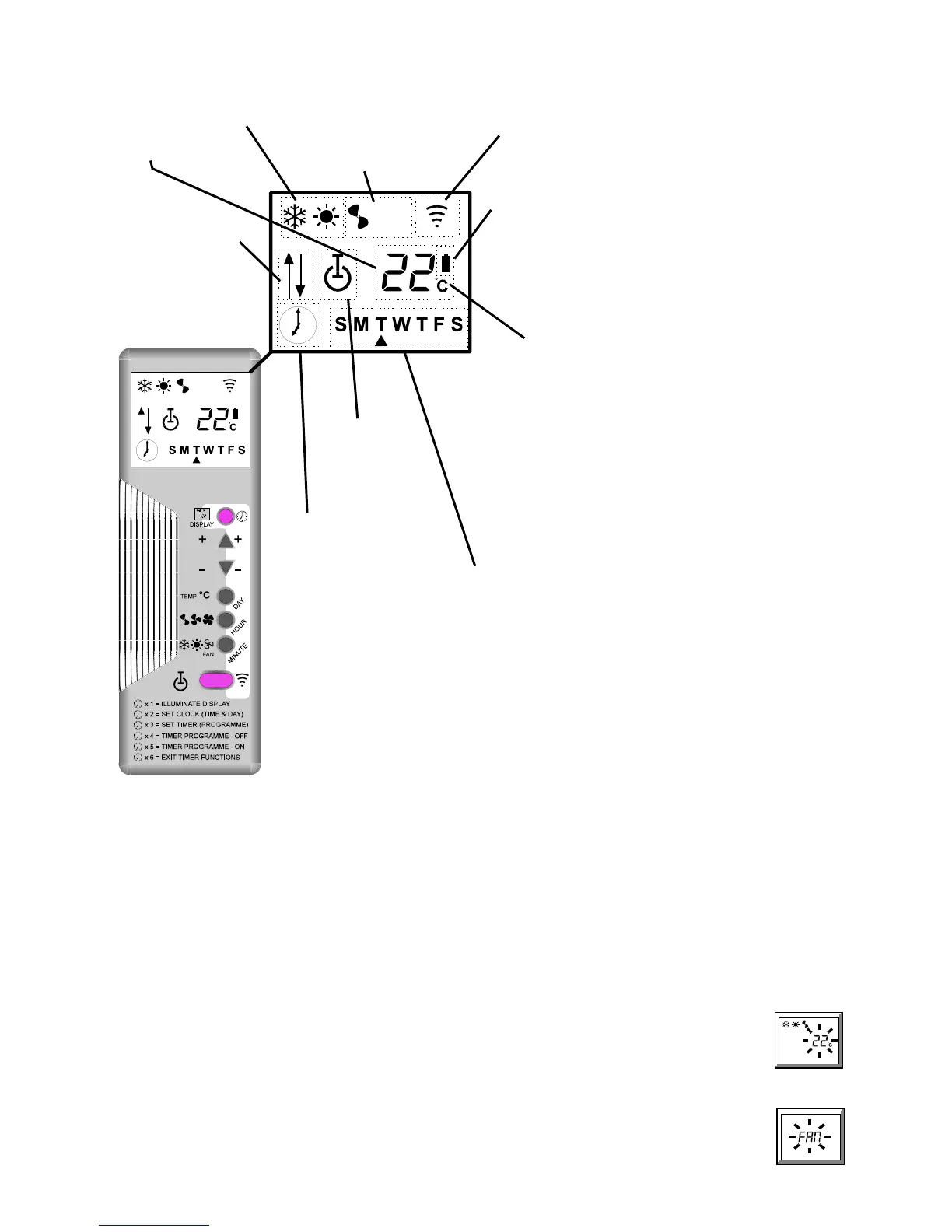
CC875 E REMOTE CONTROL HANDSET OPERATING INSTRUCTIONS
Cool/Heat Modes (2.3): Fan Speeds (2.2):
D Cooling only 2 Low fan speed
F Heating only 3 High fan speed
DF Auto cool/heat 4 Boost fan speed A Transmit
FAN Fan only (2.1) 23 Auto High Signal
24Auto Boost
Set Back Battery Indicator
High temp set
B Low battery power (9)
8 back (7.1)
Low temp set
9 back (7.2)
89 Both set back
Set Temp/Functions
22EC: Set temperature
18EC - 28EC (2.1)
SEt: Set day and time (3.1)
Standby
prog: Timer programme (4)
C Standby (1.2) E"": Incorrect input (4)
G On (1.1) 00:00 24 hour clock
(3.1, 4.1, 4.2)
FAN: Fan only (2.1)
--EC: Set back function (7)
Timer
¤ Timer set (6.1)
No clock = No timer programme (6.2)
Days of the week
(3.1, 4.1, 4.2)
Sunday to Saturday
•
indicates day chosen
z Press the blue button once to illuminate the display.
z To conserve battery power, the display will turn off after 1 minute if no button is
pressed.
z Point the handset towards the unit when altering settings, unless the handset is
wire connected.
z A single beep means a signal has been accepted.
1 On/standby
1.1 Starting the unit:
Press the blue button once to illuminate the display.
Press the orange button
(C) to switch the unit between 'standby', (red LED on the unit flashing at 5 second intervals), and 'on', (red LED on the unit
permanently on).
1.2 Stopping the unit:
Press the blue button once to illuminate the display.
Press the orange button (C) to switch the unit between 'on', (red LED on the unit permanently on), and 'standby', (red LED on the unit flashing at 5 second
intervals).
2 Basic Functions
2.1 To change the temperature setting (18EC to 28EC):
a. Illuminate the display (blue button).
b. Press TEMP EC button - the temperature digits will pulse.
c. Press the + or - (• or – ) button, whilst pointing the handset towards the unit, (unless the handset is wire connected). Each
press of the + or - (•/– ) button will increase/decrease the temperature setting by 1EC and transmit the new setting to the
unit. A single beep means the signal has been accepted.
NOTES:
z Temperature settings cannot be changed if
FAN is displayed; pressing the TEMP EC button in this state will cause the word
FAN to pulse (see 2.3).


 To Next Page