46
NOTES:
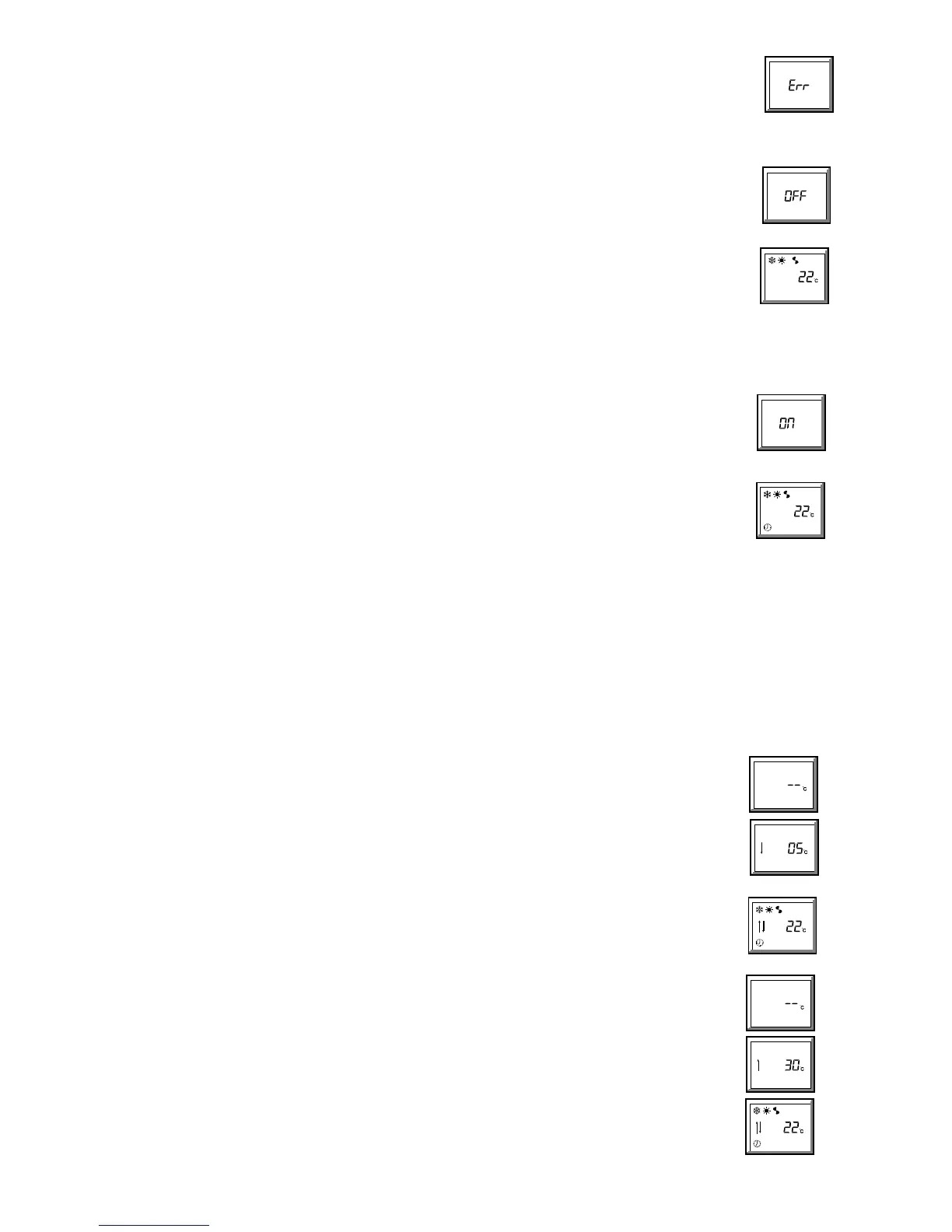
z If an illogical selection is made (e.g. 'off' time earlier than 'on' time, or 'on' time with no 'off' time, or 'off' time with no 'on'
time), the programme will not move on to another day, or transmit, until the error is removed.
E"" will be displayed each
time the DAY, or orange
A button is pressed, and the display will switch between 'on' and 'off' times until a logical time
is entered.
5 Switching the timer off
5.1 To return a unit, currently running under a timed programme, to MANUAL ON/OFF control:
a. Press the blue (¤) button four times - the display shows OFF.
b. Transmit using the orange A button. A single beep means the signal has been accepted.
c. The screen will display the basic functions. The clock
¤ symbol will be removed to show that the unit has been
instructed to run under manual ON/OFF control.
NOTES:
z If the
OFF display is transmitted during a timed run period, the unit will continue to run until turned off by pressing the
orange
A button, (whilst the basic screen is displayed).
z If the
OFF display is transmitted during a timed off period, the unit will remain in 'standby' until turned on by pressing the
orange
A button, (whilst the basic screen is displayed).
z Any setback functions programmed will also be switched off (see section 7).
z The programme
OFF signal can be re-transmitted at any time.
6 Switching the timer on
6.1 To run a unit under a timed programme:
(the timed programme will not operate correctly if the clock in the unit has not been set, see 3.1)
a. Press the blue button
(¤) five times - the display shows ON
b. Transmit using the orange A button. This will transmit the programme in the handset to the unit.. A single beep means
the signal has been accepted.
c. The screen will display the basic functions and the clock
¤ symbol to show that the unit has been instructed to run
under timed ON/OFF control.
NOTES:
z If the
ON display is transmitted during a timed run period, the unit will continue to run until turned off by the timer
programme.
z If the
ON display is transmitted during a timed off period, the unit will remain
in clock controlled 'standby' until turned on by the timer programme.
z Any setback functions programmed will also be restored, (see section 7).
z The programme
ON signal can be re-transmitted at any time
7 Set Back Function
During a programmed switch OFF period it is possible to have the unit automatically heat (if electric heating is fitted or it is a heat pump unit) if the
temperature falls below a preset LOW limit, or cool if it rises above a preset HIGH limit.
NOTES:
z If either set back temperature is set to anything other than --EC, the indoor unit's fan will run at low speed during the switched OFF period in order
to circulate air over the sensor.
z The set back function will apply to all 7 days of the week, even if the unit does not normally run, say at weekends.
z Active set back is indicated by a double flash of the red LED on the unit, repeated at 15 second intervals.
7.1 To set or change the Set Back LOW temperature limit:
a. Illuminate the display (blue button).
b. Whilst holding down the MINUTE button, press the Blue
(¤) button, then release both buttons - the screen will
display --EC. (If a set back temperature has already been set, this temperature and a down arrow
9will be displayed).
c. If no temperature has been set, press the + (•) button first, then the + or - (• or – ) buttons to select the minimum
temperature to which the room should fall before the unit switches on in heating mode.
(Temperature range from 5EC to 1E below the set point temperature).
d. Transmit using the orange
A button. A single beep means the signal has been accepted.
NOTES:
z The up and down
89 arrows will be added to the basic display, to indicate that set back has been programmed.
z Setting the set back LOW function only will default the setback HIGH function to 30EC
z Pressing the - (– ) button at 5EC will display --EC and remove both the LOW and HIGH set back functions.
7.2 To set or change the Set Back HIGH temperature limit:
a. Illuminate the display (blue button).
b. Whilst holding down the HOUR button, press the Blue
(¤) button, then release both buttons - the screen will display
--EC. (If a set back temperature has already been set, this temperature and an up arrow
8 will be displayed).
c. If no temperature has been set, press the - (– ) button first, then the + or - (• or – ) buttons to select the maximum
temperature to which the room should rise before the unit switches on in cooling mode.
(Temperature range from 30EC to 1E above the set point temperature).
d. Transmit using the orange
A button. A single beep means the signal has been accepted.
NOTES:
z The up and down
89 arrows will be added to the basic display, to indicate that set back has been programmed.
z Setting the set back HIGH function only will default the set back LOW function to 5EC
z Pressing the + (•) button at 30EC will display --EC and remove both the HIGH and LOW set back functions.


 To Next Page