Masimo LiDCO Chapter 3: Setting Up
www.masimo.com 19 Masimo
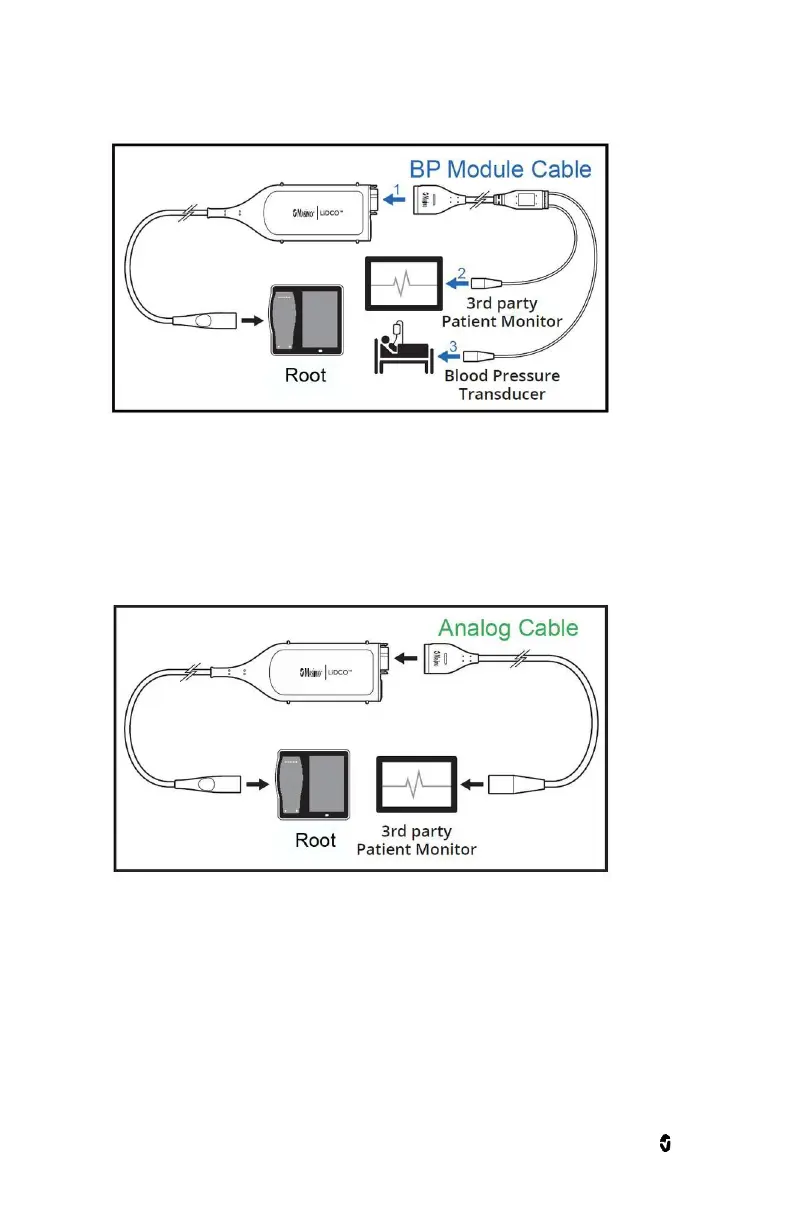
2. Using the Direct Connection to 3
rd
Party Patient Monitor Only
a. Select an Analog Cable with a connector that is compatible with your 3
rd
Party Patient
Monitor.
b. Connect the Analog Cable to the LiDCO Module cable connector.
c. Connect the Analog Cable to the 3
rd
Party Patient Monitor.
Disconnecting the LiDCO Cable from the LiDCO Module
To disconnect the module after monitoring is complete:
Disconnect the 3
rd
Party Patient Monitor and Pressure Transducer, if applicable, by holding the
LiDCO Cable connector and pulling.


 To Next Page