Masimo LiDCO Chapter 3: Setting Up
www.masimo.com 23 Masimo
Zeroing
When using a BP Module Cable, zeroing is required to sync measurements on the 3
rd
party patient
monitor and the LiDCO Module. Masimo LiDCO should be "zeroed" at the same time the blood pressure
transducer is "zeroed" on the 3
rd
party patient monitor.
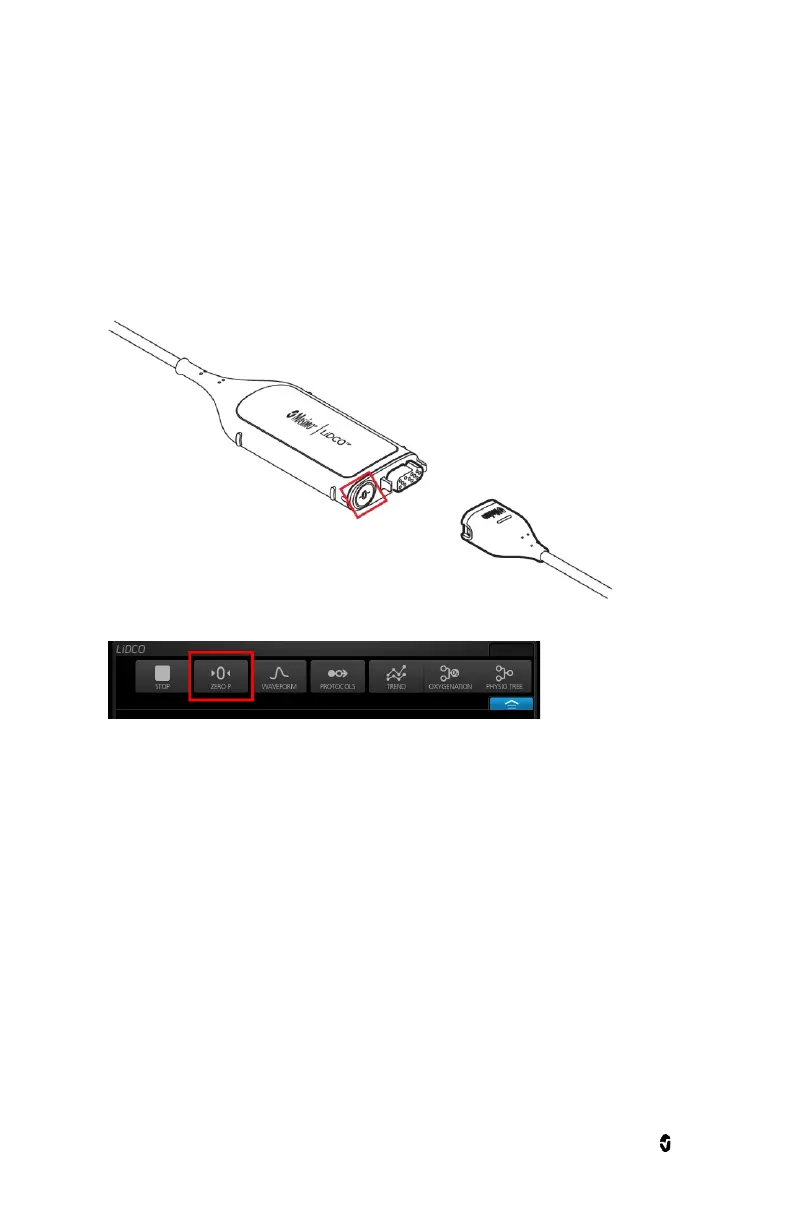
To zero Masimo LiDCO:
Option 1: Press the button next to the mating connector of the module.
Option 2: Or select the "Zero P" button in the LiDCO channel Action menu.
Zeroing is successful when:
The zero status should display "Success, time of zeroing success"
Verify the zeroing button is set to black.
Ensure that the following parameters on the monitor have values matching those on the 3
rd
party
patient monitor:
Blood Pressure (BP) waveform
Systolic Blood Pressure (SYS)
Mean Arterial Pressure (MAP)
Diastolic (DIA)
Heart Rate (HR)


 To Next Page