Masimo LiDCO Chapter 4: Operation
www.masimo.com 46 Masimo
Fluid Challenge
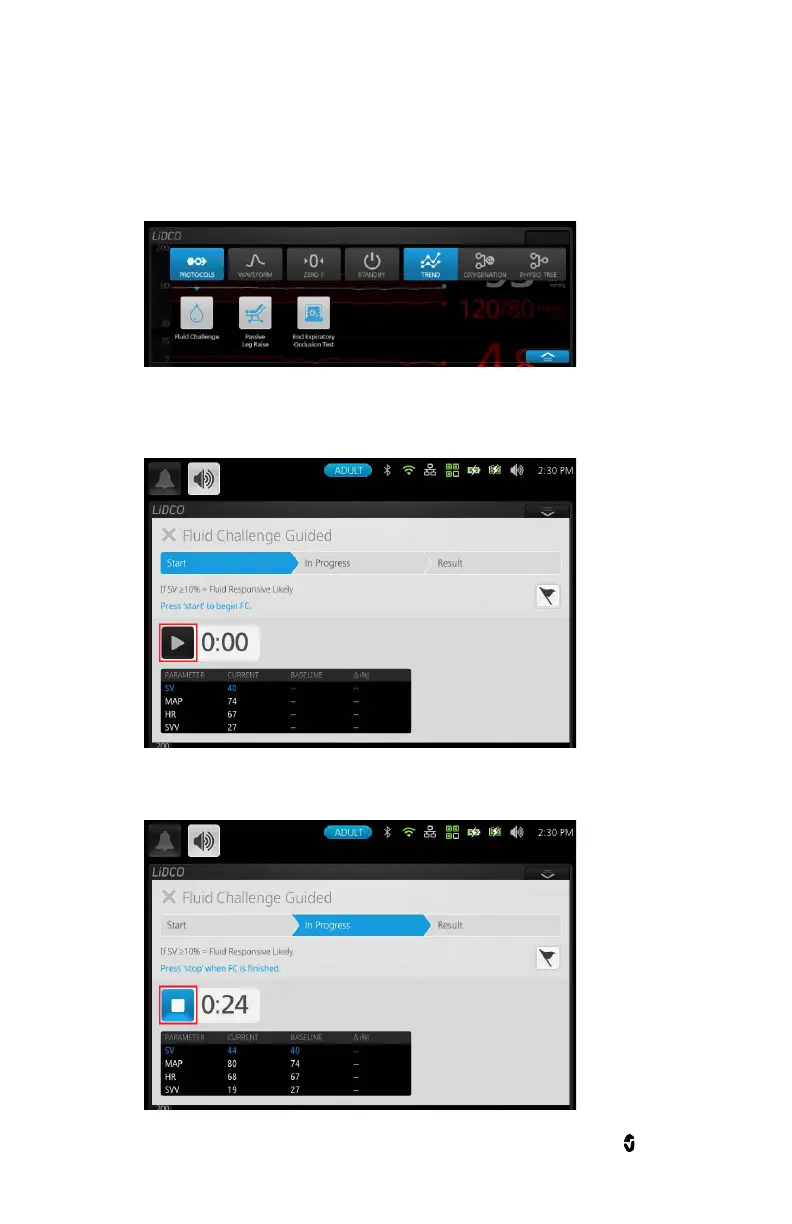
1. Touch/Select the protocols button to open a sub menu displaying the available guided
protocols. Select a protocol from the Protocols submenu. The protocol will open behind the
action menu.
2. The initializing screen is displayed only while Masimo LiDCO is getting ready to provide data.
Until then, data in the table is displayed as"--". The start button is disabled until Masimo
LiDCO is ready. Touch/Select Start to begin protocol. Follow instructions as displayed.
3. While the protocol is running, title will display "In Progress" and a Stop button replaces the
start button with time left for the protocol to complete. Touch/Select stop to end protocol.


 To Next Page