Page 33 P/N 03521015 Rev Q
Rechargeable.
For use only with MAXAIR Li-Ion
Batteries
Do not attempt to disassemble,
open, or service.
Do not place near or in a ame.
Do not drop.
Do not immerse in liquid.
Do not puncture.
Charger’s Green LED light,
Charge Completed.
Charger’s Red LED light,
Charging
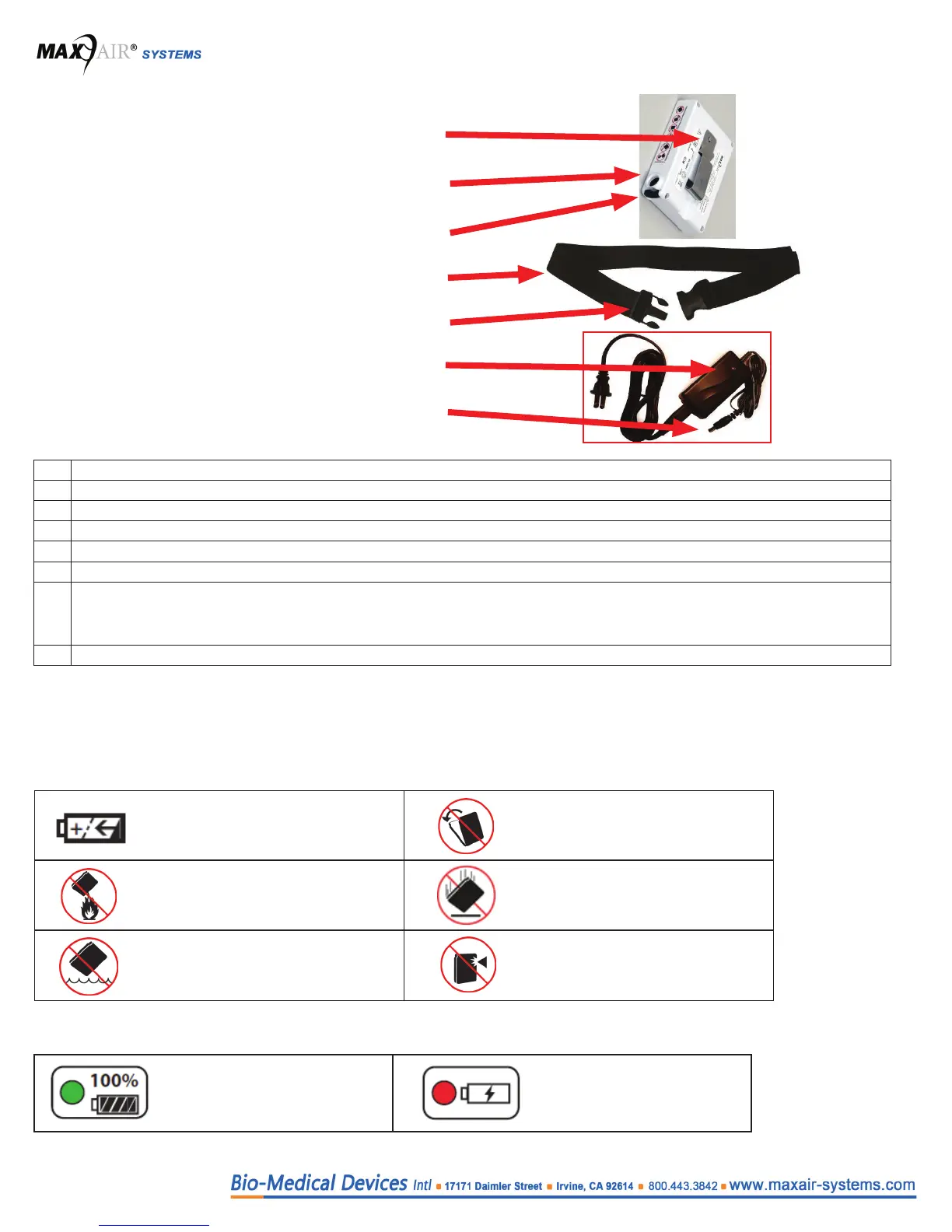
3.8 Battery, Belt, and Charger Overview
1. Battery Belt Clip
2. Power Cord Connector Socket
3. Secure Lock Pushbutton
4. Adjustable Belt
5. Belt Clip
6. Charger LED Status
7. Charger Battery Connector Plug
# Characteristics
1 Attaches to Adjustable Belt or clothing
2 Socket for Helmet’s Power Cord or Charger’s Battery Plug.
3 Releases the Power Cord Connector for removal
4 Wraps around waist. Battery is attached to belt via the belt clip.
5 Secures belt to the waist.
6
Charging status indicator for Li-Ion Battery.
Red= Charging
Green= Charge Complete
7 Plugs into Li-Ion Battery socket.
Battery and Charger Symbol Denitions
These symbols are located on the device and are dened as follows
Battery
Charger


 To Next Page