Page 56 P/N 03521015 Rev Q
12. Filter Cartridge
All MAXAIR Systems’Filter Cartridges assemble and disassemble to/from the MAXAIR
Helmets in the same manner. (Photos shown are of the 2164-10.)
CAUTION
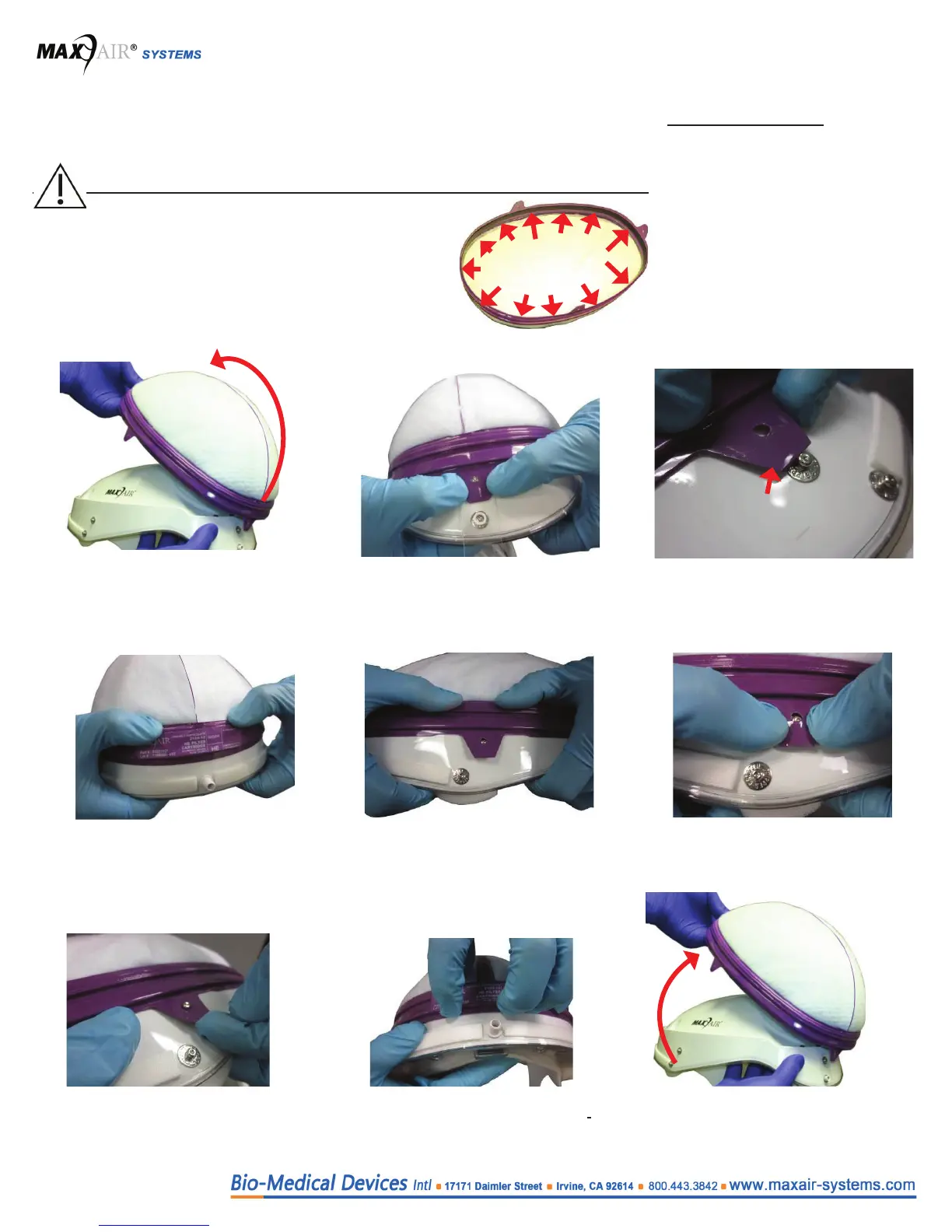
Ensure that the black Filter Cartridge-to-Helmet
Gasket Seal is uniform and at continuously
around the Filter Cartridge.
Helmet and Filter Media are exposed. Handle with
care. Avoid rough contact with lter media.
1. Hold the Helmet upright with one
hand; with the other hand align the
Filter Cartridge with the Helmet rear
upper snap.
2. Rear Snap: Snap and secure the
Filter Cartridge rear tab in place onto
the Helmet rear upper snap.
3. Center and lift the left and right side
Filter Cartridge snap tabs such that
they sit on top of the Helmet side
upper snaps.
4. Using the front top step of the Filter
Cartridge retainer ring, rmly push the
Filter Cartridge down towards the Helmet
front alignment post.
5. Similarly press the Filter Cartridge
ring down on each side so the side
tabs are in line with the Helmet side
upper snaps.
6. Snap and secure each Filter
Cartridge side snap tab on to each
respective Helmet side upper snap.
Assembly
Disassembly
1. Lift and unsnap the Filter Cartridge
Left and Right side snap tabs.
2. Using the bottom step on the Filter
Cartridge front plastic retainer ring,
pull the Filter Cartridge up o the
Helmet front.
3. Continue with an up and backward
motion to unsnap the Filter Cartridge
rear tab and complete removal of the
Filter Cartridge from the Helmet.
Filter Cartridges
2164-10 (01031327)
2163-10 (01031279)
2167-10 (07831175)
2166-10 (01031593)


 To Next Page